One-liner (checkbox + URL)
One-liner Terms and Conditions shows a checkbox on the frontend Signup form. The label includes a link that opens the provider’s public Terms and Conditions page in a new browser tab.
Customers must tick the checkbox before they can continue registration (for example to the Complete Payment step).
Enable the global setting
Path: Admin Panel → Global Settings
| Setting | Value |
|---|---|
| Flag name | terms_conditions_one_liner |
| Category | Login/Register |
| Description | Terms and conditions text displayed for the checkbox on the signup form |
Value: HTML that includes the Accept label and a link to your Terms page. Use this format:
<p>
Accept
  <a href="https://www.example.com/index.html" target="_blank" style="color: blue;">
    Terms and Conditions
  </a>
</p>
Replace the href with your real Terms and Conditions URL.
After you enable and save this global setting, the Accept Terms and Conditions checkbox appears on the frontend Signup form.
User flow
- The user opens the Signup form.
- An Accept Terms and Conditions checkbox is shown (from the HTML in
terms_conditions_one_liner). - The user must tick the checkbox to proceed with registration.
- Clicking the link opens the configured URL (
target="_blank") where the full Terms can be read. - Only after accepting Terms and Conditions can the user continue (for example to Complete Payment).
Customer Profile view (URL mode)
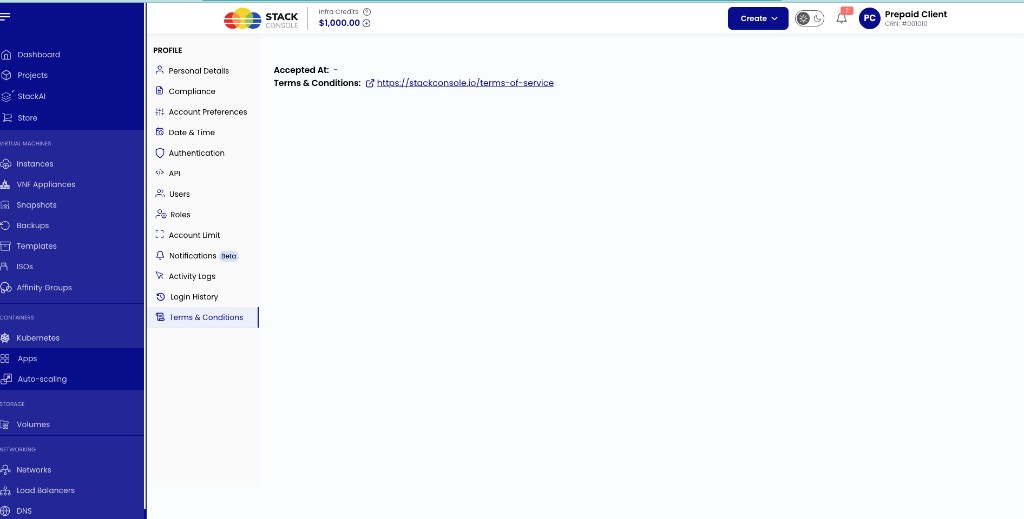
When terms are provided as an external URL, Profile → Terms & Conditions shows the link (opens in a new window). Accepted At shows when the customer accepted, or - if not yet recorded.
img/screenshots/cmp-profile-terms-url-link.png
Enforce behaviour with one-liner
For one-liner mode, acceptance is mandatory by default (enforce_terms_condition is treated as required). See Enforce Terms & Conditions.