Add Products
Create catalogue items under Settings → Products → Products → Add Product.
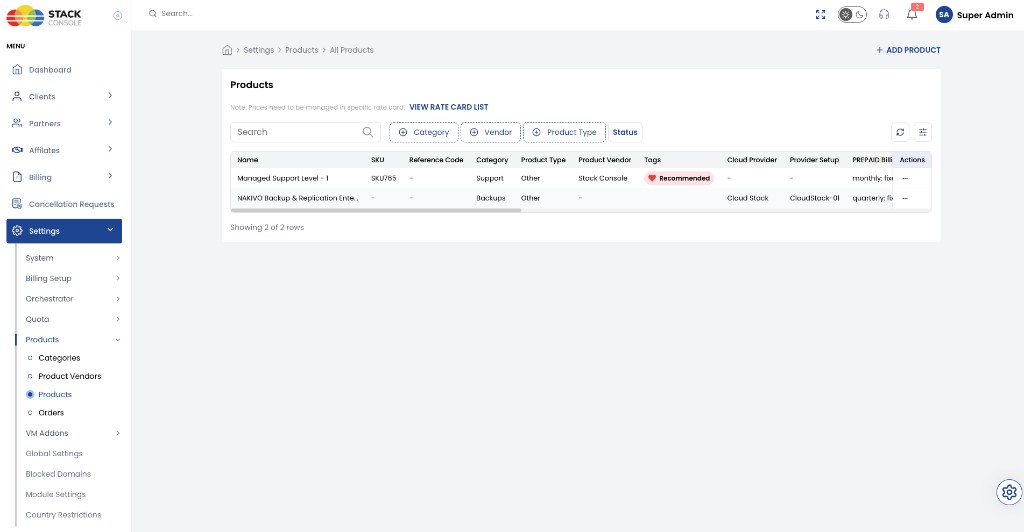
A banner on the Products list reminds you: Prices need to be managed in the specific rate card. Use Product Billing after creating the product. Do not set status to Active until pricing is configured.
img/screenshots/cmp-products-add-form.png
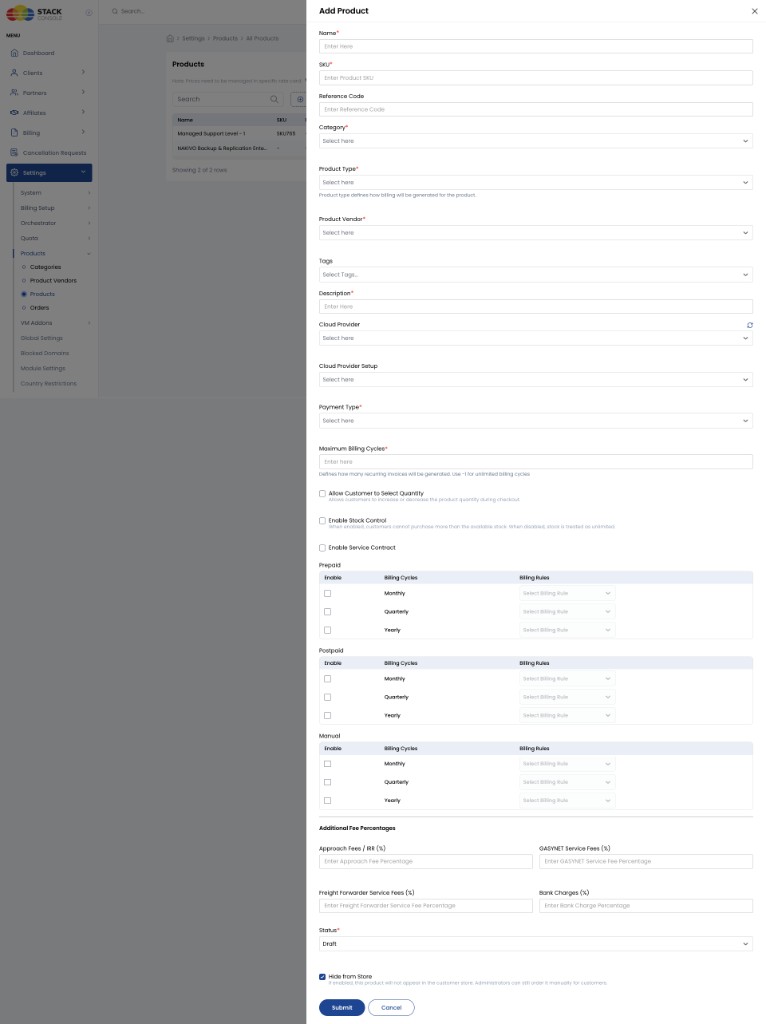
Form fields
Name
Required. Product name shown to customers in the Store.
SKU
Required. Unique stock-keeping identifier.
Reference Code
Optional. Business reference used to identify the product.
Category
Required. Category under which the product appears in the Store. See Categories.
Product Type
Required. Set to Other today. Reserved for future use; not used elsewhere in the system yet.
Product Vendor
Required. You must select a vendor. Vendor/supplier is used for procurement, management, reporting, and customer Vendor Details.
If you provide all services yourself, add your organisation as a vendor first, then select it here. See Product Vendors.
Tags
Optional. Predefined tags for filtering and highlighting (for example Recommended in the customer Store).
Description
Required. Short customer-facing description. Aim for 50–80 characters and check the Store UI so text is not truncated.
Cloud Provider
Optional. Link to a cloud provider if the product is provider-specific. Leave blank for generic services.
Cloud Provider Setup
Optional. Specific provider setup when linked to a provider.
Payment Type
Required. How billing is generated:
| Value | Behaviour |
|---|---|
| OTC (One-Time Charge) | Billed once; no recurring invoices |
| Recurring | Invoice each billing cycle (monthly / quarterly / yearly as enabled) |
| Free | Orderable with no charge |
Maximum Billing Cycles
Required for recurring. Number of recurring invoices to generate.
- -1 — unlimited recurring invoices
- Example: 10 → ten invoices, then generation stops
Allow Customer to Select Quantity
Optional. Lets the customer change quantity at checkout.
Enable Stock Control
Optional. Limits purchases based on available inventory when enabled.
Enable Service Contract
Optional. Enables a service-contract workflow for the product when required.
Hide from Store
Optional. Product does not appear in the customer Store. Use for special agreements or when only admins place orders (see Orders — place on behalf of a customer).
Enable Free Trial Period
Optional. Free trial before billing starts, when enabled.
Additional fee percentages
Optional. Percentage add-ons on the product base price during billing (fields may vary by deployment branding):
- Approach Fees / IRR (%)
- GASVNET Service Fees (%)
- Freight Forwarder Service Fees (%)
- Bank Charges (%)
Customers can see applicable fees on the product Overview in the Store.
Billing rules matrix (Prepaid / Postpaid / Manual)
You control which billing cycles each product offers at creation time. Cycles are not global for the whole Store.
| Example | Enable on the product |
|---|---|
| Product A — monthly only | Enable Monthly only |
| Product B — flexible | Enable Monthly, Quarterly, and Yearly |
For each payment mode (Prepaid, Postpaid, Manual), tick Enable for the cycles you want and choose a Billing Rule (for example FIXED_PRORATA).
- Admin rate card pricing may still show Monthly / Quarterly / Yearly columns for all currencies — set unused cycles to 0 if needed. See Product Billing.
- Customer Store only lists the cycles enabled for that product. A monthly-only product will not show Quarterly or Yearly at checkout.
Details and examples: Billing behaviour.
Status lifecycle
Previously products were only Active / Inactive. Status is now a full lifecycle:
| Status | Description |
|---|---|
| Draft | Still being configured; not orderable |
| Active | Fully configured; eligible for the Store and new orders |
| Inactive | Temporarily unavailable for new orders; kept for admin use |
| Archived | Retired; historical / reporting only |
| Coming Soon | Planned; configurable but not purchasable yet |
| End of Life | No longer offered to new customers; existing use per your policy |
| Internal Only | Internal use; not visible to external customers |
Do not move a product to Active until rate card pricing is configured.
CMP may not always block activation without prices. An Active product with no pricing can still appear in the Store and allow incomplete orders.
Business rules
- Move to Active only after mandatory configuration (including pricing and billing) is complete
- Only Active products appear in the customer marketplace and accept new Store orders
- Other statuses stay available for admin management, reporting, or later activation