StackAI
Beta
StackAI is in beta. Capabilities, suggested prompts, and enabled tools may vary by tenant. Confirm with StackConsole which features are active on your deployment.
StackAI is the cloud operations assistant inside the customer cloud console. End users describe what they want in plain language — list VMs, check billing, take a snapshot — and StackAI carries out the work against their live account.
They do not need API calls, deep menus, or command names. Type a request, confirm when asked, and StackAI executes.
Where customers open it
- Sign in to the cloud console (same dashboard used for instances, networks, and billing).
- In the left sidebar, under General, click StackAI.
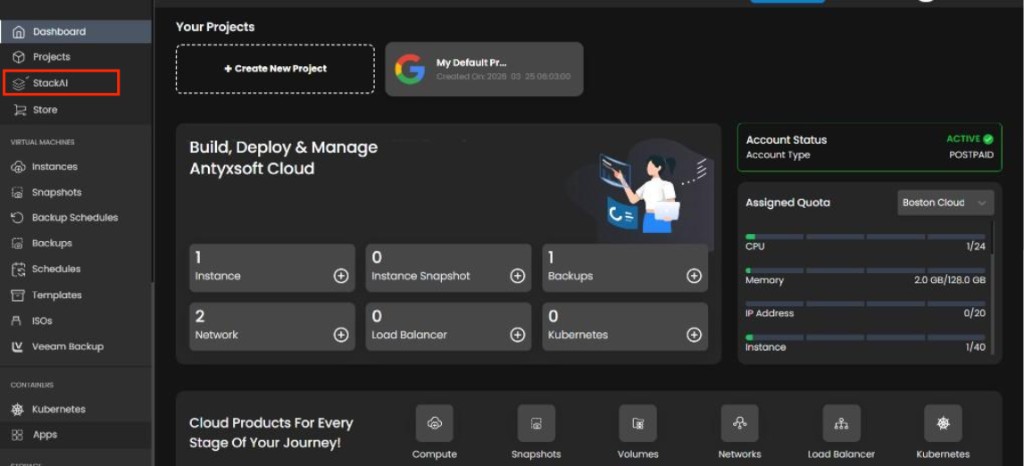
StackAI uses the existing session — there is no separate login.
Documentation
| Page | Purpose |
|---|---|
| Production Requirements | OpenAI billing and API key setup for production deployments |
| StackAI User Guide | Full tutorial — tour, workflow, examples, history, projects, safety, capabilities, FAQ |
| StackAI Roadmap | What's live, in progress, planned, and under exploration |
Admin notes
| Topic | Detail |
|---|---|
| Production setup | OpenAI account, billing, and API key — see Production Requirements |
| Audience | End customers (not CMP admin console) |
| Permissions | StackAI only lists and changes resources the logged-in user may manage |
| vs console dashboard | The Customer Dashboard home shows counts, quotas, and product shortcuts; StackAI is the conversational workspace for the same account |
| Not supported in StackAI | Kubernetes, DBaaS, load balancers, VPN — use main console menus where the provider offers them |