Multi-language
CMP can present the customer (end-user) portal in multiple languages. Multi-language is disabled by default (English only) until the StackConsole team enables it for your deployment.
Multi-language support applies only to the end-user portal. The admin panel always remains in English.
To enable multi-language support, turn on additional languages, or request a language that is not listed yet, contact the StackConsole team (raise a ticket / request). Customers cannot self-enable languages.
Does CMP support multiple languages?
Yes — with the limits above.
| Topic | Behaviour |
|---|---|
| Default | English only |
| Enablement | StackConsole team enables selected languages for your portal |
| Where it applies | End-user (customer) portal |
| Where it does not apply | Admin portal (always English) |
| Fallback | If the user has no preferred language set, CMP uses English |
What is covered in translations?
Static portal UI strings were already translated in earlier versions. Latest versions also cover more dynamic content.
Typically translated
- Email templates — payment, receipt, and service-operations emails (see Email template translations)
- System notifications / system alerts (see System alerts translations)
- Success messages
- Invoices — most invoice content is translated; a few terms may still appear in English
- Most dynamic error messages from CMP or providers (coverage is improving, not complete)
Current limitations (not fully translated yet)
Treat these as known gaps. Coverage is an ongoing process.
| Area | Notes |
|---|---|
| Activity logs | May remain partly or fully in English |
| Some informational texts | Not all help / info copy is translated |
| Unknown / unhandled exceptions | Unexpected errors may show English provider or framework text |
| Dropdown values | Enums and DB-driven lists — for example billing cycles, Support categories |
| Invoice declaration | Branch invoice declaration text |
| Invoice terms and conditions | Invoice PDF / branch terms content |
| Invoice notes | Free-text notes on invoices |
| Dynamic taxation labels | Labels such as VAT, GST (and similar), as configured per branch |
| Global auth pages | For example Forgot password and related auth screens |
| Payment modes on Complete Payment | Labels that come from the admin panel configuration |
By default, StackConsole provides system-alert translations for supported languages using AI-assisted tools. These may not be 100% accurate. If you find incorrect, unclear, or missing alert text, tell the StackConsole team for review and correction.
Translation coverage is an ongoing effort. Gaps listed above are actively being improved (see Roadmap).
Email template translations
When multi-language is enabled for a deployment, CMP provides the same email template for each enabled language by default. Each language has its own row (or version) that you can edit independently.
Example: If German (de), Uzbek (uz), and English (en) are enabled, User Registered Email appears three times — once per language — all Active.
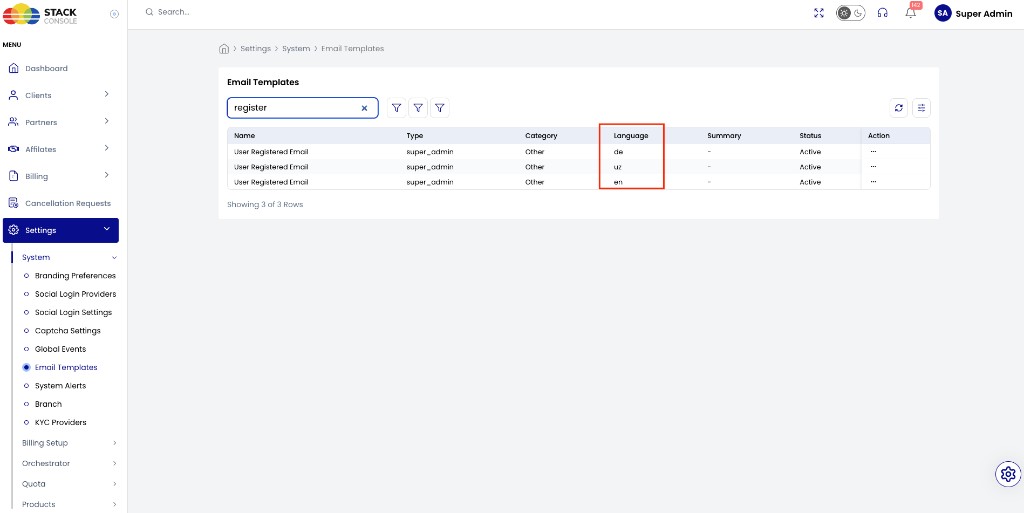
Path: Admin Panel → Settings → System → Email Templates
- Open Email Templates (use search to find a template family — for example
register). - Check the Language column to see each enabled-language copy.
- Edit the template for the language you need and customize the content.
CMP sends the version that matches the recipient’s preferred language when available; otherwise English is used as the fallback.
System alerts translations
Admins can edit language-specific system alert messages:
Path: Admin Panel → Settings → System → System Alerts
Customize alert text per supported language as required.
How can an end user set their preferred language?
Path: Profile → Account Preferences → App Language
img/screenshots/cmp-account-preferences-language.png
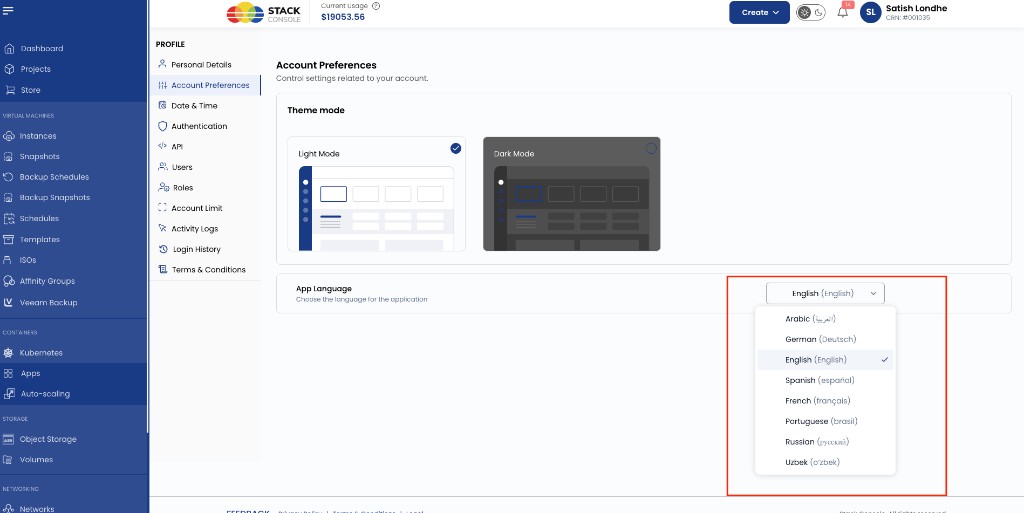
- Open Profile → Account Preferences.
- Under App Language, choose the preferred language.
- The preference is stored in the database.
That means:
- The preference persists across sessions
- If the user logs in from another device, the same language is applied after login
- After login, the portal opens in the user’s preferred language by default
If no language preference is set, English is the default.
Supported languages
If you need a language that is not listed, ask the StackConsole team — support can be added.
| Language | Language code |
|---|---|
| English | en |
| Arabic | ar |
| German | de |
| Spanish | es |
| French | fr |
| Brazilian Portuguese | pt-BR |
| Russian | ru |
| Uzbek | uz |
Exact languages available in a given portal depend on what StackConsole enabled for that deployment.
Deprecated — older language selection behaviour
The following describes previous behaviour and is deprecated in the latest version. Prefer profile App Language (database-backed preference).
Deprecated: browser detection, header selector, and cache-only preference
Once more than one language was enabled:
Automatic language detection
- CMP tried to detect the browser’s default language
- If that language was supported, the portal used it
- Otherwise the portal defaulted to English
Manual selection in the header
- Users could change language with a language selector in the portal header
Storage
- Preference was stored in browser cache only
- There was no profile-level language setting
- Preference applied only for that browser and was not synced across devices
Roadmap
Planned / in progress (not available as self-service today unless StackConsole delivers it for your build):
- Admins editing translation files themselves
- Broader coverage for the limitation areas listed above
Until then, request language enablement or translation fixes through the StackConsole team.
Related
- Platform Features
- Notifications
- Invoice Settings — declaration, terms, and notes still have translation gaps
- Payment Modes — Complete Payment labels may remain admin-configured English until translated