Marketplace application automation limitations
CMP automates infrastructure provisioning — virtual machines, storage, and networking. Application-level automation depends on what runs inside the guest OS and what you explicitly pass through Marketplace environment variables and startup scripts.
Technical limitation
CloudStack, OpenStack, and similar platforms provision and manage VMs. They do not have access to applications running inside the guest operating system.
Therefore CMP cannot automatically scrape arbitrary application state such as:
- Credentials generated only inside the guest and never returned to CMP
- API keys created by an installer with no script output hook
- Database secrets stored only in guest config files
- Installation progress that is not written to Marketplace variables
That data stays inside the virtual machine unless your Marketplace design collects it via environment variables or a startup script that CMP can persist.
When admins define environment variables and (optionally) script outputs that CMP stores for the VM, those values are available after deploy in the Application credentials email ({{table}}, {{email_content}}). Showing the same Marketplace details on the end-user VM details page is a planned improvement.
The credentials email is always sent after a successful Marketplace deploy. If you do not collect customer inputs and an init script writes credentials on the guest, document that path in Marketplace App email content / instructions so the compulsory email still tells the customer where to look.
Infrastructure (VM running, IP assigned, disk attached) is always visible in CMP.
Recommended approaches
1. Deployment parameters (Marketplace configuration parameters)
Let users provide application configuration (username, password, database settings, URL, and so on) during deployment using environment variables.
Because the customer supplies the values (or the script outputs values CMP stores), they receive them again in the credentials email.
See Configure environment variables and Application credentials email.
2. Application information and documentation
Each Marketplace App should link to clear documentation:
- App URL on the Marketplace App form
- Per-app email content / instructions (create and update on the Marketplace App)
- Template Documentation Label and Documentation URL
Use this when the provider does not ask the customer for Marketplace inputs: the init / startup script sets up the app and leaves credentials at a known path on the guest. Describe that location and access steps in the Marketplace App email content — CMP still sends the credentials email every time. See Application credentials email.
Customers can open setup guides from the CMP Marketplace / VM details without CMP needing to scrape the guest. See Configure in CMP and Documentation Label and URL.
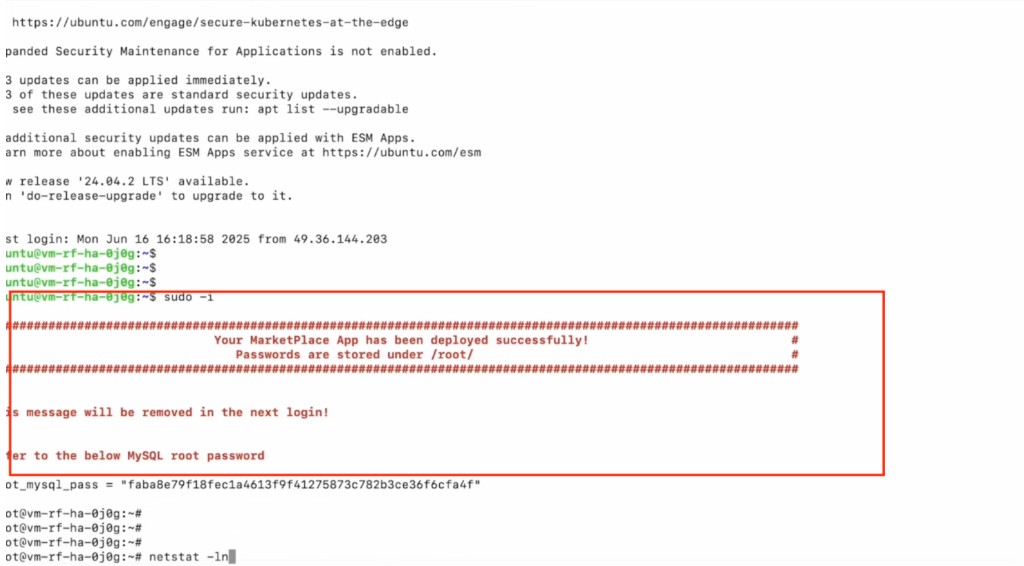
3. Display application information on the virtual machine
Show useful application information after login using guest mechanisms such as:
/etc/motd- Welcome / login banner
- A
READMEin a well-known path - First-login message printed by your startup script
Bake this into the Marketplace image or generate it from the startup script using the same environment variables the customer entered. This is image / startup-script work, not something CMP writes automatically.
Example: After SSH login (and often after sudo -i), a one-time banner confirms Marketplace deploy success and prints an app credential (for example MySQL root password). The message can note that it will be removed on the next login.