Sanctum token expiration
These global settings control how long API login tokens stay valid. They apply to normal API TOKEN authentication — not long-lived REST API TOKEN tokens (see Notes below).
Path: Admin Panel → Global Settings — search for token
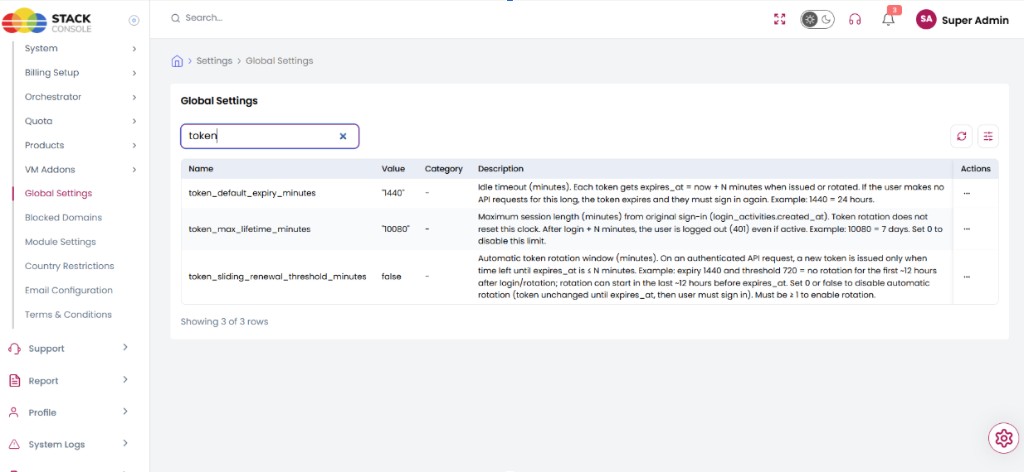
Global settings
| Setting key | Default | Role |
|---|---|---|
token_default_expiry_minutes | 1440 (1 day) | Idle timeout (minutes). Each token gets expires_at = now + N minutes when issued or rotated. If the user makes no API requests for this long, the token expires and they must sign in again. Example: 1440 = 24 hours. |
token_sliding_renewal_threshold_minutes | 0 | Automatic token rotation window (minutes). On an authenticated API request, a new token is issued only when time left until expires_at is ≤ N minutes. Example: expiry 1440 and threshold 720 = no rotation for the first ~12 hours after login/rotation; rotation can start in the last ~12 hours before expires_at. Set 0 or false to disable automatic rotation (token unchanged until expires_at; then user must sign in). Must be ≥ 1 to enable rotation. |
token_max_lifetime_minutes | 10080 (7 days) | Maximum session length (minutes) from original sign-in (login_activities.created_at). Token rotation does not reset this clock. After login + N minutes, the user is logged out (401) even if active. Example: 10080 = 7 days. Set 0 to disable this limit. |
How they work together
| Setting | What it controls |
|---|---|
| Default expiry | How long each token is valid when it is created or renewed |
| Sliding threshold | When renewal happens — only in the last N minutes before expiry, not on every request |
| Max lifetime | A fixed limit from the original login. Continuous use cannot extend the session beyond this |
Whichever limit is reached first applies — idle expiry or max session length.
Example flow
Settings: expiry 30 minutes, threshold 5 minutes, max lifetime 10080 minutes (7 days).
- Login → token expires in 30 minutes.
- Request at 10 minutes → ~20 minutes left → no renewal (above 5-minute window).
- Request at 28 minutes → ~2 minutes left → token renewed → new expiry in 30 minutes.
- User stays active → token keeps renewing as long as requests fall inside the renewal window and max lifetime has not been reached.
- After 7 days from original login → user is logged out even if the token was still being renewed.
Configure
- Open Admin Panel → Global Settings.
- Search for
token_default_expiry_minutes,token_sliding_renewal_threshold_minutes, andtoken_max_lifetime_minutes. - Set values according to your session policy (see tables above).
- Save. Changes take effect for newly issued or rotated tokens according to CMP’s token lifecycle rules.
- Verify with a test API user: confirm idle timeout, renewal window, and max lifetime behave as expected.
Notes
0orfalsefortoken_sliding_renewal_threshold_minutes→ automatic renewal is off. The token is used until it expires, then the user must sign in again.- Max lifetime is counted from original sign-in, not from each renewal.
- REST API TOKEN tokens are not affected by automatic renewal.
- If the token is already expired (idle timeout), the user must sign in again.
Related
- Global Settings overview
- APIs — generate tokens, Bearer auth, role permissions
- Identity Providers
- Platform Features