hide_postal_code
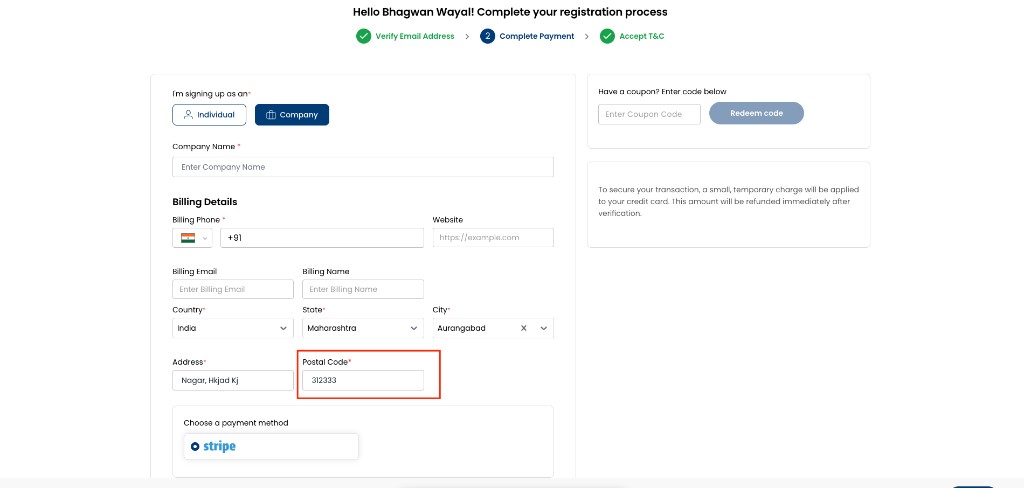
Hide Postal Code removes the postal / zip code field from all applicable forms. When enabled, users are not prompted for a postal code and can complete registration, onboarding, and billing updates without it.
Path: Admin Panel → Global Settings
| Setting | Value |
|---|---|
| Flag name | hide_postal_code |
| Typical values | true / false |
| UI label | Hide Postal Code |
Where this applies
When enabled, postal code fields are hidden consistently across:
- Admin Portal
- Customer Portal
- Partner Portal
- Registration and onboarding flows
- Profile and billing detail panels
Behaviour when enabled (true)
- Postal / zip code fields are not displayed on applicable forms.
- Users are not prompted to enter a postal / zip code.
- Forms can be submitted and saved without interruption.
- Postal code is optional even when a separate postal code required global setting is enabled — hiding the field takes precedence.
When false, postal code fields are visible on applicable forms subject to other validation rules (including any postal code required setting).
Hiding postal code removes a field that invoicing, tax, or payment providers may expect. Confirm with your billing and compliance requirements before enabling on production.
Independent of phone settings
hide_postal_code works independently of enable_phone_input and hide_billing_phone. You can hide postal code while phone fields remain visible (when Enable Phone Input is on).
| Enable Phone Input | Hide Billing Phone | Hide Postal Code | Typical billing form |
|---|---|---|---|
true | false | false | Shows billing phone and postal code |
true | true | false | Hides billing phone only |
true | false | true | Hides postal code only |
true | true | true | Hides billing phone and postal code |
Existing data
Enabling this setting hides the field from edit forms but does not delete previously saved postal codes from customer records. Read-only summary or view-only sections may still display a saved postal code.
Configure
- Go to Admin Panel → Global Settings.
- Search for
hide_postal_code(UI: Hide Postal Code). - Set Value to
trueto hide the field, orfalseto show it again. - Save and verify on registration and billing forms in the Customer Portal.
Related
- enable_phone_input
- hide_billing_phone
- Terms and Conditions — in-step form —
{{postal_code}}placeholder when postal code is collected - Global Settings overview