hide_billing_phone
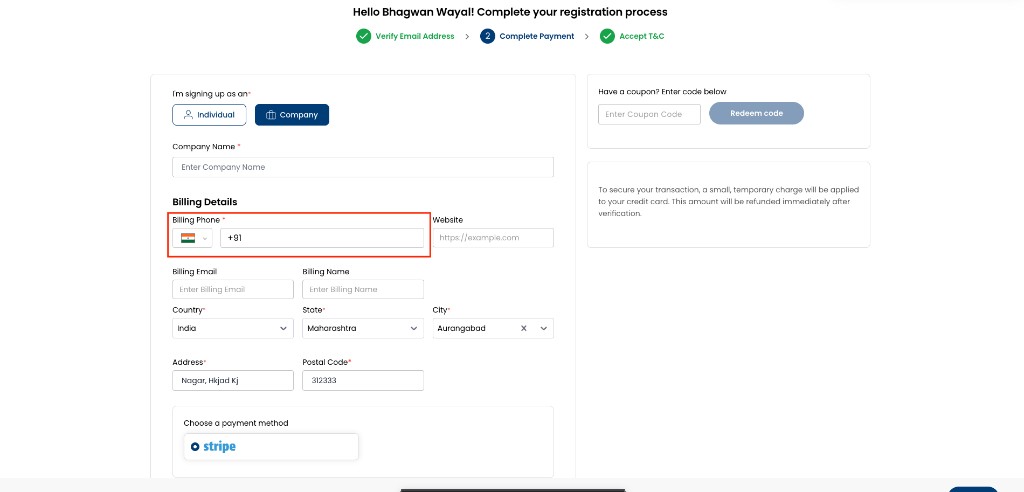
Hide Billing Phone removes the billing phone number field from organization and billing forms. It applies only when enable_phone_input is also enabled (true).
Path: Admin Panel → Global Settings
| Setting | Value |
|---|---|
| Flag name | hide_billing_phone |
| Typical values | true / false |
| UI label | Hide Billing Phone |
| Depends on | enable_phone_input must be true for this flag to change billing phone visibility |
Where this applies
When enabled, billing phone fields are hidden consistently across:
- Admin Portal
- Customer Portal
- Partner Portal
- Registration and onboarding flows
- Profile and billing detail panels
Behaviour when enabled (true)
- Billing phone number fields are not displayed on organization and billing forms.
- Users are not prompted to enter a billing phone number.
- Forms can be submitted and saved without interruption.
- Applies only when
enable_phone_inputistrue. If phone input is disabled platform-wide, billing phone is already hidden andhide_billing_phonehas no additional effect.
When false (and enable_phone_input is true), billing phone fields can be shown on applicable forms subject to other validation rules.
How it works with enable_phone_input
| Enable Phone Input | Hide Billing Phone | Billing phone field |
|---|---|---|
false | false | Hidden |
false | true | Hidden |
true | false | Visible |
true | true | Hidden |
Contact phone sync
When billing phone is hidden, CMP keeps billing contact data aligned from the account contact phone:
- On billing address save, the contact phone is copied to the billing address.
- On a later contact phone update, that value is copied to the billing address again.
This applies when phone input is enabled and users can maintain a contact phone elsewhere on the platform.
Existing data
Enabling this setting hides the field from edit forms but does not remove previously saved billing phone numbers from customer records. Read-only summary or view-only sections may still display a saved billing phone.
Configure
- Go to Admin Panel → Global Settings.
- Confirm
enable_phone_inputistrueif you need phone fields elsewhere but want billing phone hidden. - Search for
hide_billing_phone(UI: Hide Billing Phone). - Set Value to
trueto hide billing phone, orfalseto show it again (when Enable Phone Input is on). - Save and verify on a billing or registration form.