enforce_mobile_verification
Enforce Mobile Verification dictates whether completing mobile number OTP verification is mandatory (compulsory) or optional for customers to finish onboarding.
Path: Admin Panel → Global Settings
| Setting | Value |
|---|---|
| Flag name | enforce_mobile_verification |
| Typical values | true / false |
| Default | false |
| UI label | Enforce Mobile Verification |
Behaviour
This setting only takes effect when enable_mobile_verification is set to true.
| Value | Behaviour | Registration Impact |
|---|---|---|
true (Compulsory) | Mobile verification is strictly mandatory. | The user cannot advance to the next onboarding steps (e.g. Complete Payment, Accept T&C) or activate their account until the mobile number is successfully verified with the 6-digit OTP. |
false (Optional) | Mobile verification is optional. | The user is invited to enter their mobile number and verify via OTP, but can bypass or complete registration without verifying the phone number. |
Registration Workflow
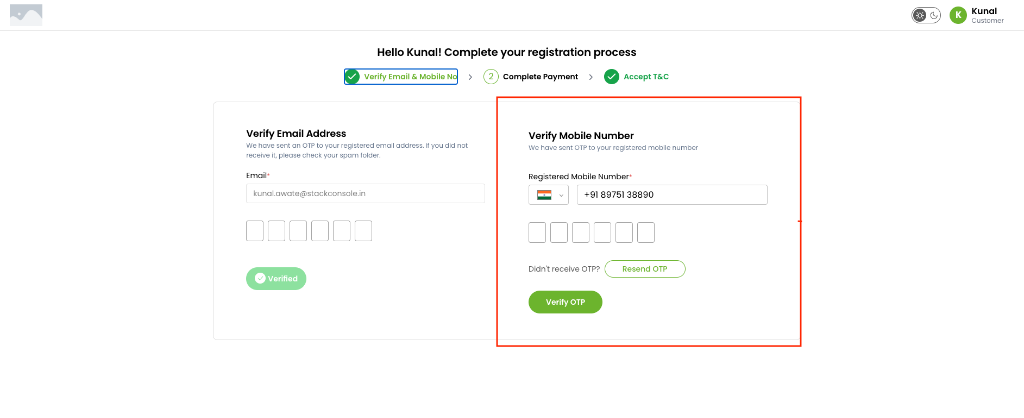
During the first stage of customer registration (Verify Email & Mobile No):
- Email Verification: Always verified via OTP.
- Mobile Verification:
- When
enforce_mobile_verificationistrue, the green Verified status badge on both email and mobile is mandatory before proceeding to Step 2. - When
enforce_mobile_verificationisfalse, users can proceed even if mobile verification remains uncompleted.
- When
Profile Mobile Number Updates
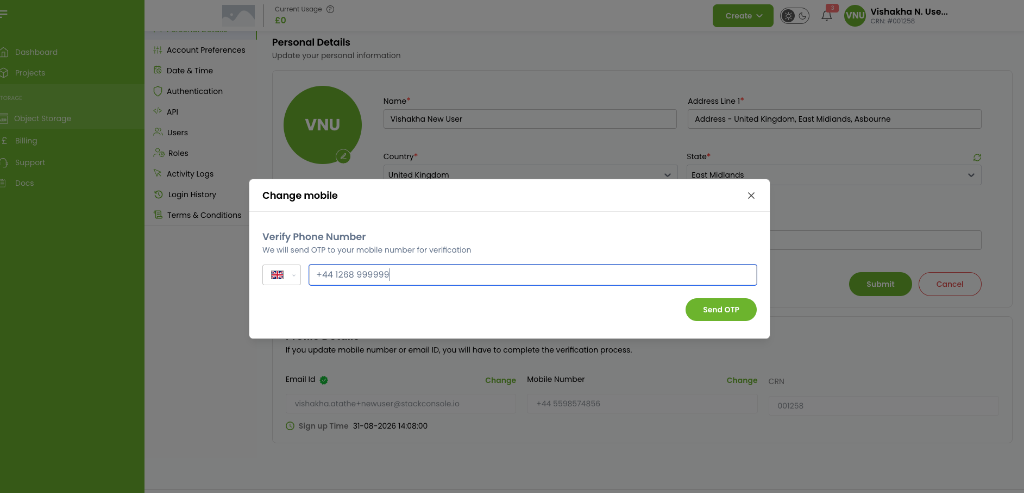
When a customer logs in to the Customer Portal and navigates to Personal Details → Mobile Number → Change:
- A Change mobile dialog opens requiring the user to enter their new number in international format and click Send OTP.
- To prevent unauthorized changes or invalid phone entries, entering the 6-digit OTP is required to submit and apply the update.
Configure
- Navigate to Admin Panel → Global Settings.
- Search for
enforce_mobile_verification. - Set Value:
true: If regulatory compliance, KYC, or fraud prevention requires all registered accounts to have a confirmed mobile number.false: If you prefer frictionless signups where mobile verification is encouraged but not blocking.
- Confirm
enable_mobile_verificationis also set totrue. - Save changes.