enable_mobile_verification
Enable Mobile Verification controls whether CMP triggers SMS OTP verification for customer mobile numbers during registration and when updating mobile numbers from the customer profile.
Path: Admin Panel → Global Settings
| Setting | Value |
|---|---|
| Flag name | enable_mobile_verification |
| Typical values | true / false |
| Default | false |
| UI label | Enable Mobile Verification |
Behaviour
| Value | Result |
|---|---|
true (Enabled) | CMP activates the mobile verification subsystem. Users are prompted to verify their mobile number via OTP during registration step 1 (Verify Email & Mobile Number) and whenever they change their mobile number in their profile. |
false (Disabled) | Mobile verification is turned off. Registration progresses without sending OTP SMS to mobile numbers. |
Before enabling this flag, ensure that SMS gateway credentials (MSG91, Twilio, or Spinning Disk) have been added to the backend .env file by the StackConsole deployment team. See SMS Gateways & Verification.
Also verify that enable_phone_input is set to true so that phone input fields are visible across registration and profile forms.
Interaction with enforce_mobile_verification
While enable_mobile_verification enables the feature, enforce_mobile_verification determines whether completing mobile verification is compulsory or optional:
enable_mobile_verification | enforce_mobile_verification | Registration Verification Flow |
|---|---|---|
false | false / true | Mobile verification is disabled. No OTP sent. |
true | false | Optional: Customer receives an OTP to verify mobile number, but can skip or proceed without completing mobile verification. |
true | true | Compulsory: Customer must verify their mobile number via OTP before they can advance to Step 2 (Complete Payment) or finish onboarding. |
Where it applies
-
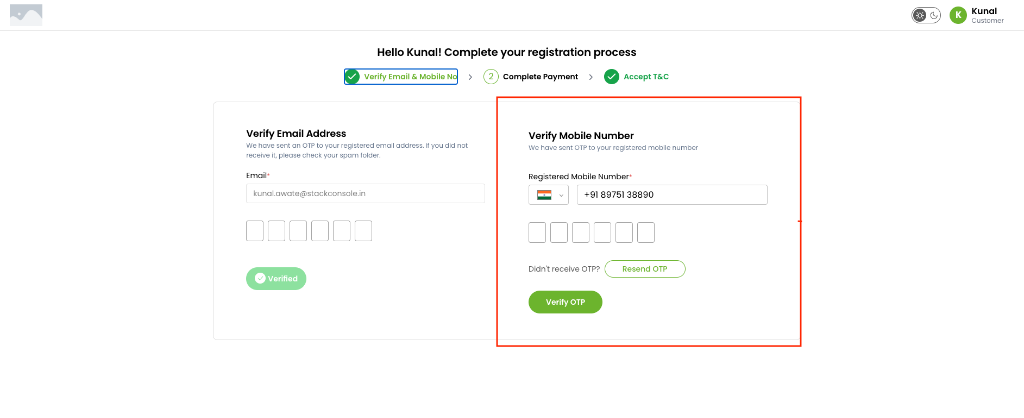
Customer Registration Wizard (Step 1 — Verify Email & Mobile No): Displays the Verify Mobile Number pane with country selector, phone number field, 6-digit OTP input, and Verify OTP button.
-
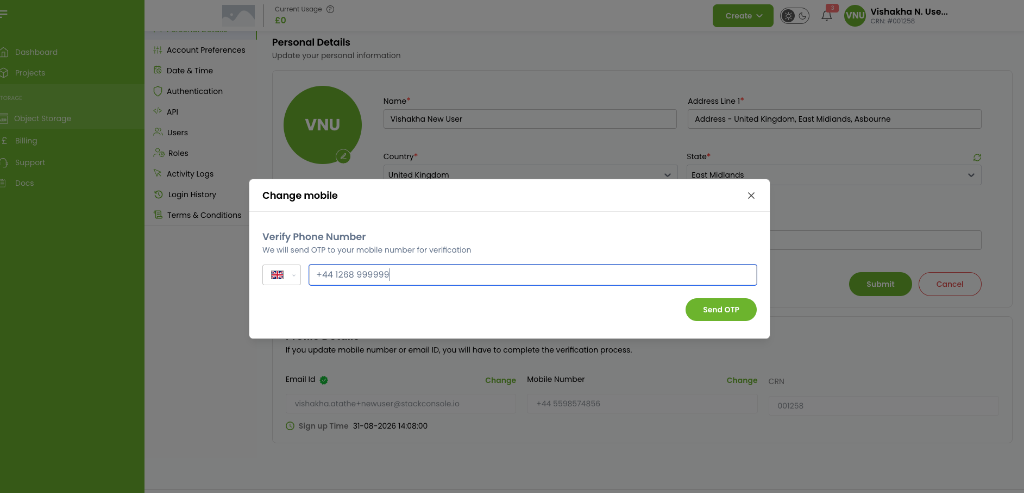
Customer Portal Profile (Personal Details): When updating the mobile number via Change mobile, an OTP is dispatched and must be verified before the profile is updated.
Configure
- Go to Admin Panel → Global Settings.
- Search for
enable_mobile_verification. - Use the row Actions menu to set the value to
true. - Configure
enforce_mobile_verificationto choose whether verification is required (true) or optional (false). - Save and test the signup flow on the Customer Portal.