Customer Dashboard
This section documents customer-facing areas of the CMP portal — what end users see on the Dashboard, under Profile, Billing, Quota, and related menus.
Use these pages when you need to explain customer self-service behaviour, troubleshoot what a customer sees, or align support answers with the live UI.
These pages describe the customer (end-user) portal. Admin quota configuration, limits, and approval workflows live under Quota Management.
Dashboard home
After login, customers land on the Dashboard — the main cloud console home.
The page typically includes:
| Area | What the customer sees |
|---|---|
| Your Projects | Cloud (billing/org) projects with + Create New Project |
| Resource summary cards | Counts for instances, snapshots, backups, networks, load balancers, Kubernetes, and similar services |
| Account status | Active / suspended state, prepaid or postpaid, assigned quota bars (CPU, memory, IP, instance limits) |
| Hero / welcome | Provider branding and short onboarding message |
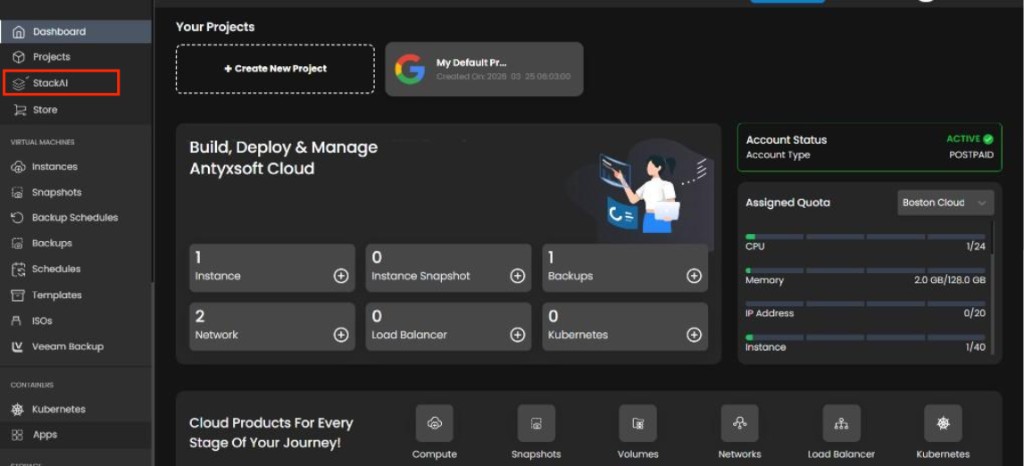
Sidebar navigation
| Item | Purpose |
|---|---|
| Dashboard | Home — projects, counts, quotas |
| Projects | Cloud project list and management |
| StackAI | AI assistant for the same account — see StackAI (Beta) |
| Store | Non-automated products (if enabled) |
Under General, StackAI opens the conversational workspace. It uses the same login session as the dashboard.
Everything you need
Below the project and quota areas, the dashboard shows a product shortcut grid — Everything you need — so customers can jump straight to common services without hunting the sidebar.
| Shortcut | Typical sidebar destination |
|---|---|
| Compute | Virtual machines / instances |
| Snapshots | Instance and volume snapshots |
| Volumes | Block storage |
| Networks | Isolated networks, IPs, firewall |
| Load Balancer | Load balancing (main console menus) |
| Kubernetes | Kubernetes clusters (main console menus) |
For multi-step or bulk work (create a VPC and two VMs, show billing summary, delete all snapshots), customers can use StackAI instead of clicking through each product area.
Additional product tiles may appear depending on what your provider has enabled (object storage, backups, apps, and so on).
Pages in this section
| Area | Page |
|---|---|
| Quota | Quota reports and usage sync |
| StackAI | StackAI User Guide — beta conversational assistant |
Add new customer-dashboard topics here as dedicated pages (for example profile, users, activity logs). Keep admin-only configuration in the relevant admin sections (Quota, Billing, Authentication, …).