CAPTCHA
CMP can protect customer portal forms (login, registration, and similar) from spam and automated bot submissions using CAPTCHA providers.
Supported providers
| Provider | Status | Setup |
|---|---|---|
| Google reCAPTCHA | Supported — v2 Checkbox only | Google reCAPTCHA v2 Checkbox |
| Cloudflare CAPTCHA | Supported | Same path: Captcha Settings → choose the Cloudflare provider → enter Site Key and Secret Key from your Cloudflare CAPTCHA dashboard → Active / Mark as Default as needed. |
Google reCAPTCHA type
For Google, CMP supports reCAPTCHA v2 Checkbox (“I'm not a robot”) only. Do not use reCAPTCHA v3 or Invisible reCAPTCHA credentials.
Where to configure in CMP
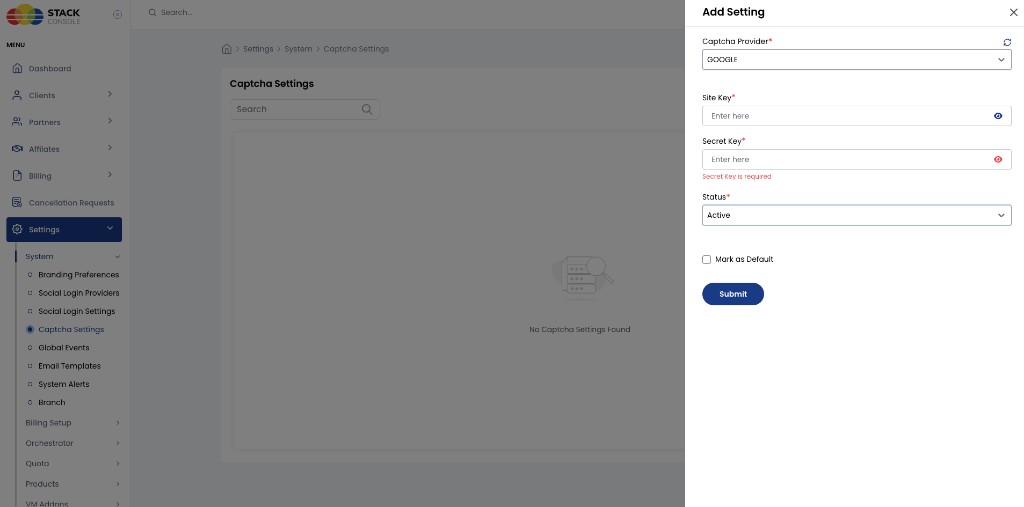
Path: Admin → Settings → System → Captcha Settings
Add a setting, choose the Captcha Provider, enter keys, set Status to Active, and optionally Mark as Default.
img/screenshots/cmp-captcha-settings-add.png
Pages in this section
- Google reCAPTCHA v2 Checkbox — create keys in Google, configure CMP, verify on login
Related
- Platform Features
- Identity Providers
- Multi-language — note that some auth pages still have translation gaps