Payouts
Path: Report → Payouts
Affiliates provide payout account details (bank, PayPal, GigPay, etc.) and view payout history.
Payout Settings does not transfer money. CMP only collects the affiliate’s bank account or wallet details so the admin team can transfer commission manually when a payout is due.
There is no automated payout. After eligible commissions are generated, admins use these saved details to send funds externally (wire transfer, PayPal, GigPay, etc.) and then mark the payout paid in the admin console — Payout settlement.
Configure payout settings after first login — step 9 of the Affiliate Workflow. The Dashboard shows an alert until payout method is set up.
Payout Settings
Open Payout Settings from the Payouts page or the Configure button on the dashboard alert banner. Use this form to save the account or wallet details admins need for manual commission transfers.
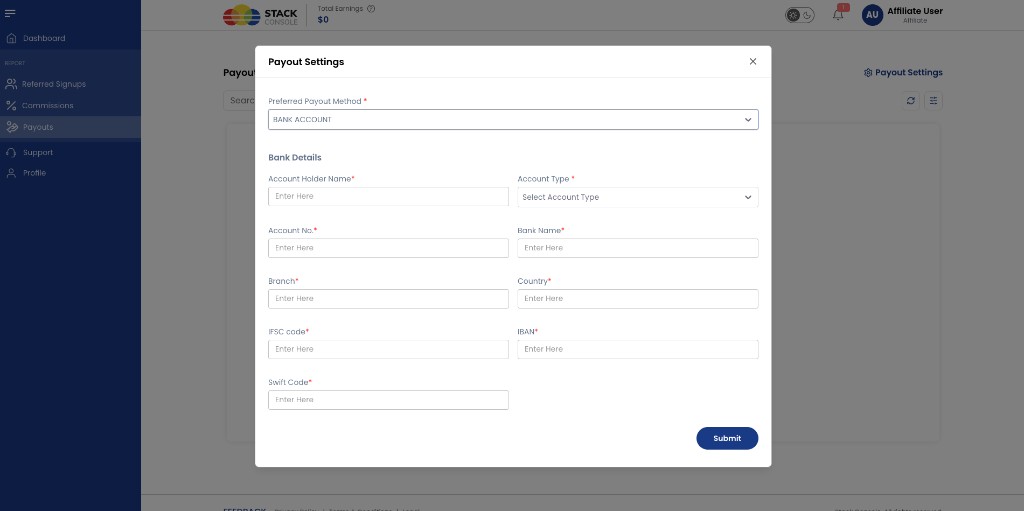
Preferred Payout Method Required. Select how you receive payouts — for example BANK ACCOUNT. PayPal and GigPay may be available depending on provider configuration.
Bank account fields
When BANK ACCOUNT is selected:
Account Holder Name Required. Name on the bank account.
Account Type Required. Select account type from the dropdown.
Account No. Required. Bank account number.
Bank Name Required. Name of the bank.
Branch Required. Branch name or identifier.
Country Required. Country where the account is held.
IFSC code Required when applicable (for example India). International banking identifier for domestic transfers.
IBAN Optional or required depending on country. International Bank Account Number.
Swift Code Optional or required for international wire transfers.
Click Submit to save payout details for the admin team.
Automated payout settlement via PayPal, GigPay, or bank gateways is planned for a future release.
Payout history
The Payouts page also shows past payout records — amounts, dates, and paid status. Affiliates receive an email when an admin marks a payout as paid.
Admins manage pending payouts under Affiliate Payouts (Admin).