Dashboard
The affiliate Dashboard is the home page after login at <BASE_URL>/affiliate/login.
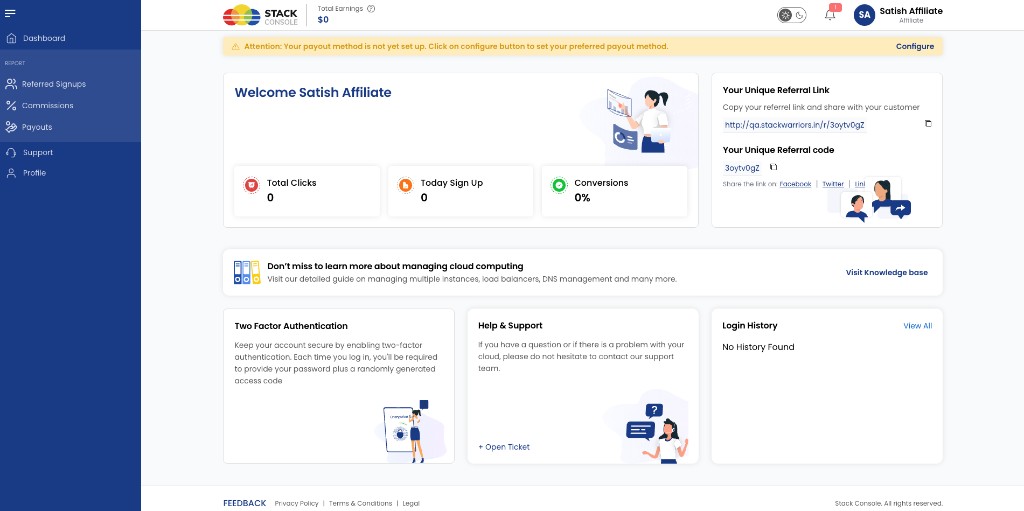
Payout method alert
If payout settings are not configured, a banner appears:
Attention: Your payout method is not yet set up. Click on configure button to set your preferred payout method.
Click Configure to open Payout Settings and save bank or wallet details. CMP does not pay out automatically — admins use these details for manual transfers when commission is due — see Mark as paid.
Performance metrics
| Metric | Description |
|---|---|
| Total Clicks | Clicks on the affiliate referral link |
| Today Sign Up | Customer signups today via the referral link |
| Conversions | Conversion rate from clicks to signups |
Referral information
| Item | Description |
|---|---|
| Your Unique Referral Link | Full URL — for example <BASE_URL>/r/<code> — with copy and open actions |
| Your Unique Referral code | Short code customers can use at registration |
| Social sharing | Share the referral link on Facebook, Twitter, and LinkedIn |
Customers who register using the link or code are linked to this affiliate in CMP. Admins view the same relationships under Referred Signups (Admin).
Other dashboard widgets
| Widget | Purpose |
|---|---|
| Knowledge base | Link to provider knowledge base content |
| Two Factor Authentication | Prompt to enable 2FA on the affiliate account |
| Help & Support | + Open Ticket — raise a support ticket |
| Login History | Recent affiliate portal logins — View All for full history |