Program, Commissions & Payouts
Configure affiliate programs, commission rules, payout methods, and taxation before and after affiliates register.
Admin paths:
- Affiliates → Affiliate Programs
- Affiliates → Affiliate Commissions
- Affiliates → Affiliate Payouts
Affiliate Programs
Path: Affiliates → Affiliate Programs
Create an affiliate program before approving pending affiliates. Assign the program during approval.
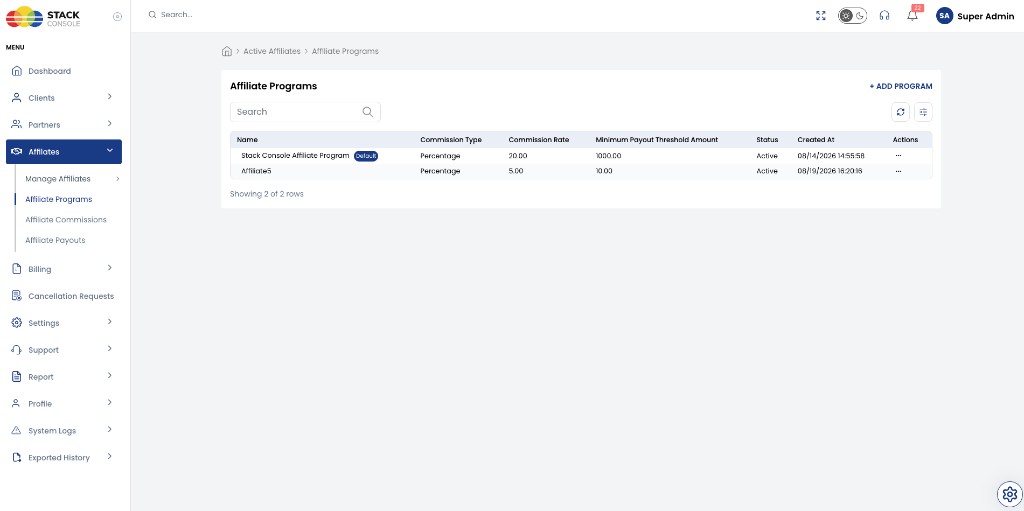
Programs list
| Column | Description |
|---|---|
| Name | Program name — one program may be marked Default |
| Commission Type | Percentage (only option in current release) |
| Commission Rate | Percentage value — for example 20.00 (20%) |
| Minimum Payout Threshold Amount | Minimum balance before payout |
| Status | Active or inactive |
| Created At | Program creation timestamp |
| Actions | Edit or manage program (⋯ menu) |
Click + ADD PROGRAM to create a program. Open Actions on a row to edit an existing program.
Mark one program as Default so new affiliates can be assigned a standard scheme quickly during approval. Only one program should be default at a time.
Add or update affiliate program
Open + ADD PROGRAM or Actions → Update on a row to open the program form.
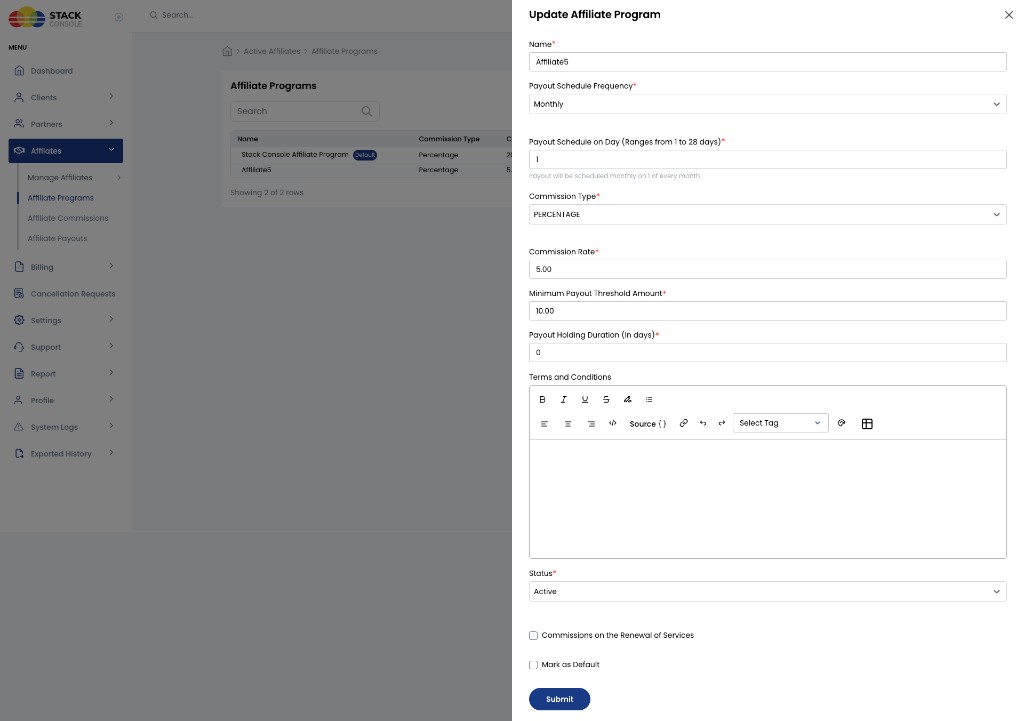
Name Required. Display name for the program — for example, Stack Console Affiliate Program or Affiliate5.
Payout Schedule Frequency Required. How often payouts are generated. Only Monthly is supported in the current release — select Monthly on the program form.
Payout Schedule on Day (Ranges from 1 to 28 days) Required. Day of the month when payouts are scheduled — for example, 1 schedules payout on the 1st of every month. Valid range is 1–28. Applies to the monthly payout schedule.
Commission Type Required. PERCENTAGE only — CMP calculates commission as a percentage of referred customer revenue. Select PERCENTAGE on the program form.
Commission Rate Required. Percentage of referred customer revenue. Enter a numeric value where 5.00 = 5% and 20.00 = 20%.
Minimum Payout Threshold Amount Required. Minimum payable balance before an affiliate appears in Affiliate Payouts — for example, 10.00 or 1000.00.
Payout Holding Duration (in days) Required. Number of days a commission must age before it becomes payable. CMP shows payouts in Affiliate Payouts only after this duration is met — see Payout eligibility. Example: 0 (immediate eligibility after other rules), 30, or 45.
Terms and Conditions Optional. Rich-text terms affiliates accept during registration Step 4.
Status Required. Active or inactive — inactive programs cannot be assigned to new affiliates.
Commissions on the Renewal of Services Optional. When checked, affiliates earn commission on service renewals and upgrades. When unchecked, commission applies to the initial purchase only.
Mark as Default Optional. Sets this program as the default for quick assignment during affiliate approval.
Click Submit to save.
Each program defines:
| Area | Configuration |
|---|---|
| Terms & Conditions | Legal terms affiliates accept at registration |
| Commission settings | Percentage commission; renewal behaviour |
| Payout settings | Threshold, holding period, settlement day |
Commission settings (program-level)
Each affiliate inherits commission rules from the assigned program. In the current release:
| Setting | Current support |
|---|---|
| Commission type | PERCENTAGE of customer revenue only |
| Commission rate | Percentage value — for example 20.00 for 20% |
| Commission on renewal | Configurable per program — Commissions on the Renewal of Services checkbox |
| Debits | Manual commission adjustments — for example chargebacks via + Add Commission on affiliate details |
Example from an active affiliate's Commission Setting tab:
- Commission Type: Percentage — 20%
- Commission on Renewal of Services: Applicable (or not — per program design)
Percentage commissions on postpaid customers are settled after the customer invoice is marked paid.
Payout settings
| Setting | Description | Example |
|---|---|---|
| Payout Schedule Frequency | How often payouts are generated — Monthly only (current release) | Monthly |
| Payout Schedule on Day | Day of month (1–28) when payouts are generated | 1 (1st of month) or 15 (15th of month) |
| Minimum payment threshold | Minimum balance before payout | USD 100 (program UI may show other values such as 1000) |
| Payout Holding Duration (in days) | Commissions must be at least this many days old before they appear as payable | 45 days (UI examples may show 30 days) |
| Payout methods | Bank Account, PayPal, GigPay wallet, etc. | Affiliate configures in dashboard after approval |
Payout Holding Duration is set on the Affiliate Program. CMP does not list a commission in Affiliate Payouts until that holding period has elapsed from the commission date. Until then, the commission accrues on the affiliate's account but stays outside the pending payout queue.
Affiliates configure Bank Account, PayPal, or GigPay details in Payout Settings after login — step 9 of the workflow.
Payout eligibility
A commission becomes eligible for payout only when all of the following are true:
| Criterion | Source |
|---|---|
| Holding duration met | Commission age ≥ Payout Holding Duration (in days) from the assigned affiliate program |
| Minimum threshold met | Total payable balance ≥ Minimum Payout Threshold Amount |
| Customer payment received | For postpaid customers, the referred customer's invoice is marked paid (percentage commissions) |
| Settlement day reached | Current date is on or after the program Payout Schedule on Day (monthly) |
Affiliates → Affiliate Payouts shows pending payouts only after the Payout Holding Duration from the affiliate program has passed for the underlying commissions. Commissions still within the holding window do not appear in the payout list.
When does the affiliate get paid?
Affiliates often confuse three different dates. CMP uses them in this order:
| Stage | What it means | Where it shows |
|---|---|---|
| 1. Commission created | Customer purchase (or manual commission) records a Pending commission | Created At on affiliate Commissions |
| 2. Holding period ends | Payout Holding Duration has elapsed — commission is eligible for a payout batch | Settlement Date on affiliate Commissions |
| 3. Payout batch | Monthly run on Payout Schedule on Day — eligible balance ≥ Minimum Payout Threshold | Affiliates → Affiliate Payouts (admin) |
| 4. Money sent | Admin transfers funds externally and marks paid | Affiliate Payout history + email |
Settlement Date on the affiliate Commissions tab is when the commission finishes the holding period and becomes eligible for the next monthly payout run. It is not the date money is deposited.
The affiliate receives funds only after an admin completes a manual transfer and marks the payout paid.
Example program settings
| Setting | Value |
|---|---|
| Payout Schedule Frequency | Monthly |
| Payout Schedule on Day | 1 (1st of every month) |
| Commission Type / Rate | Percentage — 20% |
| Minimum Payout Threshold | $100 |
| Payout Holding Duration | 30 days (or 0 — see examples below) |
How Settlement Date is calculated
Settlement Date = Created At + Payout Holding Duration (in days)
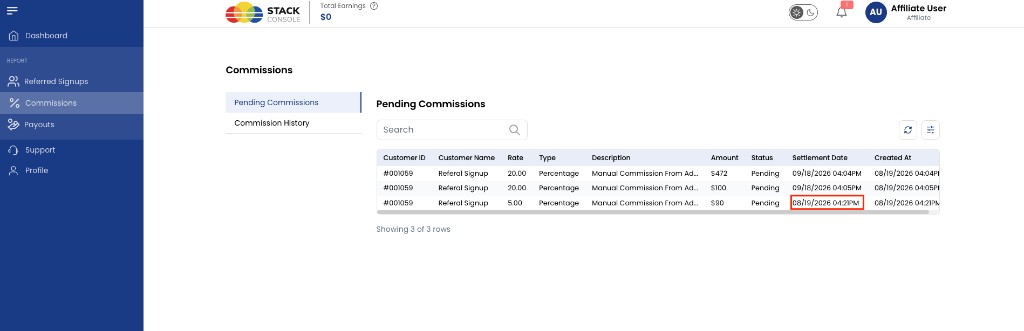
| Row | Created At | Holding duration | Settlement Date | Meaning |
|---|---|---|---|---|
| A | 08/19/2026 04:04 PM | 30 days | 09/18/2026 04:04 PM | Eligible for payout batch after 18 Sep |
| B | 08/19/2026 04:21 PM | 0 days | 08/19/2026 04:21 PM | Eligible immediately (holding met same day) |
Until Settlement Date, the commission stays Pending and does not appear in Affiliate Payouts.
Worked example — 30-day holding
Program: Monthly, payout on day 1, holding 30 days, threshold $100, rate 20%.
- 19 Aug 2026 — Referred customer invoice is paid. CMP records $472 commission (Created At 19 Aug 04:04 PM).
- Settlement Date 18 Sep 2026 — Holding period complete; commission is eligible for a payout batch.
- 1 Oct 2026 — Next Payout Schedule on Day after 18 Sep. If this affiliate's total eligible balance ≥ $100, CMP generates a row in Affiliates → Affiliate Payouts.
- Admin — Transfers $472 (plus any other eligible commissions in that batch) using the affiliate's bank/PayPal details, then clicks Mark As Paid.
- Affiliate — Receives payout marked paid email; amount appears in Payout history.
If eligible balance on 1 Oct is only $90 (below $100 threshold), no payout row is generated yet — commissions roll forward until the threshold is met on a future monthly run.
Worked example — 0-day holding
Same program, but Payout Holding Duration = 0:
- 19 Aug 2026 04:21 PM — Commission $90 recorded. Settlement Date = same timestamp (holding already met).
- 1 Sep 2026 — First monthly payout run after eligibility. If total eligible balance ≥ $100, payout appears in admin Affiliate Payouts.
- Admin manual transfer + Mark As Paid → affiliate is paid.
With 0-day holding, Settlement Date equals Created At — that is expected.
Quick reference — “When do I get paid?”
| Question | Answer |
|---|---|
| When is commission earned? | When the referred customer pays (or admin adds a manual commission) — Created At |
| When can it be included in a payout batch? | On or after Settlement Date, on the next Payout Schedule on Day, if balance ≥ threshold |
| When does money reach my bank? | After admin manually transfers and marks payout paid — not automatic |
Affiliate-facing column help: Commissions — Settlement Date.
Payout settlement
On the defined Payout Schedule on Day each month, CMP generates payouts for eligible commissions that have passed the holding duration and meet the minimum threshold. Payout schedule frequency is Monthly only in the current release.
All affiliate payouts are manual. CMP does not transfer funds automatically — regardless of payout method (Bank Account, PayPal, GigPay, or wire transfer).
| Step | Who | Action |
|---|---|---|
| 1 | System | Generates pending payout records on the settlement day |
| 2 | Admin | Transfers funds externally using the affiliate's Payout Method and Payout Details |
| 3 | Admin | Marks the payout paid in Affiliates → Affiliate Payouts |
Affiliate receives an email when a payout is marked paid.
The following affiliate features are not available in the current release:
- Additional commission types — flat rate and other commission calculation models beyond PERCENTAGE
- Commission tiers — tiered rates based on customer count or revenue volume
- Additional payout schedule frequencies — weekly, bi-weekly, quarterly, or other cadences beyond Monthly
- Automated payout settlement — direct integration with PayPal, GigPay, or bank gateways
Document these flows here when the features ship.
Taxation (W-8 / W-9)
Collect W-9 (US) or W-8 (non-US) information for commission taxation:
- Optional upload during registration Step 2
- Review on admin Tax Documents tab
Confirm tax documents before processing payouts if your compliance policy requires it.
Payment & commission rules
| Rule | Detail |
|---|---|
| Affiliate signup | No payment — CMP customer payment flow is bypassed |
| Affiliate commission | Earned on eligible referred customer purchases |
| Renewals | Configurable per program — some programs pay initial purchase only |
| Postpaid customers | Percentage payouts settle after invoice is marked paid |
| Chargebacks | Debits can be applied to commission account where supported |
Email notifications
| Event | Recipient | When |
|---|---|---|
| New affiliate registration | Admin | Affiliate completes registration (Step 6) |
| Account approved | Affiliate | Admin sets status ACTIVE |
| Referred customer signup | Affiliate | Customer registers via affiliate link |
| Payout marked paid | Affiliate | Admin marks payout as paid |
Affiliate Commissions (platform view)
Path: Affiliates → Affiliate Commissions
Platform-wide list of commission balances across all affiliates. Use for reporting and reconciliation alongside the per-affiliate Commissions tab — Affiliate Details.
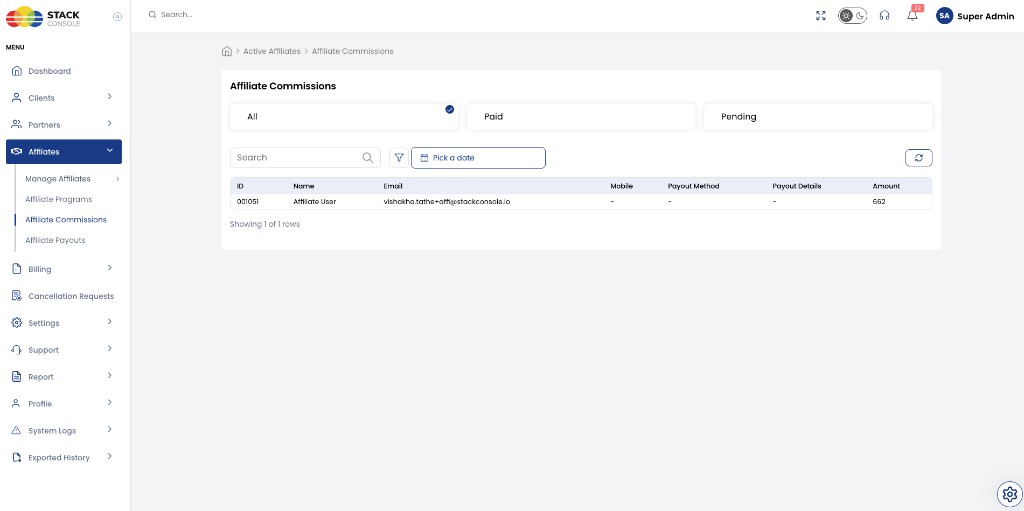
Status filters
| Tab | Shows |
|---|---|
| All | Every affiliate commission record |
| Paid | Commissions already settled via payout |
| Pending | Commissions not yet paid out |
Commissions table
| Column | Description |
|---|---|
| ID | Affiliate CRN |
| Name | Affiliate account name |
| Registered email | |
| Mobile | Contact number (if provided) |
| Payout Method | Bank, PayPal, GigPay — from affiliate payout settings |
| Payout Details | Account or wallet details |
| Amount | Total commission amount for the affiliate |
Use search, filters, and the date picker to narrow results. Click Refresh to reload the list.
Affiliate Commissions shows accrued commission totals per affiliate. Affiliate Payouts shows amounts ready for settlement after Payout Holding Duration and other program rules are met.
Per-affiliate commission line items (customer, rate, type, payable amount, status) are on Affiliates → Manage Affiliates → Active Affiliates → Commissions — Affiliate Details.
Affiliate Payouts (platform view)
Path: Affiliates → Affiliate Payouts
Lists affiliates with pending payouts — amounts that have passed the program Payout Holding Duration and meet other eligibility rules. Commissions still within the holding window do not appear here.
Payout Method and Payout Details in this list come from each affiliate’s Payout Settings — bank account or wallet information CMP collected for your finance team.
CMP does not transfer money automatically. Admins must send funds externally using those saved details, then mark the payout paid here.
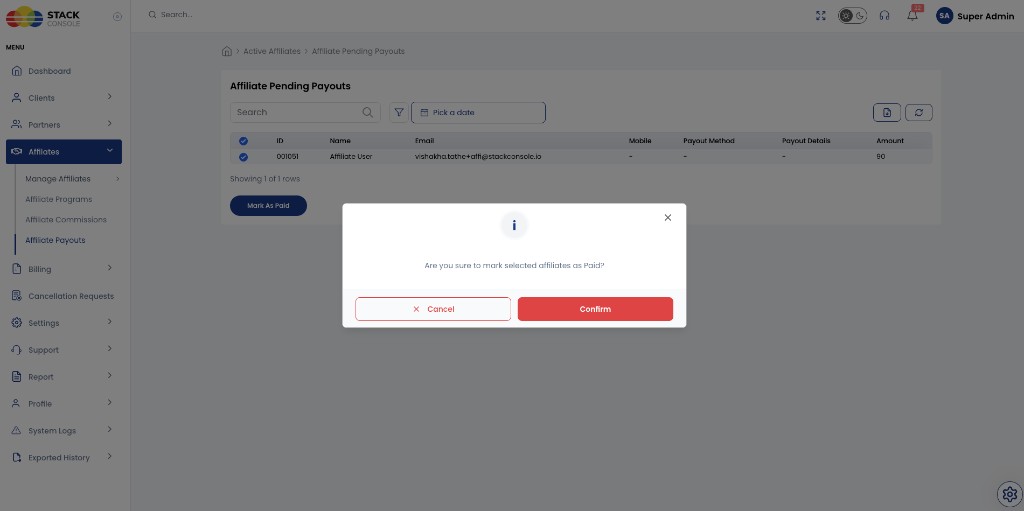
Pending Payouts table
| Column | Description |
|---|---|
| ID | Affiliate CRN |
| Name | Affiliate account name |
| Registered email | |
| Mobile | Contact number (if provided) |
| Payout Method | Bank, PayPal, GigPay, etc. — from affiliate payout settings |
| Payout Details | Account or wallet details for the selected method |
| Amount | Payable amount ready for settlement |
Use search, filters, and the date picker to find specific payout batches.
Mark as paid
All payouts require manual settlement:
- Open Affiliates → Affiliate Payouts
- Select the affiliate row(s) with pending payout
- Transfer funds externally — wire transfer, PayPal, GigPay, or bank transfer per the affiliate's configured Payout Method and Payout Details
- Click Mark As Paid
- Confirm in the dialog — Are you sure to mark selected affiliates as Paid?
- Click Confirm
Complete the external transfer before or when marking paid, per your finance process. The affiliate receives a payout marked paid email after confirmation.
Paid payouts appear on the affiliate's Payout History tab.