Manage Affiliates (Admin)
Admins review affiliate registration requests, approve accounts, and manage active affiliates.
Admin path: Affiliates → Manage Affiliates
| Sub-page | Purpose |
|---|---|
| Pending Affiliates | Registrations awaiting approval |
| Active Affiliates | Approved affiliates with referral links and performance |
An Affiliate Program must exist before you approve affiliates.
Pending Affiliates
Path: Affiliates → Manage Affiliates → Pending Affiliates
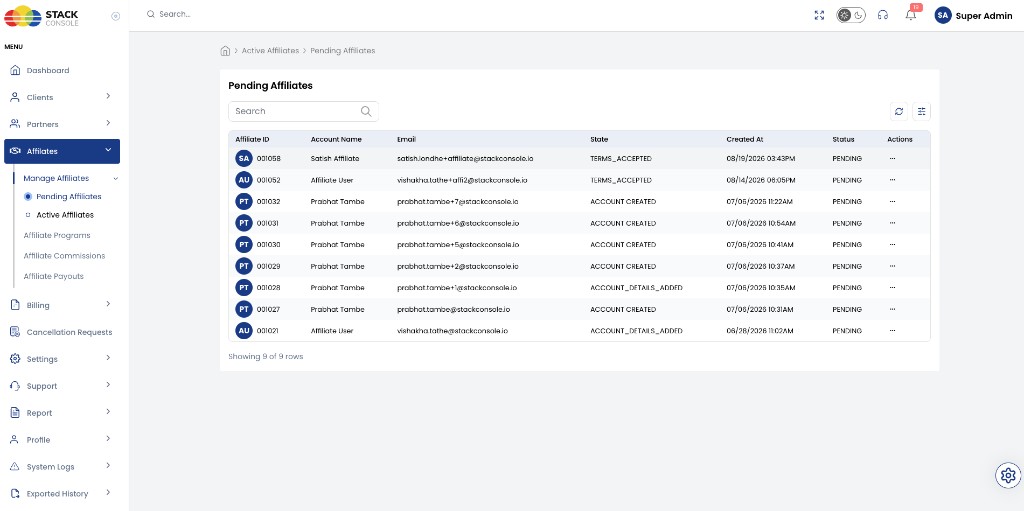
The table lists registration requests that are not yet active.
| Column | Description |
|---|---|
| Affiliate ID | CMP affiliate identifier |
| Account Name | Name from registration |
| Registered email | |
| State | Registration progress — for example TERMS_ACCEPTED, ACCOUNT_CREATED, ACCOUNT_DETAILS_ADDED |
| Created At | Registration timestamp |
| Status | PENDING until approved |
| Actions | Open approval drawer (⋯ menu) |
Use search and filters to find specific applications.
Admin receives an email when a new affiliate completes registration.
Approve a pending affiliate
- Open Pending Affiliates
- Click Actions on the row (or open the affiliate)
- Complete the Approve Affiliate drawer
- Click Submit
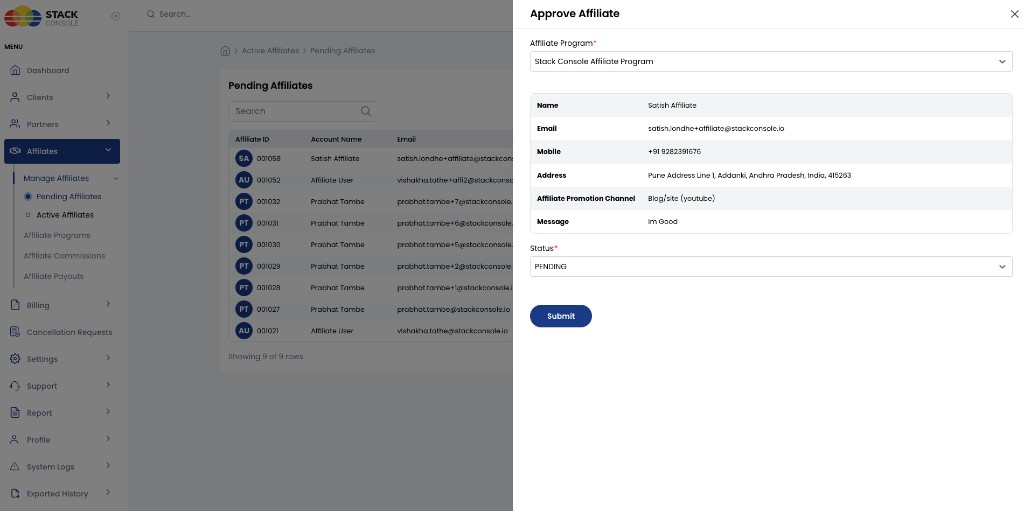
Approve Affiliate fields
Affiliate Program
Required. Select the program to assign — for example, Stack Console Affiliate Program. Commission and payout rules come from this program and can be viewed per affiliate under Commission Setting.
Affiliate details (read-only)
Review submitted information:
| Field | Example |
|---|---|
| Name | Satish Affiliate |
| Registered email | |
| Mobile | Contact phone |
| Address | Billing address from Step 2 |
| Affiliate Promotion Channel | Blog/site, YouTube, etc. |
| Message | Free-text from additional questions |
Status
Required. Change from PENDING to ACTIVE to approve and activate the account.
Click Submit. The affiliate receives a confirmation email when the account is approved.
After approval, the affiliate appears under Active Affiliates and can log in at <BASE_URL>/affiliate/login.
Active Affiliates
Path: Affiliates → Manage Affiliates → Active Affiliates
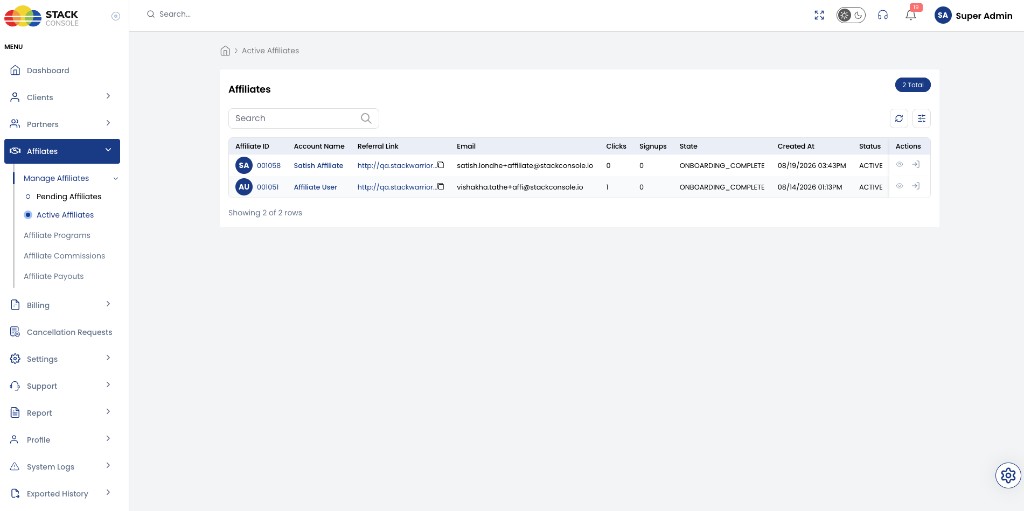
Lists approved affiliates with referral performance at a glance.
| Column | Description |
|---|---|
| Affiliate ID | CMP affiliate identifier |
| Account Name | Affiliate display name |
| Referral Link | Unique URL — copy icon to clipboard |
| Registered email | |
| Clicks | Referral link click count |
| Signups | Customer signups via referral |
| State | For example ONBOARDING_COMPLETE after full setup |
| Created At | Registration date |
| Status | ACTIVE |
| Actions | View details (eye), login-as-affiliate (arrow) |
Click the view icon to open Affiliate Details.
Other Affiliates menu items
| Menu item | Purpose |
|---|---|
| Affiliate Programs | Create and configure programs — Affiliate Programs |
| Affiliate Commissions | Platform-wide commission totals — Affiliate Commissions (platform view) |
| Affiliate Payouts | Pending payouts and mark as paid — Affiliate Payouts (platform view) |