Veeam Packages & Unit Pricing
After connecting Veeam, configure how customers buy Veeam capacity in CMP:
- Veeam Account packages — predefined plans with remote-service quotas and cycle prices
- Veeam Custom Unit Pricing — usage-based rates for Cloud Connect, Remote, Hosted, and VB365
- Connecting CMP to Veeam is complete (including zone and storage settings)
- You know workstation / server agent limits, repository GB, and prices for each plan
Create Veeam Account Package
Path: Settings → Billing Setup → Rate Cards → Default → Packages → Veeam → Create Veeam Account Package
img/screenshots/cmp-veeam-account-package.png
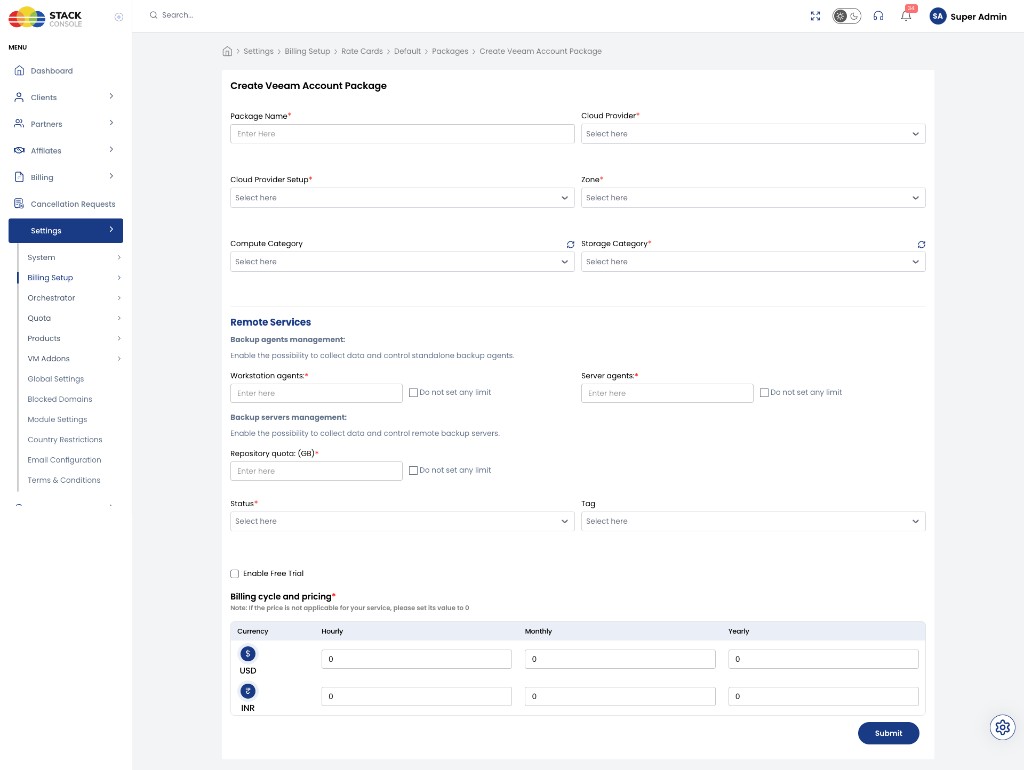
- Open Create Veeam Account Package
- Complete each field below
- Click Submit
- Repeat for additional plans (for example Silver, Gold, Platinum)
General
Package Name
Required. Customer-facing plan name — for example Silver Plan.
Cloud Provider
Required. Select the Veeam cloud provider.
Cloud Provider Setup
Required. Select the Veeam provider setup.
Zone
Required. Zone where this package is sold.
Compute Category
Optional. Select a compute category if used for filtering or representation.
Storage Category
Required. Storage category for this package (from Storage Settings on the provider).
Remote Services
Backup agents management
Enables collecting data and controlling standalone backup agents.
Workstation agents
Required. Maximum workstation agents on the plan. Tick Do not set any limit for unlimited.
Server agents
Required. Maximum server agents on the plan. Tick Do not set any limit for unlimited.
Backup servers management
Enables collecting data and controlling remote backup servers.
Repository quota: (GB)
Required. Repository storage allowance in GB. Tick Do not set any limit for unlimited.
Status, tag, and trial
Status
Required. Set to Active when the package is ready to sell (after pricing is correct).
Tag
Optional. Administrative or storefront tag.
Enable Free Trial
Not applicable. Free trial does not work for Veeam Account packages. Leave it disabled; do not rely on it for Veeam billing.
Billing cycle and pricing
Required. Prices per currency and cycle.
If a price is not applicable for a cycle, set its value to 0.
| Column | Purpose |
|---|---|
| Currency | For example USD, INR |
| Hourly | Hourly rate |
| Monthly | Monthly rate |
| Yearly | Yearly rate |
Create multiple packages so customers can pick a fixed plan that matches their backup footprint, then upgrade later (for example repository size) through Stack Console.
Example quotas (Account Package)
The Create Veeam Account Package form sets Remote Services quotas:
| Dimension | Example |
|---|---|
| Workstation agents | 10 (or unlimited) |
| Server agents | 5 (or unlimited) |
| Repository quota | 20 GB (or unlimited) |
VM and concurrent task dimensions are configured under Veeam Custom Unit Pricing (Cloud Connect Services), not on the Account Package remote-services form. Use Custom Unit Pricing when you need per-VM or per-task billing.
Veeam Custom Unit Pricing
Use unit pricing when you want usage-based billing instead of (or alongside) fixed Account packages.
Path: Settings → Billing Setup → Rate Cards → Default → Packages → Veeam Custom Unit Pricing
When your commercial model bills per resource consumed rather than a fixed plan, configure rates per Cloud Provider + Setup + Zone for dimensions such as:
| Dimension | Unit |
|---|---|
| Repository (GB) | Per GB storage |
| VM | Per VM |
| Workstation | Per workstation |
| Server | Per server |
| Concurrent task | Per concurrent task |
See the full field list below for Cloud Connect, Remote, Hosted, and VB365 sections.
img/screenshots/cmp-veeam-unit-pricing.png
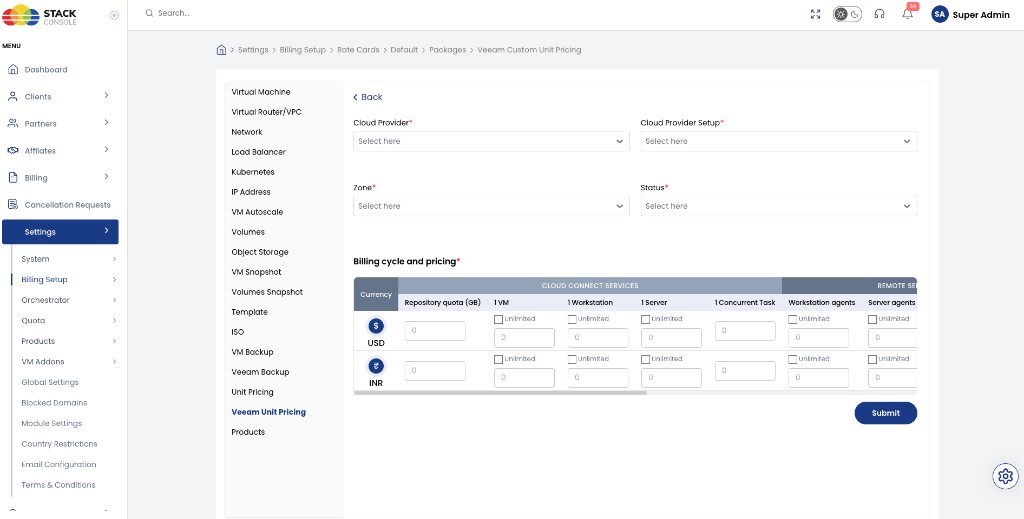
- Open Veeam Custom Unit Pricing (Create)
- Complete the fields below
- Set Status to Active and click Submit
Cloud Provider
Required. Select the Veeam cloud provider.
Cloud Provider Setup
Required. Select the Veeam provider setup.
Zone
Required. Select the zone for these unit rates.
Status
Required. Set to Active to enable unit pricing for that provider setup and zone.
Billing cycle and pricing
Required. Enter a unit price per currency. Where shown, tick Unlimited if that dimension should not be limited / billed as a capped unit (per your commercial model).
Set unused prices to 0.
Cloud Connect Services
| Unit | Description |
|---|---|
| Repository quota (GB) | Price per GB of Cloud Connect repository |
| 1 VM | Price per VM (optional Unlimited) |
| 1 Workstation | Price per workstation (optional Unlimited) |
| 1 Server | Price per server (optional Unlimited) |
| 1 Concurrent Task | Price per concurrent task |
Remote Services
| Unit | Description |
|---|---|
| Workstation agents | Price per workstation agent (optional Unlimited) |
| Server agents | Price per server agent (optional Unlimited) |
Hosted Services
| Unit | Description |
|---|---|
| Source Remote Data (GB) | Price per GB of source remote data (optional Unlimited) |
| Source Hosted Data (GB) | Price per GB of source hosted data (optional Unlimited) |
| Repository quota (GB) | Price per GB of hosted repository (optional Unlimited) |
Microsoft 365 Backup (VB365)
| Unit | Description |
|---|---|
| Subscription User (per user) | Price per VB365 subscription user (optional Unlimited) |
| VB365 storage quota (GB) | Price per GB of VB365 storage (optional Unlimited) |
Unit rates apply per Cloud Provider + Setup + Zone. Create a separate unit-pricing row for each zone where you sell usage-based Veeam capacity.
Limits and features (CMP + VSPC)
| Area | Behaviour |
|---|---|
| Account lifecycle | CMP creates VSPC company accounts and can update quotas / plans via API |
| Credentials | Generated via API; emailed to the customer; reset available in Stack Console |
| Backup execution | Not managed by CMP — customer installs agents / configures jobs in Veeam |
| Portal redirect | After provisioning, users use the public VSPC UI for day-to-day backup operations |
| Supported VSPC | 9.1 (latest supported by Stack Console) |
| Infrastructure Site | At least one VSPC Infrastructure Site (Veeam Cloud Connect) required — see Veeam Requirements |
Additional customer UI flows, quota-upgrade screenshots, and edge-case limits will be expanded as Veeam feature documentation is completed. See Veeam Features.