Volumes packages (Proxmox)
Volumes packages define disk size, storage category, and storage pricing on the rate card. On Proxmox they are used when:
- Enable Override Disk Offering is Yes — to provision the root disk at VM create (customer selects a volume package / size)
- Customers need additional volumes — create extra disks from the same packages and attach them to a VM
VM packages then price CPU and memory only. See Virtual Machine packages — Override disk.
- Connecting CMP to Proxmox — Enable Override Disk Offering set to Yes if these packages are used for root disks
- Storage categories configured in wizard Step 5 — Storage Setting (for example SSD Storage)
- Block Storage / SSD (or related) services enabled on the provider if you offer attachable volumes
CMP path: Settings → Billing Setup → Rate Cards → [Rate Card] → Packages → Volumes → Add Package
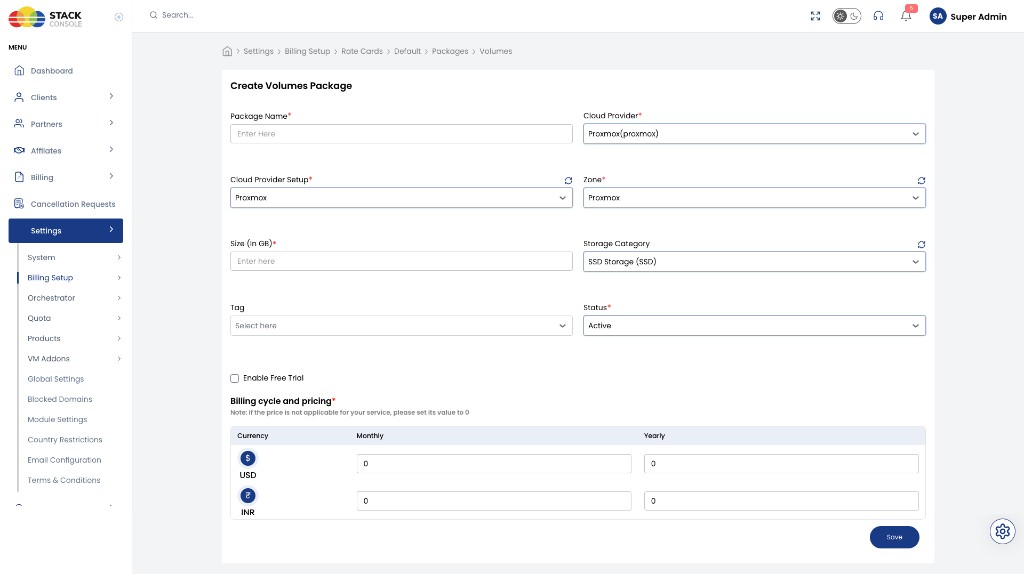
Packages are unique per Cloud Provider + Setup + Zone + Storage Category (and size). Create a separate package for each size and storage tier you sell.
How volume packages are used
| Use case | When | Behaviour |
|---|---|---|
| Root disk | Enable Override Disk Offering = Yes | At Create Instance, the customer selects storage (this volume package). CMP provisions the root disk on Proxmox using that size and storage category. |
| Additional volume | Any time after (or as offered in the portal) | Customer creates another volume from a Volumes package and attaches it to a VM for extra disk space. |
Override disk = Yes
  → VM package = CPU + memory pricing
  → Volumes package = root disk (and optional extra disks)
When override disk is No, root disk size and cost live on the VM package instead — volume packages are then mainly for additional attachable disks (if you still offer them).
Create / edit Volumes package fields
Package Name
Required. Display name — for example SSD-60GB or 100 GB SSD.
Cloud Provider
Required. Select Proxmox (proxmox).
Cloud Provider Setup
Required. The Proxmox setup from Connecting.
Zone
Required. CMP zone where this storage package is sold.
Size (in GB)
Required. Disk size in gigabytes for this package — for example 60 or 100.
Storage Category
Required / as shown. Storage tier from Storage Setting — for example SSD Storage (SSD). Must match how you group packages and what customers pick at create time.
Tag
Optional. CMP-level label for representation (for example Recommended or Free Trial).
Status
Required.
| Status | Behaviour |
|---|---|
| Active | Package appears where customers select root or additional volumes |
| Inactive | Hidden — use while configuring pricing or testing |
Enable Free Trial
Optional. When enabled, this volume package can be used under a free-trial policy. Full guide: Free Trials.
When override disk is Yes, enable free trial on both the VM package and the related volume packages if you want a full trial without surprise disk charges.
Billing cycle and pricing
Required. Set prices for each currency and cycle CMP displays (for example Monthly and Yearly for USD and INR).
Example (from the form):
| Currency | Monthly | Yearly |
|---|---|---|
| USD ($) | 0 | 0 |
| INR (₹) | 0 | 0 |
Click Save.
Checklist
- Enable Override Disk Offering is Yes if these packages provision root disks
- One Active package per size × storage category × zone you sell
- Storage Category matches orchestrator storage settings
- Free trial aligned with VM packages when both are trialled together
- Status is Active and pricing is set
Related
- Proxmox Packages
- Virtual Machine packages — override disk / compute-only pricing
- Connecting CMP to Proxmox — Enable Override Disk Offering, Storage Setting
- Free Trials
- CloudStack Volumes packages — shared root vs additional volume pattern