VM Snapshot packages (Proxmox)
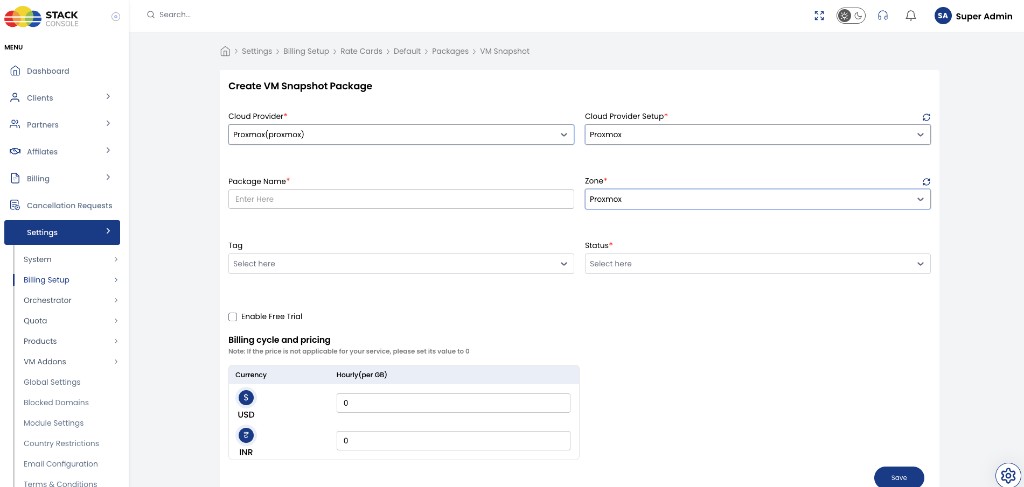
VM Snapshot packages define how CMP bills VM (instance) snapshots on Proxmox (VM_SNAPSHOT). Pricing is hourly per GB based on snapshot size.
CMP allows only one VM Snapshot package per Cloud Provider Setup + Zone.
Free trials are not applicable to VM Snapshot packages. Do not use Enable Free Trial on this form even if the checkbox appears — snapshot billing follows the hourly per-GB rate from creation until the snapshot is deleted.
- Connecting CMP to Proxmox — enable VM Snapshot (or equivalent) under Cloud Provider Services if you offer snapshots to customers
- Zone and rate card exist for the Proxmox setup
- Understand that
VM_SNAPSHOTis an always-hourly service type — see Billing overview
CMP path: Settings → Billing Setup → Rate Cards → [Rate Card] → Packages → VM Snapshot → Add Package
How VM snapshot billing works
VM snapshot cost per hour = current snapshot size (GB) × Hourly (per GB)
Billing continues while the snapshot exists and stops when it is deleted. Monthly / yearly package cycles are not used for this service — only Hourly (per GB) on the form.
Create / edit VM Snapshot package fields
Cloud Provider
Required. Select Proxmox (proxmox).
Cloud Provider Setup
Required. The Proxmox setup from Connecting.
Package Name
Required. Display name — for example VM Snapshot or Instance Snapshot Plan.
Zone
Required. CMP zone where this snapshot pricing applies. One package per setup + zone.
Tag
Optional. CMP-level label for representation.
Status
Required.
| Status | Behaviour |
|---|---|
| Active | Per-GB hourly pricing applies when customers create VM snapshots in this zone |
| Inactive | Hidden — use while configuring pricing or testing |
Enable Free Trial
Not applicable. Leave unchecked. Free trials do not apply to VM Snapshot packages.
Billing cycle and pricing
Required. Enter Hourly (per GB) for each currency CMP displays (for example USD and INR).
| Currency | Hourly (per GB) |
|---|---|
| USD ($) | (your rate) |
| INR (₹) | (your rate) |
Click Save.
Checklist
- One Active VM Snapshot package per Proxmox Setup + Zone where you sell snapshots
- Enable Free Trial left off
- Hourly (per GB) rates set for each currency
- Status is Active
Related
- Proxmox Packages
- Connecting CMP to Proxmox
- Upcoming & Roadmap — backup destinations (external storage / PBS) under development for an upcoming version; snapshots are separate from backup
- Billing cycles — hourly
- CloudStack Volume Snapshot packages — similar hourly per-GB pattern