Virtual Machine packages (Proxmox)
VM packages define the compute customers select when creating instances on Proxmox: vCPU, memory, OS family, and (depending on override disk) root disk size and pricing.
Unlike CloudStack, Proxmox VM packages in CMP do not map to a separate “select offering” UUID — you enter vCore CPU, Memory, and (when applicable) Storage directly on the package. CMP provisions those sizes on the Proxmox node chosen at runtime (Node Selection Algorithm).
- Connecting CMP to Proxmox — provider, zone, templates, storage categories
- Enable Override Disk Offering set on Provider Config (see below)
- Storage categories exist under wizard Step 5 — Storage Setting (for example SSD Storage)
- Templates exist for the Select OS Family you will sell (for example Windows or Linux)
CMP path: Settings → Billing Setup → Rate Cards → [Rate Card] → Packages → Virtual Machine → Add Package (or edit an existing package)
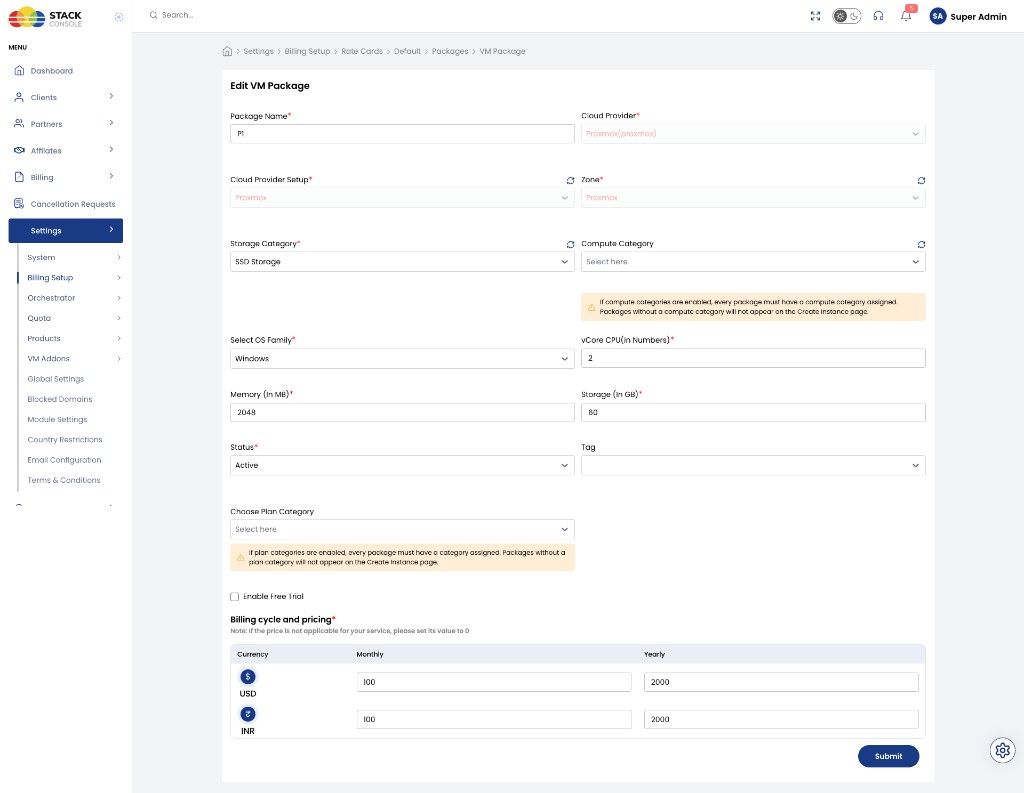
Packages are unique per Cloud Provider + Setup + Zone + Storage Category (and package definition). Create a separate package for each zone / storage tier combination you sell.
Enable Override Disk Offering
Set on Cloud Provider Step 2 — Provider Config: Enable Override Disk Offering.
| Flag | Storage | What to price on the VM package |
|---|---|---|
Yes (true) | Storage is configured separately via Volumes packages; customer selects root disk at create time; can also add attachable volumes | Configure CPU and memory prices only. Do not put storage cost into the VM package price (set storage-related price cells to 0 if the form still shows them). |
No (false) | Root disk is part of the VM package | Set Storage (In GB) and include storage in the Billing cycle and pricing for the package |
With Enable Override Disk Offering = Yes, keep VM packages as compute-only pricing (vCPU + RAM). Sell and bill root disk (and extra disks) through Volumes packages.
Create / edit VM package fields
Package Name
Required. Display name customers see — for example P1 or 2vCore-2GB.
Cloud Provider
Required. Select Proxmox (proxmox).
Cloud Provider Setup
Required. The Proxmox setup from Connecting (for example Proxmox).
Zone
Required. CMP zone where this package is sold. The package appears on Create Instance only for this zone.
Storage Category
Required. Storage category from Connecting — Storage Setting (for example SSD Storage). Still required for package uniqueness and which storage tier the instance uses, even when override disk is Yes.
Compute Category
Optional when compute categories are disabled.
Required when compute categories are enabled in CMP.
Assign a compute category so packages and templates filter correctly on Create Instance.
If compute categories are enabled, every package must have a compute category. Packages without a compute category do not appear on the Create Instance page.
Select OS Family
Required. OS family this package supports — for example Windows or Linux. Customers see this package only when provisioning templates from that family.
vCore CPU (in Numbers)
Required. Number of vCPU cores — for example 2.
Memory (In MB)
Required. RAM in megabytes — for example 2048 for 2 GB.
Storage (In GB)
Depends on override disk.
| Override disk | Guidance |
|---|---|
| Yes | Root disk size is chosen / billed via separate storage configuration — do not treat this field as the storage price. Prefer leaving sizing to the storage path customers use at create time. |
| No | Required. Root disk size for this package — for example 60. Include storage cost in the package price. |
Status
Required. Controls package visibility.
| Status | Behaviour |
|---|---|
| Active | Package appears on Create Instance (subject to compute / plan category rules) |
| Inactive | Hidden from customers — use while configuring pricing or testing |
Tag
Optional. CMP-level tag for representation (for example Free Trial). Not related to Proxmox host or storage tags.
Choose Plan Category
Optional when plan categories are disabled.
Required when plan categories are enabled.
Groups packages in the customer portal (for example General Compute).
If plan categories are enabled, every package must have a plan category. Packages without a plan category do not appear on the Create Instance page.
Enable Free Trial
Optional. When enabled, customers can provision from this package under a free-trial policy. Full guide: Free Trials.
When free trial is on, complete any additional trial fields CMP shows (for example days and VMs per account) as described on that page. If override disk is Yes, also enable free trial on related storage packages so the full solution can be trialled without surprise disk charges.
Billing cycle and pricing
Required. Set prices for each currency and billing cycle CMP displays (for example Monthly and Yearly for USD and INR).
| Override disk | What to enter |
|---|---|
| Yes | CPU and memory (compute) prices only. Set any storage price cells to 0 if they appear and are not used. |
| No | Full package price including root disk. |
Example (compute-focused package with override Yes — storage priced elsewhere):
| Currency | Monthly | Yearly |
|---|---|---|
| USD ($) | 100 | 2000 |
| INR (₹) | 100 | 2000 |
Enter values for every currency enabled at the application level. Hourly or other cycles appear when configured for your rate card / global billing settings.
Checklist
Before selling a Proxmox VM package:
- Enable Override Disk Offering matches how you price storage (Provider Config)
- If override is Yes: VM package prices cover CPU + memory only; storage packages / categories are ready
- If override is No: Storage (In GB) and package price include disk
- Cloud Provider, Setup, and Zone match the live Proxmox connection
- Storage Category matches a configured storage setting
- Select OS Family matches available templates
- Compute Category / Plan Category set if those features are enabled
- Status is Active and pricing is set
- Free trial fields completed if Enable Free Trial is on
Related
- Proxmox Packages
- Volumes packages — root disk when override is Yes; additional attachable volumes
- Unit Pricing — per-unit rates for custom packages
- Connecting CMP to Proxmox — Enable Override Disk Offering
- Preparing CMP-compatible templates
- Node Selection Algorithm
- Free Trials
- CloudStack Virtual Machine packages — shared override-disk / category patterns