Configure IP Address pricing (Proxmox)
IP Address packages define how IPs are priced on the rate card for a Proxmox setup and zone. CMP allocates addresses from the pools you manage in Networks and IPAM; this package is the billing side of those IPs.
Category overview: IP Address. When billing applies per network: Shared Network IP Billing.
CMP allows only one IP Address package per Cloud Provider Setup + Zone. You cannot create multiple IP package tiers for the same setup and zone.
Free trials are not applicable to IP Address packages. The form does not include Enable Free Trial — IPs are billed according to package pricing and network billing flags from acquisition / allocation.
- Connecting CMP to Proxmox complete, with IP Address enabled under Cloud Provider Services if you offer IP billing
- Networks and IPAM — networks imported, IP pools generated, and Do you want to enable billing for IP addresses for this network? set per network
- Zone exists for the Proxmox setup
CMP path: Settings → Billing Setup → Rate Cards → [Rate Card] → Packages → IP Address → Add Package
Same package prices apply when IP billing is enabled on a Proxmox network. Per-network when billing applies: Shared Network IP Billing.
How this relates to Networks and IPAM
| Layer | Where | Role |
|---|---|---|
| IPAM | Networks IP Address | Pool of available / allocated IPs (and optional Associated IP for display) |
| Network flag | Import / Update Network — enable billing for IP addresses | Yes = charge for IPs on that network; No = no IP billing for that network |
| IP Address package | This page | Rate card prices (monthly / yearly / etc.) when IP billing applies |
If the network’s IP billing flag is No, customers are not charged for IPs on that network even when an IP package exists. Set the flag to Yes when you want this package’s pricing to apply.
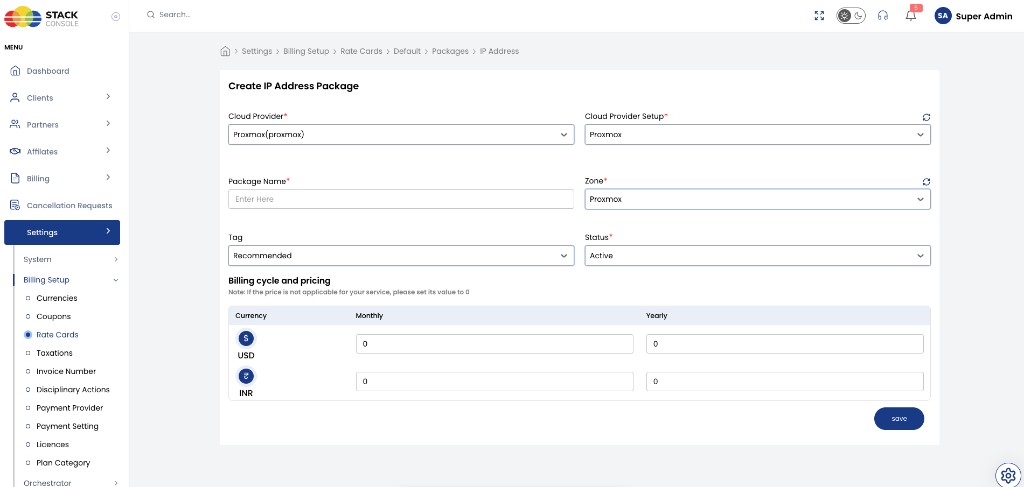
Create / edit IP Address package fields
Cloud Provider
Required. Select Proxmox (proxmox).
Cloud Provider Setup
Required. The Proxmox setup from Connecting (for example Proxmox).
Package Name
Required. Display name for the IP plan — for example Public IP or Ip Plan.
Zone
Required. CMP zone where this IP pricing applies. Create a separate package if you sell IPs in multiple zones (one package per setup + zone).
Tag
Optional. CMP-level label for representation (for example Recommended). Not related to Proxmox tags.
Status
Required.
| Status | Behaviour |
|---|---|
| Active | IP pricing can apply when customers use billable IPs in this zone |
| Inactive | Hidden — use while configuring pricing or testing |
Billing cycle and pricing
Required. Set prices for each currency and cycle CMP displays (for example Monthly and Yearly for USD and INR).
Example (from the form):
| Currency | Monthly | Yearly |
|---|---|---|
| USD ($) | 0 | 0 |
| INR (₹) | 0 | 0 |
Use non-zero values when you charge for IPs. For hourly derivation from monthly, see Pricing Formulas where applicable.
The Create IP Address Package form does not include Enable Free Trial.
Click Save.
Checklist
- One Active IP package per Proxmox Setup + Zone where you bill IPs
- Networks that should charge IPs have enable billing for IP addresses = Yes
- IP pools exist under Networks IP Address
- Pricing set
Related
- IP Address — category overview
- Shared Network IP Billing
- Proxmox Packages
- Networks and IPAM
- Virtual Machine packages
- CloudStack — IP Address
- Free Trials — IPs are not free-trial eligible