DNS Pricing
CMP supports DNS domain billing — customers can be charged when they create a DNS domain, typically on an hourly or monthly cycle.
Most providers offer DNS management included with the platform or as a paid add-on, not as a primary product. DNS billing is optional and is disabled by default until StackConsole enables it for your deployment.
Enable DNS billing
DNS billing is not turned on automatically. To charge for DNS domains:
- Contact StackConsole (support ticket) and request DNS domain billing for your CMP deployment.
- After approval, StackConsole updates the module setting
enable-dns-domain-pricing. - Create DNS Pricing packages under rate cards (see below).
- Customers then see Billing Cycle and price on Create DNS Domain before confirming.
Module setting: enable-dns-domain-pricing
Path: Settings → Module Settings (updated by StackConsole after your request)
| Value | Behaviour |
|---|---|
| Enabled | DNS Pricing packages apply; customers select billing cycle and are charged per package |
| Disabled (default) | DNS domain creation has no package pricing flow — DNS is free at the CMP billing layer |
Providers cannot enable enable-dns-domain-pricing themselves. Raise a ticket with StackConsole to enable DNS billing before creating paid DNS packages.
DNS Pricing packages
After billing is enabled, define plans and prices under rate cards.
CMP path: Settings → Billing Setup → Rate Cards → Default → Packages → DNS Pricing
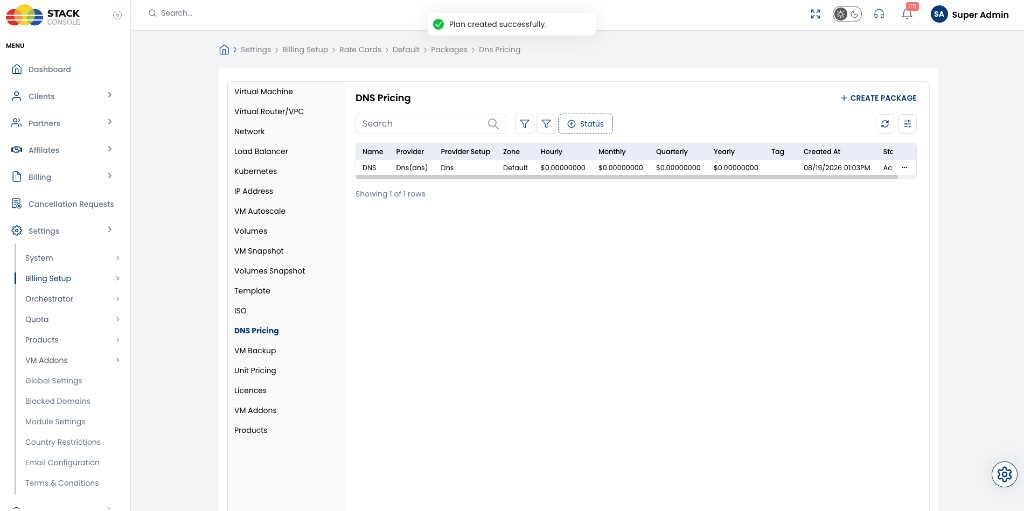
Click + CREATE PACKAGE to add a plan.
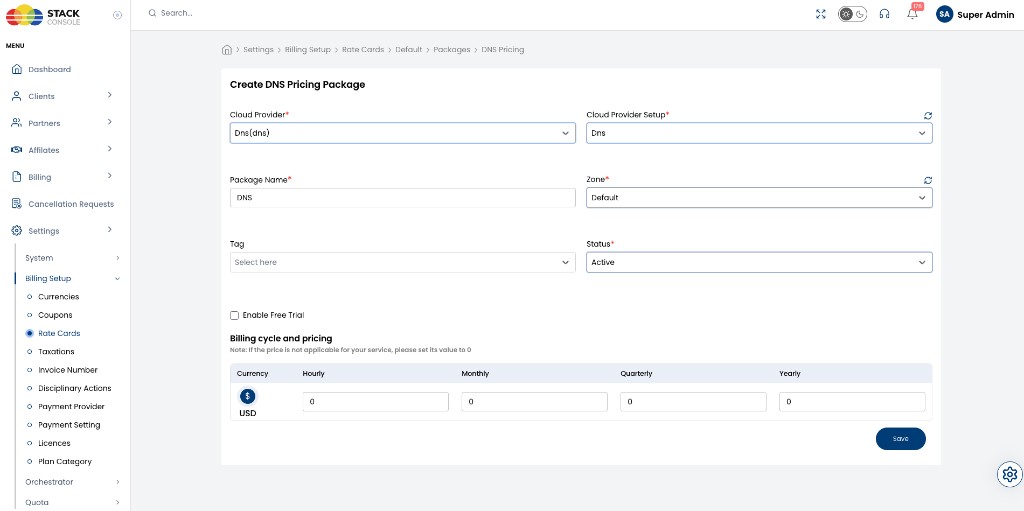
Package fields
Cloud Provider
Required. Select Dns(dns).
Cloud Provider Setup
Required. Select the DNS Cloud Provider Setup — for example, Dns.
Package Name
Required. Display name — for example, DNS. Customers see this when creating a DNS domain (when billing is enabled).
Zone
Required. CMP zone where this package is sold — for example, Default.
Tag
Optional. Promotional or filtering label for the package.
Status
Required.
| Status | Behaviour |
|---|---|
| Active | Package available for customer DNS domain creation |
| Inactive | Hidden from customers |
Enable Free Trial
Not supported for DNS packages. Leave unchecked. Free trial does not apply to DNS Pricing packages.
Billing cycle and pricing
Required. Enter prices for each billing cycle and currency CMP supports.
If a cycle does not apply to your DNS product, set its value to 0.
Example (USD):
| Currency | Hourly | Monthly | Quarterly | Yearly |
|---|---|---|---|---|
| USD ($) | 0.90 | 10 | 0 | 0 |
Click Save to create or update the package.
Define the monthly price first, then derive hourly using Monthly ÷ (30.5 × 24). See Pricing Formulas.
Customer experience when billing is enabled
When enable-dns-domain-pricing is on and an Active DNS Pricing package exists, Create DNS Domain shows billing before provision:
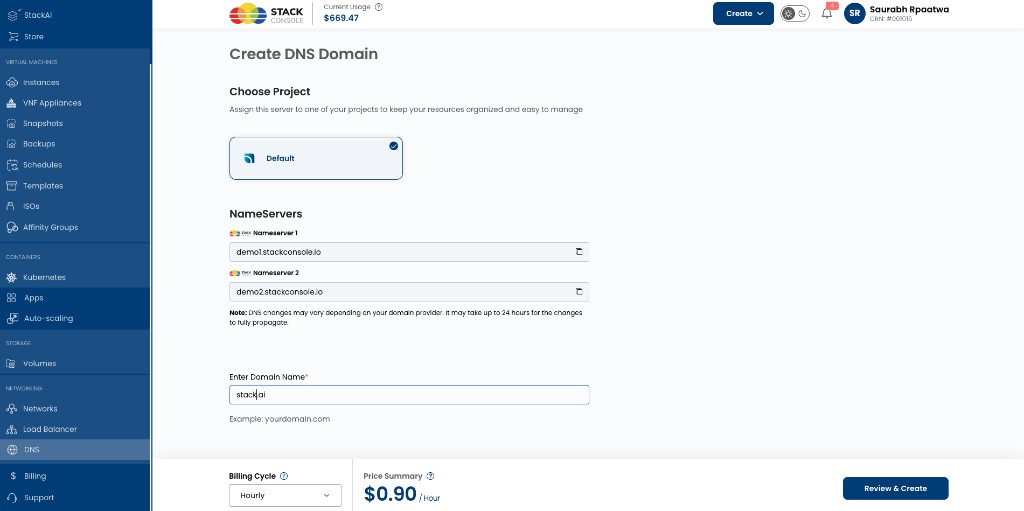
| Field | Description |
|---|---|
| Billing Cycle | Hourly, Monthly, or other cycles configured on the package |
| Price summary | Amount for the selected cycle — for example, $0.90 / Hour |
| Review & Create | Confirms project, nameservers, domain name, and billing before creating the zone |
Full customer flow: DNS Operations — Create DNS Domain.
When billing is disabled, customers create DNS domains without a billing cycle or price step.
Validation checklist
Before offering paid DNS:
- StackConsole has enabled
enable-dns-domain-pricing - Connecting CMP to PowerDNS is complete
- At least one Active DNS Pricing package exists for the target zone
- Enable Free Trial is not used on DNS packages
- Pricing is set for each currency and cycle you sell (unused cycles =
0)