Regions & Availability Zones
After OpenStack is connected in CMP, map each customer-facing zone to an OpenStack region (and optionally an availability zone) before customers can provision in that location.
Most zone behaviour matches Configuring Zones in CMP (CloudStack) — Coming Soon, Status, icons, and country display work the same way. This page covers the OpenStack-specific fields (Region, Availability Zone) and the shared Add Zone form.
- Connecting CMP to OpenStack Steps 1–2 are complete for this setup
- OpenStack regions / AZs exist and are operational
- Availability Zone names are identical across Nova, Cinder, and Neutron — see OpenStack Requirements
Zone configuration is manual
Zone inventory in CMP is not updated automatically when OpenStack changes. CMP does not provide a self-service Sync for zones.
Any region or AZ created, renamed, or removed in OpenStack must be configured or updated manually in CMP under Settings → Orchestrator → Zones.
Changes made directly in OpenStack are not automatically reflected in CMP. After creating or modifying regions/AZs, update the corresponding zone mapping in CMP.
Initial setup (Wizard Step 3)
During first-time Cloud Provider setup, add zones in Wizard Step 3 — Zone. See Connecting CMP to OpenStack.
You can also manage zones anytime at Settings → Orchestrator → Zones.
Creating or editing a zone
- Log in to the CMP Admin Panel
- Navigate to Settings → Orchestrator → Zones
- Click Add Zone (or open an existing zone to edit)
- Configure the fields below
- Set Status to Active and click Save
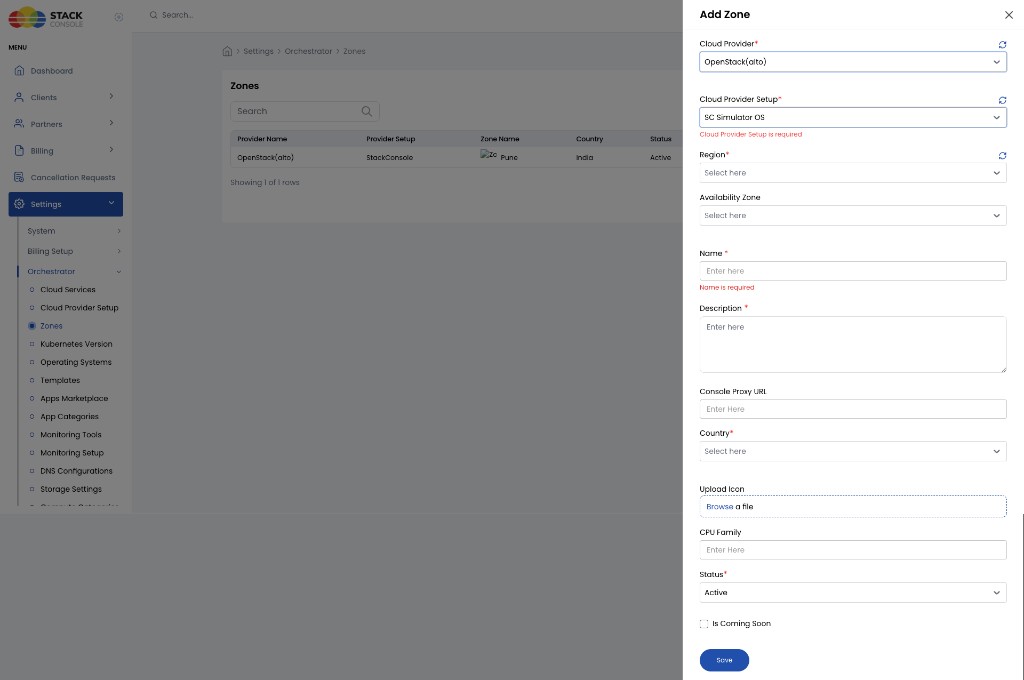
Form fields
Cloud Provider
Required. Select OpenStack (may appear as OpenStack (alto) or a similar alias).
Cloud Provider Setup
Required for active zones. Select the OpenStack setup created in Connecting (for example SC Simulator OS).
Each zone links to exactly one Cloud Provider Setup. Region (and Availability Zone) options are loaded from that setup’s OpenStack API connection.
When Is Coming Soon is enabled, Cloud Provider Setup and Region mapping are not required. See Is Coming Soon.
Region
Required for active zones. Select the OpenStack region returned for the selected setup. This is the primary orchestrator mapping for where CMP provisions resources.
| Requirement | Detail |
|---|---|
| Region must exist in OpenStack | Create/enable the region in OpenStack before mapping it in CMP |
| One CMP zone per region mapping you offer | Each customer-facing location needs its own CMP zone entry |
| Correct setup selected | The region list reflects only regions on the selected Cloud Provider Setup |
If Region does not match the intended OpenStack region, provisioning fails or resources are created in the wrong location. Verify the region in Horizon / OpenStack before saving.
Availability Zone
Optional. Select the OpenStack availability zone within the region when your cloud exposes AZs and you want CMP to target a specific one.
AZ names must match across Nova, Cinder, and Neutron. Mismatched names cause silent provisioning failures.
Name
Required. Customer-facing display name (for example Pune or Mumbai DC 1). Shown in the portal when choosing a datacenter. Independent of the OpenStack region/AZ internal names — mapping is via Region / Availability Zone.
Description
Required. Admin-only text; not shown to customers.
Console Proxy URL
Deprecated — not in use. Same as Provider Config: leave empty or ignore. See Console Proxy URL.
Country
Required. Geographic country for display and filtering (for example grouping or country flag).
Upload Icon
Optional. Upload a zone icon (Browse a file). If set, shown when customers pick a zone; otherwise CMP uses the country flag.
CPU Family
Optional. Optional label for CPU family metadata for this zone (if used in your catalogue messaging). Leave empty if not needed.
Status
Required.
| Status | Behaviour |
|---|---|
| Active | Zone enabled in CMP — customers can see it (subject to Is Coming Soon) |
| Inactive | Hidden from customer provisioning; still visible in admin so you can finish templates, packages, and quotas |
Use Inactive while finishing setup on a new zone in production; switch to Active only when the zone is ready for customers.
Is Coming Soon
Optional. Show the zone to customers before it is ready for provisioning.
| Behaviour | Detail |
|---|---|
| Visible to end users | Yes — listed in the portal |
| Available for provisioning | No |
| Cloud Provider Setup required | No — can defer |
| Region mapping required | No — can remain unset until ready |
When ready: edit the zone, clear Is Coming Soon, complete Cloud Provider Setup / Region (and AZ if used), set Status to Active, and save.
Same Coming Soon pattern as CloudStack zones.
After saving
Once a zone is active and mapped:
- Configure Images for this zone
- Assign VM packages scoped to this zone
- Configure Storage Settings and quotas per Provider + Zone
Packages, images, and quotas are scoped per Cloud Provider + Zone — each new zone needs its own configuration even when OpenStack shares flavors across AZs.
Validation checklist
- Region (and AZ, if used) exists and is healthy in OpenStack
- AZ names consistent across Nova / Cinder / Neutron
- Cloud Provider and Cloud Provider Setup point to the correct OpenStack instance
- Region (and Availability Zone) map to the intended location
- Name, Description, and Country are set
- Is Coming Soon is off for production zones
- Status is Active
- Images and packages are configured for this zone
Related
- Connecting CMP to OpenStack
- Configuring Zones in CMP (CloudStack) — shared Coming Soon / Status behaviour
- Images
- Virtual Machine packages
- OpenStack Requirements