OpenStack Virtual Router Packages
Virtual Router Packages define how CMP provisions, bills, and accounts for Neutron routers in OpenStack. A CMP virtual router maps to an OpenStack Neutron router. The package's External Network Id is used as the router's external gateway network.
CMP path: Settings → Billing Setup → Rate Cards → Default → Packages → Virtual Router
Before You Begin
Ensure the following prerequisites are in place before creating and activating Virtual Router packages:
- Cloud Provider Setup is connected and Virtual Router is enabled in Wizard Step 1.
- Regions & Availability Zones are mapped in CMP.
- At least one external/provider Neutron network exists in the target region and is configured as
router:external=true. - Storage Categories are configured under Storage Settings if the storage-setting module is enabled.
- Customer quotas for Virtual Router, CPU, memory, and storage are sufficient for the package values.
How Virtual Routers Work in OpenStack
In OpenStack, a CMP virtual router maps directly to a Neutron router. The router provides Layer 3 connectivity between tenant private subnets and connects them to an external/provider network through its gateway interface:
CMP Package → External Network Id → Neutron Router External Gateway
CMP CPU / Memory / Storage        → CMP representation and quota accounting
CMP Pricing                       → Recurring router-service charge
OpenStack components
| Component | Role |
|---|---|
| Neutron Router | Layer 3 router for the project; connects tenant subnets and provides egress/ingress through an external gateway. |
| External Network | Provider or shared Neutron network configured as external (router:external=true) and used as the router gateway. |
| External Gateway | Gateway configuration on the Neutron router referencing the selected external network. |
| Tenant Networks / Subnets | Private networks and subnets attached to the router via router interfaces. |
| Floating IPs | Public IP resources allocated from the external network for reachability to private compute instances. |
| CMP CPU / Memory / Storage | CMP-side representation for billing, optional customer display, and quota accounting; they do not size the Neutron router. |
OpenStack Horizon — Create Router
When CMP provisions a virtual router for a tenant, it issues calls to the Neutron API equivalent to the Create Router dialog in OpenStack Horizon:
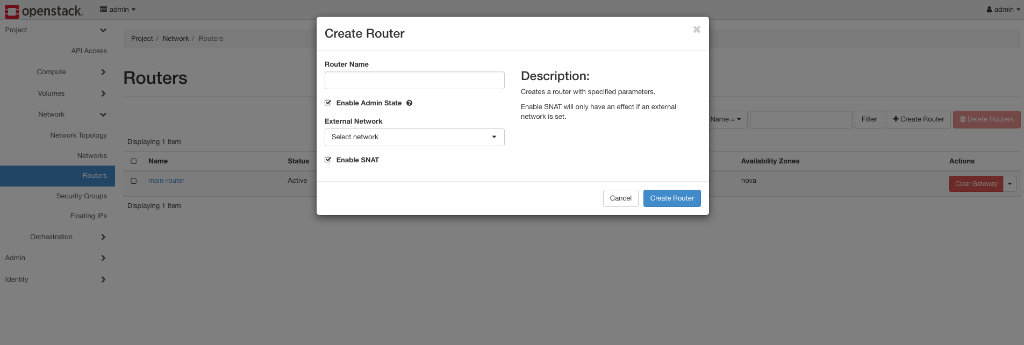
In Horizon, an operator provides a Router Name, enables Admin State, selects the External Network, and enables SNAT. CMP automates this entire provisioning sequence using the package definition.
External Network and OpenStack Prerequisites
The External Network Id is the key OpenStack-specific package setting. When CMP creates the Neutron router, the selected network is configured as the router's external gateway.
- The selected network must be a valid external network in the target region.
- The network must have a suitable subnet and IP pool allocation for SNAT and floating-IP use cases.
- Select the external network that customers should use for outbound and inbound external connectivity in that zone.
OpenStack prerequisites
External network verification
- Identify the external/provider network for the target region (such as
publicorext-net). - Confirm the network is marked with
router:external=true. - Verify subnet CIDR and IP allocation pools are configured with sufficient addresses for router gateway ports and floating IPs.
- Identify the network UUID used by CMP as the External Network Id.
Tenant connectivity flow
- The customer creates a virtual router from an active CMP package.
- The customer creates a private network and subnet.
- The customer attaches the subnet to the router as an internal interface.
- Floating IPs from the external network can be allocated and associated with instance ports for public ingress.
Configure a Virtual Router Package
- Navigate to Settings → Billing Setup → Rate Cards → Default → Packages → Virtual Router.
- Click Add Package (form title: Create Virtual Router/VPC Package).
- Complete the form fields documented below.
- Configure pricing for required currencies and billing cycles.
- Set Status to Active only after validation.
- Click Save.
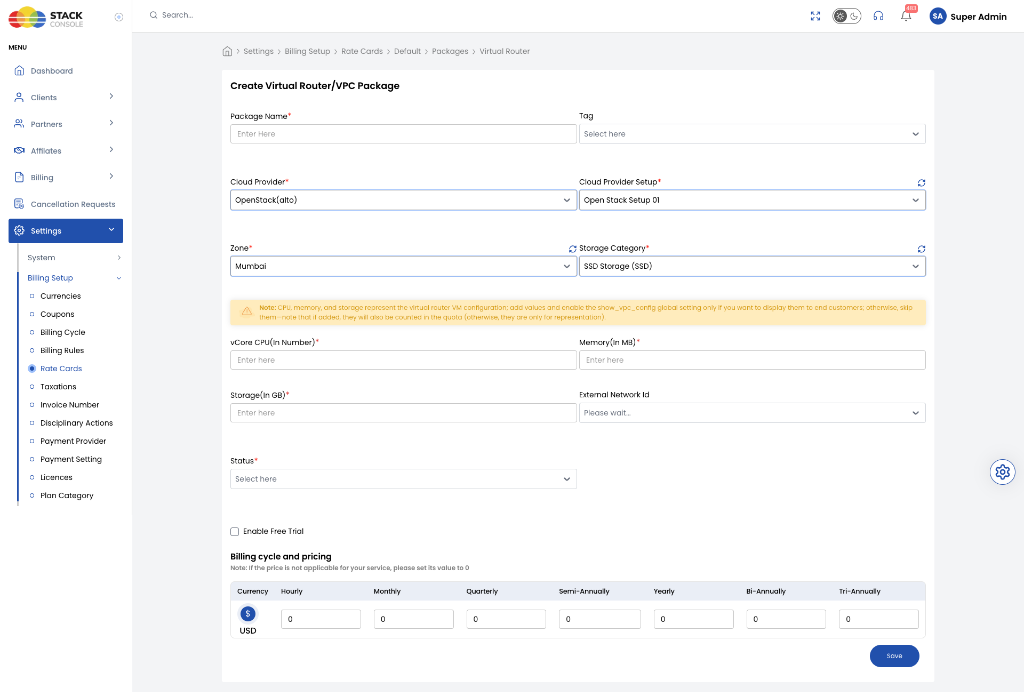
Package Name
Required. Customer-facing name for the virtual router tier — for example, Standard Virtual Router.
Tag
Optional. CMP label for internal filtering, classification, or promotional presentation. Tags are CMP-level metadata and do not configure the OpenStack router.
Cloud Provider
Required. Select OpenStack (or your specific OpenStack driver, e.g. OpenStack(alto)).
Cloud Provider Setup
Required. Select the connected OpenStack environment to which this package belongs.
Zone
Required. Select the CMP zone/region where the package is available. Selecting a zone populates the available External Networks for that region.
Create a separate package for each zone where you offer virtual router services.
Storage Category
Required when the storage-setting module is enabled. Used for quota accounting. It does not attach storage to the Neutron router.
Must match a configured entry under Storage Settings for the selected zone.
The form displays an orange note: CPU, memory, and storage represent the virtual router VM configuration.
These values do not create a Nova flavor, do not resize a Neutron router, and do not cause OpenStack to allocate CPU, memory, or storage specifically to the router. Enter these values when they are needed for customer-facing representation or quota accounting.
vCore CPU (In Number)
Required (enter 0 to skip quota deduction). CMP representation and quota deduction value. Has no direct effect on Neutron router capacity.
Memory (In MB)
Required (enter 0 to skip quota deduction). CMP representation and quota deduction value. Has no direct effect on Neutron router capacity.
Storage (In GB)
Required (enter 0 to skip quota deduction). CMP representation and quota deduction value. Does not attach a Cinder volume to the router.
External Network Id
Required for OpenStack. Select the external/shared Neutron network used as the router's external gateway.
The dropdown shows "Please wait…" while networks are loading from the selected zone. If the dropdown is empty, verify that external networks exist and are mapped in the target OpenStack region.
Status
Required. Controls package visibility to customers. Set to Active to publish, or Inactive while testing.
Enable Free Trial
Optional. When enabled, eligible customers can provision a virtual router under this package within CMP's automated free-trial policy.
Billing cycle and pricing
Required. Configure pricing for each supported currency and billing cycle. Set unused billing cycles to 0 as instructed by the form note.
CPU, Memory, and Storage Mapping
The form's orange note explains that CPU, memory, and storage represent the virtual-router configuration. Enter these values when they are needed for customer-facing representation or quota accounting.
| Field | CMP purpose | Effect on Neutron router |
|---|---|---|
| vCore CPU | Representation, customer display, quota deduction | No direct router sizing |
| Memory | Representation, customer display, quota deduction | No direct router sizing |
| Storage | Representation, customer display, quota deduction | No volume created or attached to router |
External Network Id Requirements
CMP stores the selected external network UUID and uses it when creating the router's external gateway:
| Requirement | Detail |
|---|---|
| Must be external | The network must be configured in Neutron with router:external=true and be suitable for use as a router gateway. |
| Zone-scoped | Available networks depend on the selected Cloud Provider Setup and zone/region. |
| Floating IPs | The external network can be used for floating-IP allocation where supported by the CMP/OpenStack configuration. |
Status
| Status | Behaviour |
|---|---|
| Active | Package is available for customer virtual-router creation in the selected zone. |
| Inactive | Package is hidden and can be used while configuring or testing. |
Billing and Pricing
Pricing is controlled by CMP. Configure the required price for each supported currency and billing cycle:
| Cycle | Description |
|---|---|
| Hourly | Rate charged per hour for an active virtual router. |
| Monthly | Standard monthly recurring price. |
| Quarterly | Three-month billing price. |
| Semi-Annually | Six-month billing price. |
| Yearly | Annual billing price. |
| Bi-Annually | Two-year commitment rate. |
| Tri-Annually | Three-year commitment rate. |
The package should generally be priced as a recurring virtual-router service. CPU, memory, and storage support representation and quota accounting rather than direct OpenStack router capacity. If a cycle is not offered, enter 0 as prompted by the form note.
Customer Portal Experience
When a customer creates a virtual router from an active package, they use the Create Virtual Router flow in the Customer Portal:
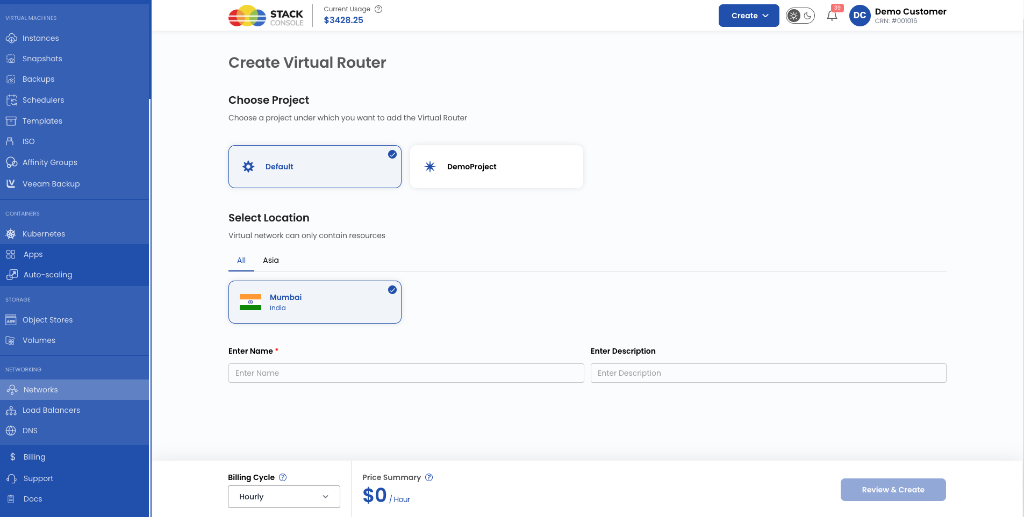
- Choose Project: The customer selects the tenant project under which the router will be created.
- Select Location: The customer selects the target zone/region.
- Name & Description: The customer enters a recognizable name and optional description.
- Billing Cycle & Pricing: CMP displays the rate summary based on the package pricing.
| Package availability | Typical experience |
|---|---|
| Multiple Active packages | Customer can choose the required virtual-router tier. |
| One Active package | CMP can auto-select the only available package. |
After creation, customers can attach private subnets to the router and assign floating IPs as required.
What Happens When a Customer Creates a Virtual Router
- CMP validates applicable quotas, including virtual-router count and package CPU, memory, and storage values.
- CMP calls the OpenStack Neutron API to create the router.
- CMP configures the router's external gateway using the package's External Network Id.
- CMP creates the related offering/subscription record.
- CMP deducts the configured quotas from the tenant account.
- CMP starts billing according to the package pricing.
End-to-End Example
Goal: Sell a standard OpenStack virtual-router package in zone SC-OS-ZONE-1 using external network public.
Step 1 — OpenStack verification
- Confirm the
publicnetwork exists in the region and is markedrouter:external=true. - Confirm suitable subnet/IP allocation exists for required SNAT and floating-IP use cases.
- Note the network UUID for reference.
Step 2 — CMP package configuration
- Enable Virtual Router in Cloud Provider Setup (Wizard Step 1).
- Open Settings → Billing Setup → Rate Cards → Default → Packages → Virtual Router → Add Package.
- Set Package Name to
Standard Virtual Router. - Select Cloud Provider (
OpenStack), the required Cloud Provider Setup, and Zone (SC-OS-ZONE-1). - Select Storage Category if required.
- Enter CPU, memory, and storage values if required for representation or quota accounting (enter
0to skip). - Select the
publicexternal network in External Network Id. - Configure pricing for desired billing cycles and currencies.
- Set Status to Active and click Save.
Validation Checklist
Before making a Virtual Router package Active in production:
- Virtual Router enabled: Confirmed in Cloud Provider Setup Wizard Step 1.
- Zone mapped: Target OpenStack region/zone is mapped correctly in CMP.
- External Network valid: External Network Id points to a valid external Neutron network (
router:external=true). - Storage Category configured: Configured under Storage Settings when the storage-setting module is enabled.
- Resource sizing aligned: CPU, memory, and storage values match the intended commercial and quota model.
- Quotas sufficient: Customer account quotas allow the virtual-router count and configured resource deductions.
- Pricing configured: Prices set for all required currencies and billing cycles.
- Test creation verified: A test virtual router has been successfully provisioned from the Customer Portal before production activation.
Important Clarifications
| Topic | Clarification |
|---|---|
| CPU / Memory / Storage | CMP-side representation, billing, and quota values; they do not represent actual Neutron router capacity or allocate compute resources in OpenStack. |
| External Network Id | The key OpenStack mapping because it determines the router external gateway network. |
| Floating IP | Not the router itself. It is a separate networking resource used for external reachability. See IP Address Packages. |
| Storage Category | Does not attach a Cinder volume to the router; it supports CMP quota accounting only. |
| Tag | CMP-level classification field, not an OpenStack router tag or configuration. |
Summary
- The OpenStack Virtual Router Package is a CMP billing, quota, and provisioning abstraction over an OpenStack Neutron router.
- The most important OpenStack mapping is External Network Id: CMP uses the selected external network when configuring the Neutron router's external gateway.
- CPU, memory, and storage should not be interpreted as actual Neutron router capacity. In CMP, they are used for representation, optional customer display, billing context, and quota accounting.
Related
- OpenStack Packages Overview
- Connecting CMP to OpenStack
- Regions & Availability Zones
- OpenStack Storage Settings
- OpenStack Quota Management
- OpenStack IP Address Packages — floating IPs
- OpenStack Networks — private/public network packages
- OpenStack Virtual Machine Packages
- CloudStack Virtual Router/VPC Packages — reference implementation
- Rate Cards & Pricing Formulas
- Stoppable Services