Object Storage Packages
Object Storage packages define the Impossible Cloud plans customers purchase in CMP — storage capacity, zone, storage category, and pricing.
Each package is unique per Cloud Provider + Setup + Zone + Storage Category. Complete Connecting CMP to Impossible Cloud before creating packages.
- Connecting CMP to Impossible Cloud is complete with Object Storage enabled
- At least one zone is Active with S3 region and URI
- At least one storage setting exists — for example, SSD Storage
CMP path: Settings → Billing Setup → Rate Cards → Default → Packages → Object Storage
How packages work
Select package (compulsory)
        │
        ▼
Object Storage package (CMP)  →  Impossible Cloud storage account + S3 credentials
                              →  Storage (In GB), zone, category applied
| Package field | Effect at provisioning |
|---|---|
| Storage (In GB) | Maximum storage capacity for that object storage service |
| Zone | S3 region where storage is provisioned |
| Storage Category | Logical tier from Storage Settings — for example, SSD Storage |
Impossible Cloud allows a maximum of 100 buckets per object storage service. This is a fixed provider limit — it cannot be changed in CMP or on the package. CEPH packages expose a configurable Bucket Limit field; Impossible Cloud does not.
Configure packages in CMP
- Open Settings → Billing Setup → Rate Cards → Default → Packages → Object Storage
- Click Add Package
- Complete each field below
- Set Status to Active and save
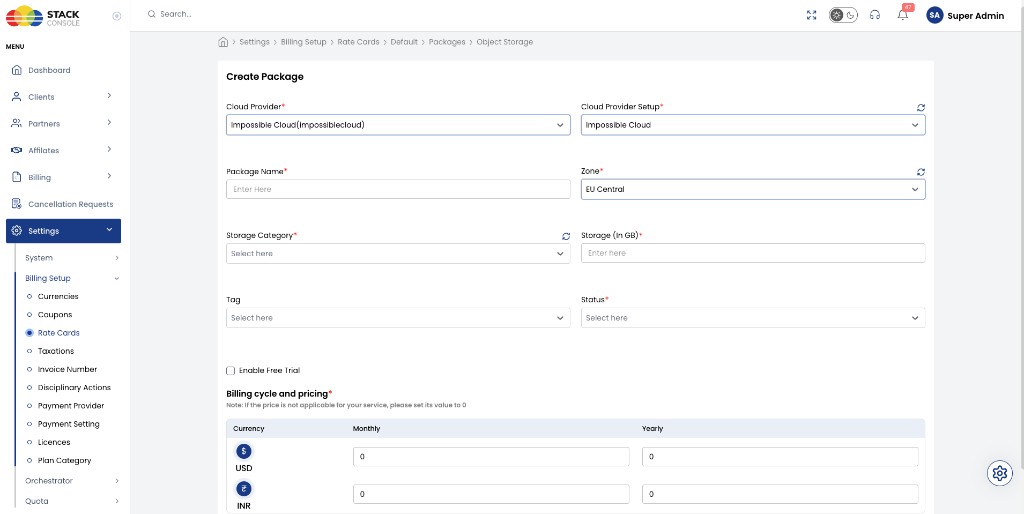
Cloud Provider
Required. Select Impossible Cloud(impossiblecloud).
Cloud Provider Setup
Required. Select your setup — for example, Impossible Cloud.
Package Name
Required. Plan name shown to customers — for example, IC-2 or Object Storage 2 GB.
Zone
Required. CMP zone mapped to the S3 region — for example, EU Central.
Storage Category
Required. Select from Storage Settings — for example, SSD Storage.
Storage settings and Storage Category are not implemented on Impossible Cloud — they are for CMP management and representation only (packaging and UI labelling).
Storage (In GB)
Required. Maximum capacity — for example, 2, 60, or 100.
Tag
Optional. Promotional or filter tag.
Status
Required. Active or Inactive.
Enable Free Trial
Optional. When checked, offered as free trial per CMP rules.
Billing cycle and pricing
Required. Set prices for each billing cycle and currency your rate card supports.
End-to-end example
Goal: Sell 2 GB SSD object storage in EU Central.
- Complete connecting with region
eu-central-2and S3 URI configured - Add storage setting SSD / SSD Storage for zone EU Central
- Create package: Name
IC-2, Storage (In GB)2, ZoneEU Central, Storage CategorySSD Storage - Set monthly price (for example,
$10) and hourly derived rate - Set Status Active
Customers then create object storage from the customer portal — see Object Storage features.
Validation checklist
- Provider setup is Active with Object Storage enabled
- Zone is Active with correct Region and S3 URI
- Storage setting exists for the package Storage Category
- Storage (In GB) matches the plan you sell
- Pricing configured for supported currencies and cycles