Connecting CMP to Impossible Cloud
Connect CMP to Impossible Cloud for object storage — Partner API credentials, ICMC (V1) endpoint, S3 region mapping, storage settings, and rate cards.
Impossible Cloud is independent of compute orchestrators. You can run it alongside CloudStack, VMware, or others so customers provision object storage through CMP.
- Impossible Cloud Requirements complete — Partner API key, Beta API URL, S3 regions
- CMP VM can reach the Partner API and S3 endpoints
- You are logged in to CMP as Super Admin
Overview
CMP connects to Impossible Cloud in two layers:
Create object storage (CMP)
        │
        ▼
CMP  ──── Partner Beta API (Bearer token) ────▶  Impossible Cloud
        │                                     creates storage account (IAM user)
        │                                     + S3 access/secret keys
        ▼
After creation — buckets, objects, retention
CMP / end user  ──── S3 Endpoint ────▶  Impossible Cloud S3
| In CMP | On Impossible Cloud |
|---|---|
| Create Object Storage | Create a storage account (partner-managed IAM user) |
| Multiple object storages per customer | Multiple storage accounts |
| Selected package | Storage capacity and billing from rate card |
When a customer creates object storage, they must select a package. Storage capacity and plan parameters come from the Object Storage package.
Storage accounts are API-only — customer login to the Impossible Cloud storage console is not supported through the current Partner API integration. Customers use CMP and S3 credentials for operations.
Admin setup overview
| Step | Task | Documentation |
|---|---|---|
| 1 | Cloud Services — enable Object Storage | Step 1 — Cloud Services |
| 2 | Provider Setup — Beta API endpoint and Bearer token | Wizard Step 1 — Provider Setup |
| 3 | Provider Config — ICMC V1 endpoint and GB multiplier | Wizard Step 2 — Provider Config |
| 4 | Zone — map S3 region and S3 URI | Wizard Step 3 — Zone |
| 5 | Storage settings — storage categories for packages | Wizard Step 4 — Storage Setting |
| 6 | Rate card plans — storage pricing | Rate card configuration |
CMP path: Settings → Orchestrator → Cloud Provider Setup → Add Cloud Provider
Step 1 — Cloud Services
Path: Settings → Orchestrator → Cloud Services
Enable Object Storage for the Impossible Cloud provider. This must align with Object Storage selected in Provider Setup.
Cloud Provider wizard
The wizard has five steps:
- Provider Setup
- Provider Config
- Zone
- Storage Setting
- Success
Wizard Step 1 — Provider Setup
Partner API connection for account creation and management.
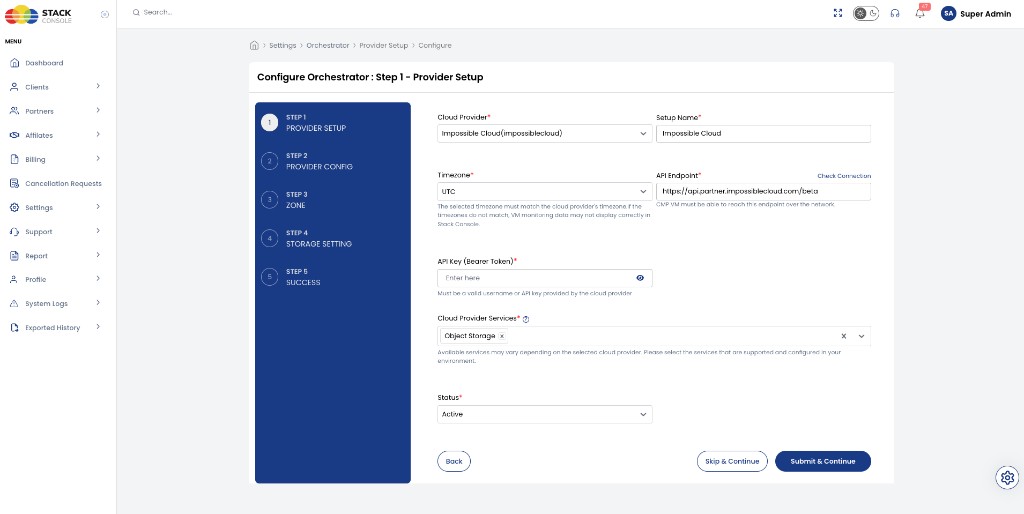
Cloud Provider
Required. Select Impossible Cloud(impossiblecloud).
Setup Name
Required. Display name for this connection — for example, Impossible Cloud.
Timezone
Required. Must match the provider timezone — for example, UTC. If timezones do not match, VM monitoring data may not display correctly when compute providers share the same CMP instance.
API Endpoint
Required. Impossible Cloud Beta Partner API URL — for example:
https://api.partner.impossiblecloud.com/beta
CMP VM must reach this endpoint. Use Check Connection before continuing.
API Key (Bearer Token)
Required. Paste the Partner API key from the Impossible Cloud Partner Portal. Authentication uses Bearer token format. The key is shown only once at generation — store it securely.
Cloud Provider Services
Required. Select Object Storage only.
Status
Required. Active to enable provisioning, or Inactive while configuring dependent settings.
Click Submit & Continue.
Wizard Step 2 — Provider Config
Additional configuration including the V1 (ICMC) API endpoint used for account-management APIs.
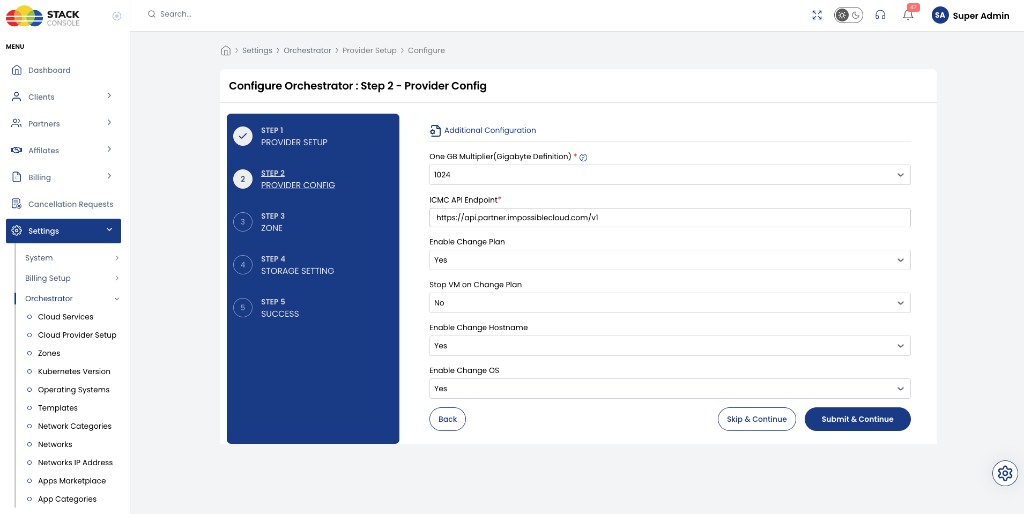
One GB Multiplier (Gigabyte Definition)
Required. How CMP defines 1 GB — typically 1024 (binary) or 1000 (decimal). Match your billing policy.
ICMC API Endpoint
Required. Impossible Cloud V1 API base URL — for example:
https://api.partner.impossiblecloud.com/v1
Some account lifecycle operations reference this endpoint while the Beta API handles primary integration. The Beta API may not yet expose every operation (for example, full storage account deletion).
Click Submit & Continue.
Wizard Step 3 — Zone
Map each Impossible Cloud S3 region to a CMP zone.
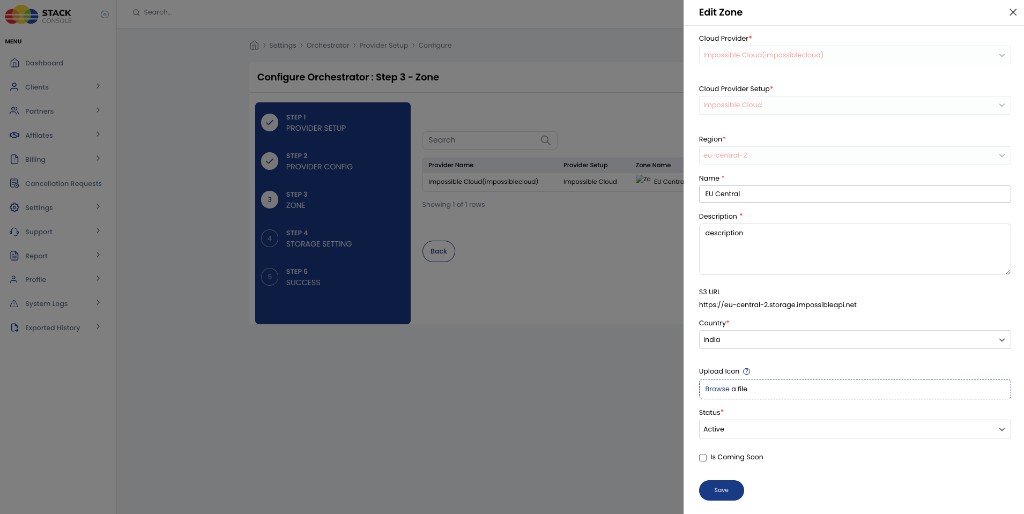
- Add or edit a zone row for this provider setup
- Set Region to the Impossible Cloud region code — for example,
eu-central-2 - Set Name — for example,
EU Central - Set S3 URI — regional S3 endpoint — for example,
https://eu-central-2.storage.impossibleapi.net - Set Country, Status, and optional icon
- Continue when at least one zone is Active
| Field | Example |
|---|---|
| Region | eu-central-2 |
| Name | EU Central |
| S3 URI | https://eu-central-2.storage.impossibleapi.net |
Wizard Step 4 — Storage Setting
Complete this wizard step so CMP can label and package object storage plans. Storage settings are required in the Cloud Provider workflow even though Impossible Cloud does not use them at the provider level.
Storage settings are not supported or implemented with Impossible Cloud. They exist in CMP for management and representation only — for example, display names and Storage Category on rate-card packages. They do not configure placement targets, storage classes, or tiers on the Impossible Cloud side.
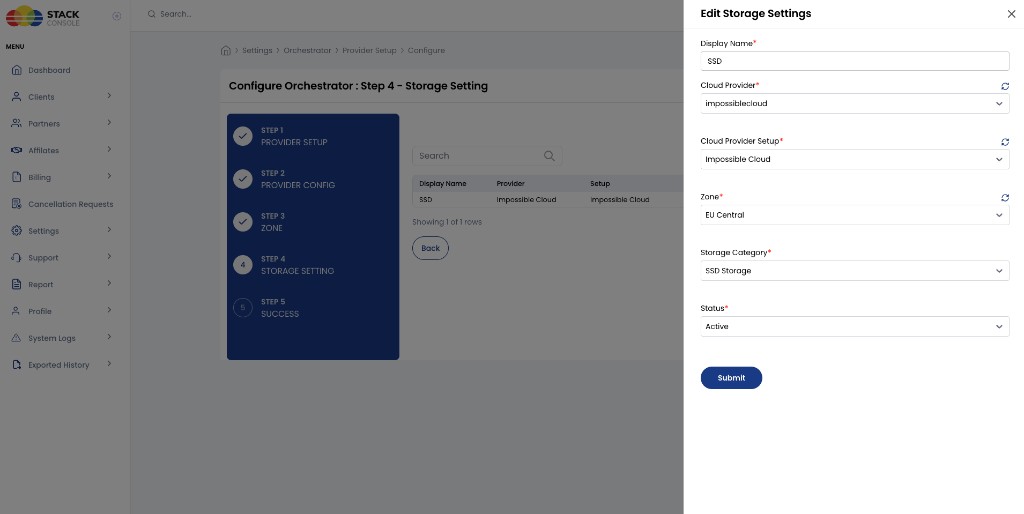
- Add or edit a storage setting
- Set Display Name — for example,
SSD - Select Cloud Provider, Setup, and Zone
- Set Storage Category — for example,
SSD Storage - Set Status to Active
Use at least one Active storage setting per zone so Object Storage packages can reference a Storage Category.
Wizard Step 5 — Success
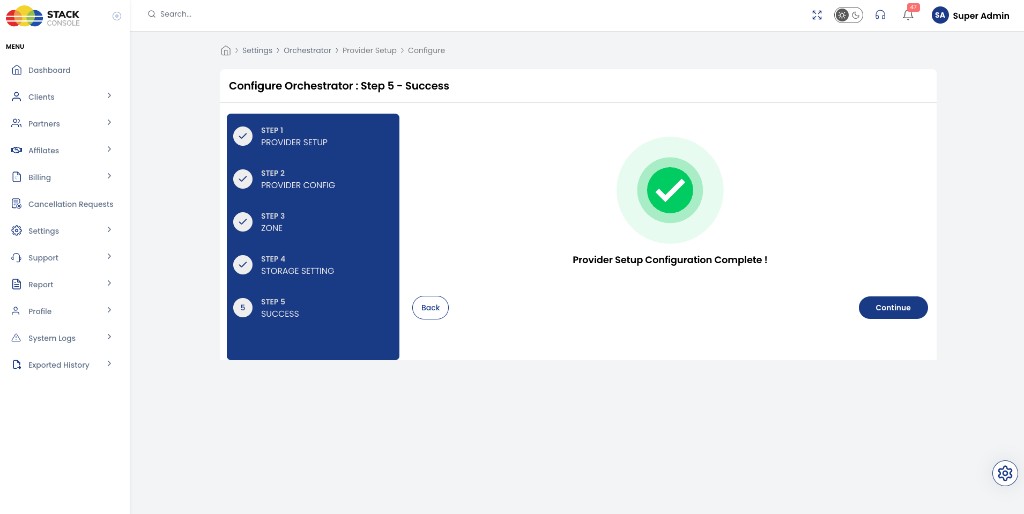
Confirm setup completed, then create Object Storage packages.
Rate card configuration
Configure Object Storage packages under:
Settings → Billing Setup → Rate Cards → Default → Packages → Object Storage
| Area | Configured in packages |
|---|---|
| Storage pricing | Hourly, monthly, and other cycles per currency |
| Plan allocation | Storage (In GB) — maximum capacity per object storage service |
| Billing mapping | Rate card → package → customer object storage |
| Zone | S3 region / location where the plan is sold |
| Storage category | CMP label from Storage Settings — for example, SSD Storage (representation only; not sent to Impossible Cloud) |
Impossible Cloud enforces a fixed maximum of 100 buckets per object storage service at the provider level. This limit cannot be increased or decreased. Unlike CEPH packages, there is no per-package Bucket Limit field — the provider cap applies automatically.