Network Packages
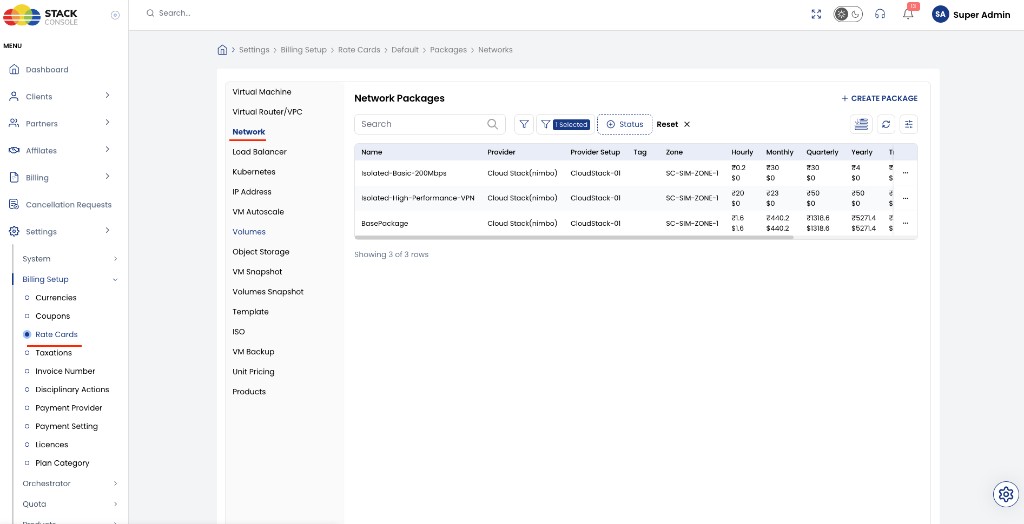
Network packages define how CMP bills Isolated and L2 guest networks. Each package maps to a CloudStack network offering for a Cloud Provider Setup and zone.
VPC billing uses a separate package type — see Virtual Router/VPC.
You must configure Network packages for Isolated and/or L2 if customers use those network types.
If you offer Isolated or L2 networks for free, still create the package(s) and set all pricing to 0. Do not skip the package.
- Cloud Provider Setup is connected
- Zones are mapped in CMP
- Isolated and/or L2 network offerings exist in CloudStack for the target zone
- Decide whether network usage is free (
0prices) or charged
CMP path: Settings → Billing Setup → Rate Cards → Default → Packages → Network
Enable network billing (enable_network_billing)
Network billing is controlled by a global flag — not per package.
| Setting | Value | Where |
|---|---|---|
enable_network_billing | true | Admin Panel → Global Settings |
| Flag | Behaviour |
|---|---|
true | Network billing is compulsory for all Isolated and L2 Network packages. CMP applies each package’s rates when networks are created (manual or with VM create) |
false / unset | Network billing is off globally — package prices are not charged for those flows |
You cannot turn billing on for one Network package and off for another. When enable_network_billing = true, billing applies to every Network package.
To offer a “free” Isolated or L2 network while the flag is on, still create the package and set all prices to 0. The charge line may still follow the package, but the amount is zero.
Creating packages alone is not enough — set enable_network_billing = true when you want network charges to apply.
Feature context: Isolated Network — billing, L2 Network.
Isolated and L2 in one package list
On Create Networks Package, Network Type is Isolated or L2:
| Network Type | Maps to | Typical services |
|---|---|---|
| Isolated | CloudStack isolated network offering (usually with Source NAT / VR) | DHCP, DNS, NAT, firewall via virtual router — see Isolated Network |
| L2 | CloudStack L2 network offering | Layer 2 only — no VR; external DHCP/NAT — see L2 Network |
If Isolated or L2 is free for your customers, create the package, choose the correct Network Type and Network Offering, and set every billing-cycle price to 0. The form note says: If the price is not applicable for your service, please set its value to 0.
With enable_network_billing = true, that free package is still under the global billing path — only the rate is zero.
Multiple Isolated offerings (latest CMP)
Recent CMP versions support multiple Isolated network offerings (multiple Network packages):
- Create several Isolated packages (for example Basic 200 Mb/s vs High-Performance with VPN)
- Each package selects a different CloudStack Network Offering
- Set different prices per package (including
0for a free tier) - Customers can choose the package that matches their needs when creating a network
Billing itself is not optional per package — it follows the global enable_network_billing flag for all of them.
You are no longer limited to a single default isolated offering for all tenants.
Configure Network packages in CMP
- Open Settings → Billing Setup → Rate Cards → Default → Packages → Network
- Click + Create Package (form title: Create Networks Package)
- Complete the fields below
- Save
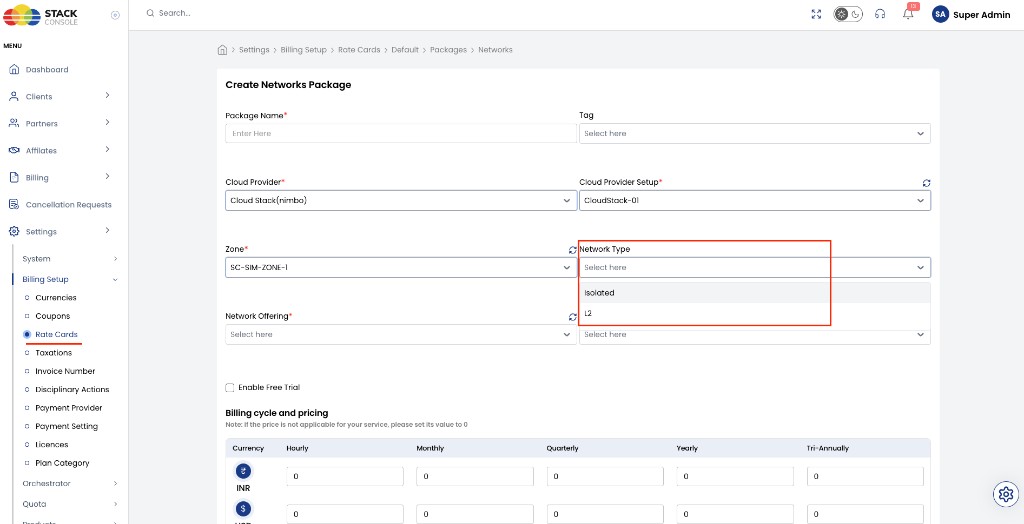
Package Name
Required. Display name — for example Isolated-Basic-200Mbps or L2-Enterprise-VLAN.
Tag
Optional. Tag for filtering or grouping packages in the rate card.
Cloud Provider
Required. Orchestrator — for example CloudStack.
Cloud Provider Setup
Required. The connected provider setup for this zone.
Zone
Required. CMP zone where this network package applies.
Network Type
Required. Isolated or L2. Controls which CloudStack network offerings appear and how the network is provisioned.
Network Offering
Required. CloudStack network offering for this package (must match the selected Network Type).
Enable Free Trial
Optional. When enabled, eligible customers can use this network package under free-trial policy without immediate billing for the trial period.
Pricing
Enter rates for each currency and billing cycle you offer (Hourly, Monthly, Quarterly, Yearly, Tri-Annually, and others shown on the form).
- Set
0for any cycle that does not apply or when the network is free - For paid Isolated packages, price the virtual router capacity, network rate, and (if desired) include Source NAT IP cost in the package — see Isolated Network — Source NAT IP billing
Example packages
| Package name | Network Type | Intent |
|---|---|---|
Isolated-Basic-200Mbps | Isolated | Standard free or low-cost isolated network — prices may be 0 |
Isolated-High-Performance-VPN | Isolated | Paid tier with richer offering (for example VPN / higher rate) |
L2-Enterprise | L2 | VLAN-backed L2 — often 0 if included with enterprise connectivity |
Related
- Isolated Network
- L2 Network
- Virtual Router/VPC packages — VPC is separate from Network packages
- IP Address packages
- Cloud Provider Setup
- FAQ — IP & network billing