Kubernetes Node Packages
Kubernetes node packages define the compute plans customers select for control (master) nodes and worker nodes when creating or scaling a CloudStack Kubernetes cluster in CMP.
Under the current model (CloudStack 4.20+, CMP admin panel 4.21.0+), the Kubernetes cluster itself is not a billable package. You create separate Master/Control Node and Worker Node packages. Root disk, networks, load balancers, and public IPs are billed through their own packages where enabled — see Kubernetes features — billing.
Ensure the following are already configured:
- CloudStack 4.20+ with CloudStack Kubernetes Service (CKS) available in the target zones
- Cloud Provider Setup is connected
- Zones are mapped in CMP
- Fixed compute offerings exist in CloudStack for each control-node and worker-node size (CPU + memory only — see below)
- Volumes packages exist for the root disk sizes you will offer (one shared storage plan is used for both node types at cluster create)
CMP path: Settings → Billing Setup → Rate Cards → Default → Packages → Kubernetes
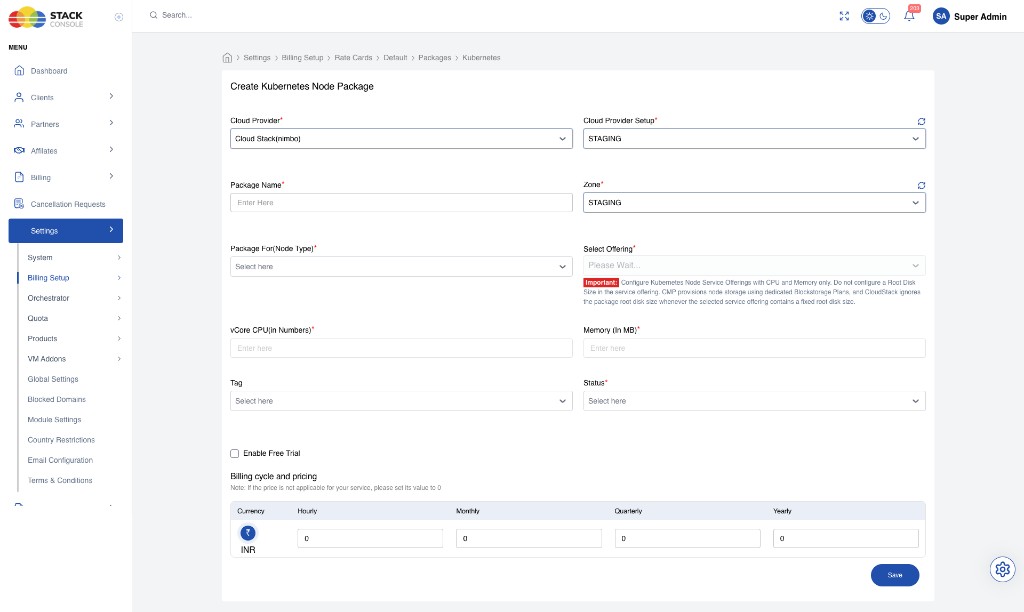
Administrative settings (versions vs packages)
| Setting | CMP path | Purpose |
|---|---|---|
| Kubernetes version | Settings → Orchestrator → Kubernetes Version | Versions offered to customers; Access documents (Documentation Config) |
| Kubernetes pricing / packages | Settings → Billing Setup → Rate Cards → … → Packages → Kubernetes | Master/Control and Worker node plans (this page) |
Predefined packages (recommended)
CMP supports configuring Kubernetes packages in the rate card similar to VM packages. Predefined Master/Control and Worker packages are recommended.
Custom packages (not recommended / not supported for K8s)
CloudStack does not natively support creating Kubernetes clusters with custom (unconstrained) compute offerings.
Do not rely on custom Kubernetes node sizing in CMP. Older approaches that created compute offerings on the fly in CloudStack produced many automatic offerings and made resource management harder. Current product guidance: use predefined packages only.
Only predefined Master/Control and Worker packages mapped to fixed CloudStack offerings are supported.
CloudStack compute offering requirements
Kubernetes node packages map to CloudStack fixed compute offerings.
Minimum CPU and memory
CloudStack requires a minimum of 2 CPU cores for Kubernetes nodes. Plan packages accordingly:
| Resource | Minimum |
|---|---|
| vCPU | ≥ 2 cores |
| Memory | ≥ 2 GB (2048 MB) recommended minimum aligned with CloudStack node requirements |
CPU and memory only — no root disk in the offering
Configure Kubernetes node service offerings with CPU and memory only. Do not set a fixed root disk size on the compute offering.
CMP provisions node root disks using dedicated Volumes (block storage) plans. If the selected CloudStack service offering includes a fixed root disk size, CloudStack ignores the package / root_disk_size value and creates the VM root volume from the size embedded in the compute offering. You then cannot override storage when customers need a different root disk size.
Recommended CloudStack setup
- Log in to the CloudStack UI with admin privileges
- Navigate to Service Offerings → Compute Offering → Add Compute Offering
- Use a fixed offering (not custom)
- Set # of CPU cores and Memory (in MB) only for the intended control or worker size
- Use a compute-only disk model (no customer root disk size on the offering) so CMP can pass a separate disk offering at provision time
- Set Public to Yes and assign the target Zone(s)
- Create separate offerings for typical control plane sizes and worker sizes — for example,
k8s-master-2c-2gandk8s-worker-8c-8g
CMP validates node offerings so packages that bundle fixed root disk size incorrectly are rejected or warned where validation is enabled.
Create a Kubernetes Node Package in CMP
Open Packages → Kubernetes → Add Package (or Create Kubernetes Node Package). Each field below matches the form.
Cloud Provider
Required. Select the orchestrator — for example, Cloud Stack (nimbo).
Cloud Provider Setup
Required. Select the CloudStack instance this package belongs to — for example, STAGING.
Package Name
Required. Display name for the node plan — for example, Master 2Core/2GB or Worker 8Core/8GB. Customers see this when choosing control or worker plans.
Zone
Required. CMP zone where this package is sold. Create a separate package entry per zone even if the CloudStack offering name is the same.
Package For (Node Type)
Required. Which node role this package applies to:
| Value | Use for |
|---|---|
| Master/Control Node | Control plane VMs |
| Worker Node | Worker VMs |
Create at least one active package of each type per zone you sell Kubernetes in. Customers can use different CPU/memory sizes for control vs worker nodes in the same cluster.
Select Offering
Required. CloudStack compute offering for this node type. Must be a fixed offering whose CPU and memory match the package fields below.
Configure Kubernetes Node Service Offerings with CPU and Memory only. Do not configure a Root Disk Size in the service offering. CMP provisions node storage using dedicated Blockstorage Plans, and CloudStack ignores the package root disk size whenever the selected service offering contains a fixed root disk size.
vCore CPU (in Numbers)
Required. Number of vCPU cores. Must match the selected CloudStack compute offering. Must be ≥ 2 (CloudStack Kubernetes minimum).
Memory (In MB)
Required. RAM in megabytes. Must match the selected CloudStack compute offering — for example, 2048 for 2 GB. Use at least 2048 MB for Kubernetes nodes.
Tag
Optional. Metadata tag for filtering or internal classification.
Status
Required. Active packages appear for customers; Inactive packages are hidden from new purchases.
Enable Free Trial
Optional in the UI — not supported for Kubernetes. Leave unchecked. Free trial does not apply to Kubernetes node packages even if the checkbox is present.
Billing cycle and pricing
Required. Set prices for each cycle you offer. If a cycle is not sold, set its value to 0.
| Column | Description |
|---|---|
| Currency | Rate card currency — for example, INR (₹) |
| Hourly | Price per hour |
| Monthly | Price per month |
| Quarterly | Price per quarter |
| Yearly | Price per year |
Define the monthly price first, then derive hourly using Monthly ÷ (30.5 × 24). See Pricing Formulas.
Each control node and each worker node gets its own subscription and billing line when the cluster is provisioned. Price the node package for a single node of that type, not for the whole cluster.
Click Save.
Root volume plan (shared for both node types)
At cluster create, customers select one root volume / block storage plan that applies to both control and worker nodes. Apache CloudStack does not accept separate root disk plans for control vs worker in the same cluster create call.
Configure suitable Volumes packages for the sizes you want customers to choose (for example, 20 GB for small control labs and 50 GB for larger workers — customers still pick one plan for all nodes at create; later volume resize is a manual customer operation).
Templates (CloudStack vs CMP)
CloudStack 4.20+ can support selecting templates separately for control and worker nodes. CMP does not expose separate control/worker template selection yet — continue to use the template flow CMP provides for Kubernetes until that capability is added.
End-to-end example
Goal: Sell a small control plane and a larger worker size in zone STAGING.
CloudStack
- Create fixed compute offering
k8s-master-2c-2g— 2 vCPU, 2048 MB, no fixed root disk size for customer storage - Create fixed compute offering
k8s-worker-8c-8g— 8 vCPU, 8192 MB, same storage rule - Ensure disk offerings / volume packages exist for the root sizes you will offer
CMP
- Packages → Kubernetes → Add Package — Master/Control Node, offering
k8s-master-2c-2g, set pricing, Active, free trial off - Add Package again — Worker Node, offering
k8s-worker-8c-8g, set pricing, Active - Confirm Volumes packages cover the shared root disk plan used at create
Related
- Kubernetes features — resource-based billing, cluster UI, operations, sync behaviour
- Volumes packages
- Load Balancer packages
- IP Address packages
- Networks packages
- CloudStack Packages
- Billing Cycles