Shared Network IP address billing (CloudStack)
When CMP creates or cancels an IP subscription on a CloudStack Shared / VLAN network — not how to set the rate-card price.
Pricing uses the same Configure pricing package for the setup and zone. Category overview: IP Address.
For Proxmox, see Shared Network IP Billing (Proxmox).
The global setting enable_shared_network_ip_billing is removed and is not applicable. Configure billing on each shared network in the Admin Panel instead.
Admin path: Settings → Orchestrator → Networks (import or edit a shared / VLAN network)
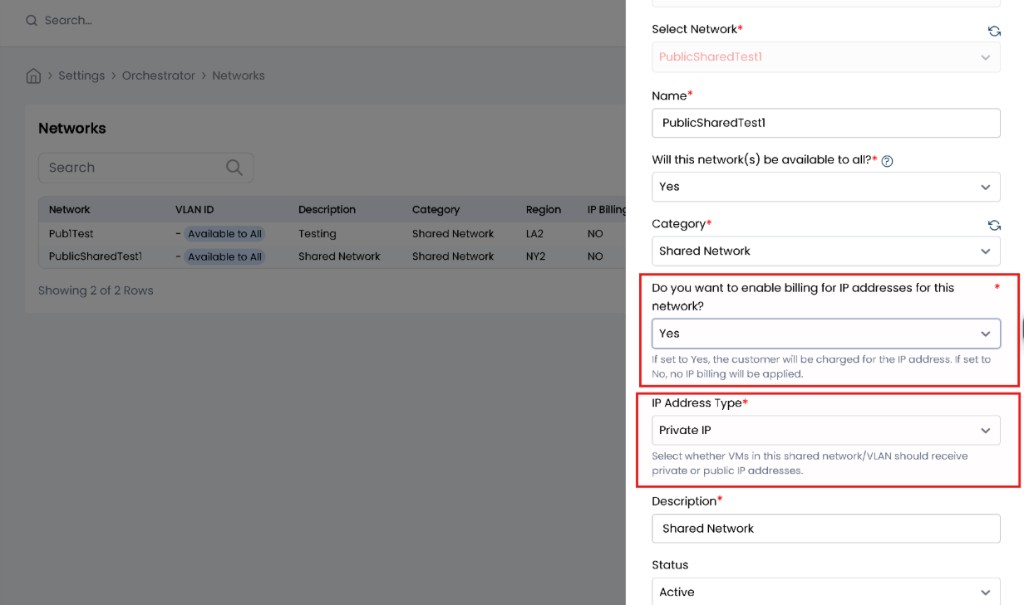
Admin fields
Do you want to enable billing for IP addresses for this network?
| Value | Behaviour |
|---|---|
| Yes | CMP creates an IP address subscription when an IP is acquired on this shared network (see when subscription is created) |
| No | No IP subscription is created for IPs on this network |
Helper text in the UI: if Yes, the customer is charged for the IP; if No, no IP billing is applied.
IP Address Type
| Value | Behaviour |
|---|---|
| Public IP | CMP shows the IP as a public IP. Customers are restricted from acquiring multiple IPs while creating a VM on this shared network. The separate Acquire public IP option is hidden when this type is Public (see Customer panel). |
| Private IP | CMP shows the IP as a private IP. |
In VM Overview, Private / Public follows the type configured on the shared network.
Network addressing fields
On the CloudStack Shared Network form in CMP, these fields are not applicable:
- CIDR
- Gateway IP
- IP address textarea
Configure public / guest addressing in CloudStack itself.
When CMP creates the IP subscription
If IP billing is enabled on the shared network (Yes), CMP creates a subscription for the shared-network IP when:
- The customer creates a VM with that Shared Network, or
- The customer attaches that Shared Network to an existing VM
Pricing comes from the zone’s IP Address package (same prices as Configure pricing). Charge IPs separately (recommended). The global plan_ip_billing flag is deprecated (default true) — see billing modes.
Customers cannot manually cancel the subscription for a shared-network IP. Cancellation is driven by detach or VM destroy (below).
When CMP cancels the IP subscription
If IP billing is enabled on the shared network and the customer created or attached a VM with that Shared Network:
| Customer action | Subscription |
|---|---|
| Remove the Shared Network from the VM | IP subscription is automatically cancelled |
| Destroy the VM | IP subscription is automatically cancelled |
Use cases (IP billing enabled)
Customer creates a VM with only Shared Network
- Subscription is created for the IP acquired on the Shared Network
- Customer sees Shared Network IP billing in the create preview and after creation
Customer creates a VM with Shared Network and Isolated Network
- Customer sees billing for the Shared Network IP (when IP billing is Yes on that network)
- If Shared Network IP Address Type is Public IP, the customer cannot also acquire a public IP on the Isolated Network path in the same flow (Acquire public IP is restricted / hidden as configured)
- If Shared Network IP Address Type is Private IP, the customer can still acquire an IP on the Isolated Network (subject to normal isolated / public IP rules)
Customer attaches Shared Network to an existing VM
- IP address subscription is created and IP billing applies
Customer removes Shared Network from an existing VM
- IP subscription is cancelled
Customer panel behaviour
| Area | Behaviour |
|---|---|
| VM Creation — preview | Shared Network IP address billing is shown in the preview when IP billing is enabled on that network |
| After VM creation | IP billing is applied (subscription created) |
| Acquire public IP | Checkbox / option is shown or hidden conditionally based on Shared Network IP Address Type (hidden when type is Public IP so the customer does not pick a second public IP) |
| VM Overview — attach | Attaching Shared Network creates the IP subscription and applies billing |
| VM Overview — remove | Removing Shared Network cancels the IP subscription |
| VM Overview — IP type | Shows Private or Public per the Shared Network configuration |
| Subscription cancel | Manual cancel of the shared-network IP subscription is not allowed |
Admin checklist
-
enable_shared_network_ip_billingis not used (removed) - Each shared network has enable IP billing set correctly (Yes / No)
- IP Address Type is Public IP or Private IP as intended
- An IP Address package exists for the setup + zone when billing is Yes
- CIDR / Gateway / IP textarea on the shared network form are treated as not applicable