VPN Gateway
Workflows on this page follow CloudStack documentation and general Site-to-Site VPN practice. Not practically reviewed end-to-end in CMP — see Site-to-Site VPN.
A VPN Gateway is the CloudStack-side endpoint of a Site-to-Site VPN connection — the public IP your customer's firewall uses as the IPsec peer.
VPN Gateway is for Site-to-Site VPN only. In CMP the VPC tab is labelled VPN Gateway but creates a Site to Site VPN object. For laptop → VPC, use Public IP Addresses → Source NAT → Enable VPN — see Remote Access VPN.
- CMP — Networking → Networks → VPC → open VPC → VPN Gateway tab.
- CloudStack — Network → Site-to-site VPN → Add VPN Gateway or VPC → Configure → Site-to-Site VPNs.
Topology
Customer Firewall                    CloudStack VPC
Public IP (customer side)                    VPN Gateway
       |                              Public IP (CloudStack side)
       |=========== IPsec tunnel ===========|
       |                                       |
VPN Customer Gateway                      VPC private CIDR
| Side | Object |
|---|---|
| Customer | VPN Customer Gateway |
| CloudStack | VPN Gateway (this page) |
Create VPN Gateway (CMP)
CMP path: Networking → Networks → VPC Network → open the VPC → VPN Gateway tab → + Create Site To Site VPN
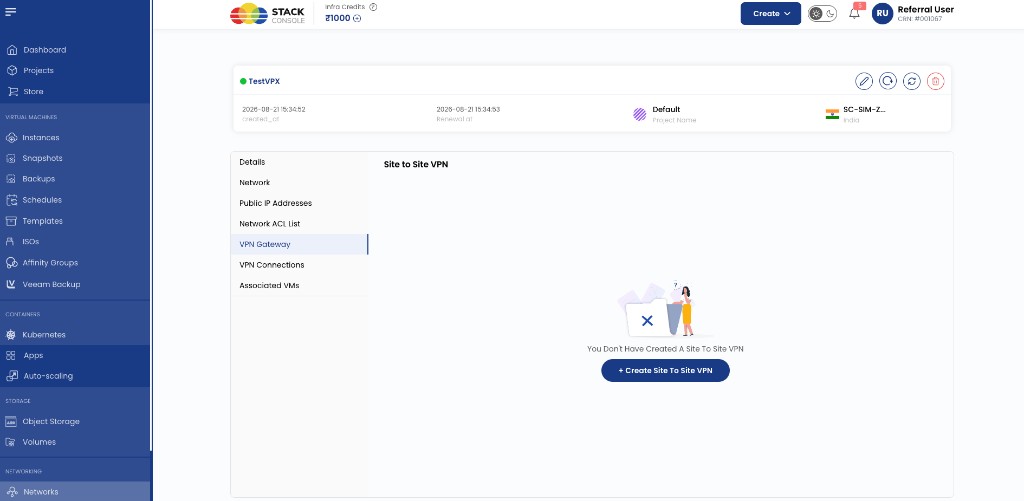
CMP creates the CloudStack VPN Gateway for that VPC. Note the assigned public IP — the customer firewall uses it as the remote peer.
After creation, continue with VPN Connection.
Create VPN Gateway (CloudStack reference)
CloudStack path: Network → Site-to-site VPN → Add VPN Gateway
Or: VPC → Configure → Site-to-Site VPNs → create VPN Gateway when prompted.
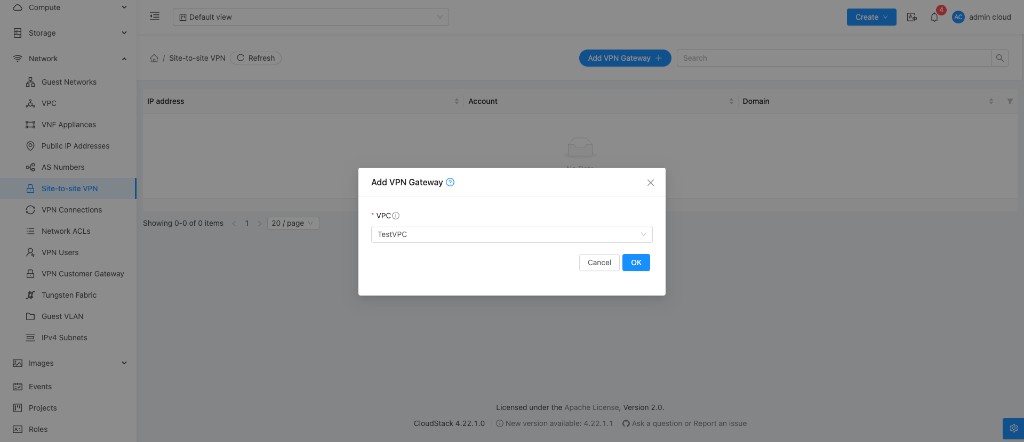
VPC Required. Select the target VPC.
Click OK. CloudStack assigns a public IP to the VPN gateway.
After creating the VPN Gateway
- Create a VPN Customer Gateway (customer public IP + private CIDRs) — Networks → VPN Customer Gateway in CMP if not already created
- Create a VPN Connection on the VPC VPN Connections tab
- Configure the customer firewall:
- Peer = CloudStack VPN Gateway public IP
- Matching PSK and IKE/ESP parameters
- Local customer subnets and remote VPC CIDR
Related
CloudStack reference: Creating a VPN gateway for the VPC.