VPN Customer Gateway
Field details on this page follow CloudStack documentation and general Site-to-Site VPN practice. Not practically reviewed end-to-end in CMP — see Site-to-Site VPN.
A VPN Customer Gateway describes the customer-side site-to-site VPN endpoint — the remote VPN device and the private networks behind it. Use it only for Site-to-Site VPN — not for laptop Remote Access VPN.
Customer path (CMP): Networking → Networks → VPN Customer Gateway → create gateway
A VPN Customer Gateway can connect to only one CloudStack VPN gateway at a time.
- Site-to-Site overview — Site-to-Site VPN.
- Remote Access (laptop) — Remote Access VPN — uses VPN User, not this object.
- This page — Gateway and CIDR List field reference for the customer gateway object.
- VPC VPN — requires VPN on the VPC offering — Virtual Router/VPC packages.
Site-to-site VPN topology
Customer Network                    Internet / IPsec              CloudStack VPC
192.168.10.0/24                          VPN                    10.10.0.0/16
      |                                    |                            |
[Palo Alto / Customer VPN Gateway]         |                   [CloudStack VPN Gateway]
Public IP: <customer VPN gateway>  =======|==================  Public IP: <CloudStack VPN gateway>
      ^                                    ^                            ^
 Customer Gateway                      IPsec tunnel              VPC VPN Gateway
 (this page)                                                        (separate step)
| Side | What it is | Public IP example |
|---|---|---|
| VPN Customer Gateway | Customer's VPN device on the internet | Customer VPN gateway public IP |
| VPC VPN Gateway | CloudStack VPN endpoint for the VPC | CloudStack VPN gateway public IP |
Gateway on the VPN Customer Gateway form is the customer-side VPN device's public IP address — not a CloudStack public IP and not an IP from the customer's private LAN.
Enter the customer VPN gateway public IP in Gateway — not the CloudStack VPN gateway public IP.
CIDR List contains the customer's private / internal network ranges behind their VPN gateway — the remote encryption domains CloudStack should reach over the tunnel.
Enter 192.168.10.0/24 (private LAN), not the customer's public IP.
Create VPN Customer Gateway (CMP)
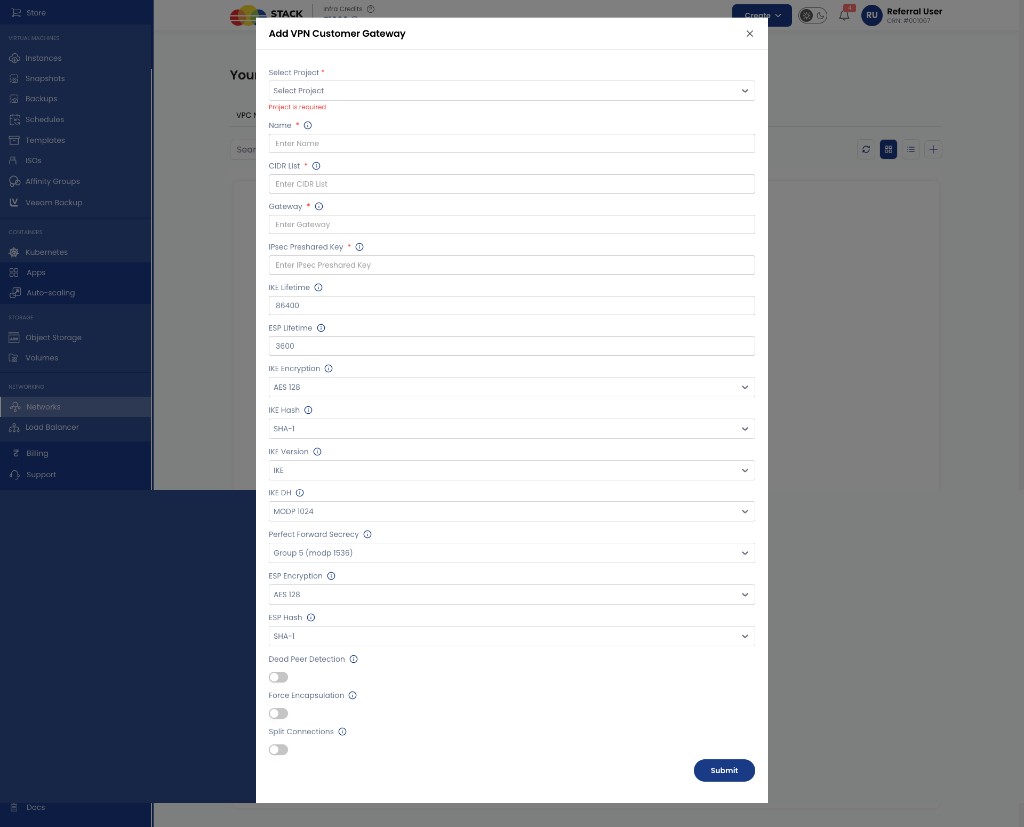
Select Project Required. Project that owns this customer gateway.
Name
Required. Display name for the gateway — for example Office-VPN-GW.
CIDR List
Required. Customer private network(s) behind the VPN device. Comma-separated if multiple — for example 192.168.10.0/24 or 192.168.10.0/24,192.168.20.0/24. Must be RFC1918-compliant. Must not overlap the VPC CIDR or other guest CIDRs in use.
Gateway Required. Customer VPN device's public IP address — the routable address of the customer's firewall or VPN appliance on the internet.
IPsec Preshared Key
Required. Shared secret for IPsec authentication. Must match the configuration on the customer's VPN device. Cannot contain a newline or double-quote (").
IKE Lifetime Optional. IKE SA lifetime in seconds — default 86400.
ESP Lifetime Optional. ESP SA lifetime in seconds — default 3600.
IKE Encryption Optional. IKE phase 1 encryption — for example AES 128 or aes256. Must match the customer device.
IKE Hash Optional. IKE phase 1 hash — for example SHA-1 or sha256.
IKE Version Optional. IKE version — for example IKE (IKEv1) or IKEv2 per your CloudStack / device support.
IKE DH Optional. Diffie-Hellman group for IKE — for example MODP 1024 or Group 31 (curve 25519).
Perfect Forward Secrecy Optional. PFS group for ESP — for example Group 5 (modp 1536) or None.
ESP Encryption Optional. ESP encryption — for example AES 128 or aes256.
ESP Hash Optional. ESP hash — for example SHA-1 or sha256.
Dead Peer Detection Optional. Enable DPD to detect unreachable peers.
Force Encapsulation Optional. Force UDP encapsulation of ESP packets when required by the customer firewall/NAT.
Split Connections Optional. Split connections per remote subnet when enabled.
Click Submit to create the customer gateway.
Create VPN Customer Gateway (CloudStack UI)
The same object can be created in the CloudStack admin UI for reference or troubleshooting.
Path: Network → VPN Customer Gateway → Add VPN Customer Gateway
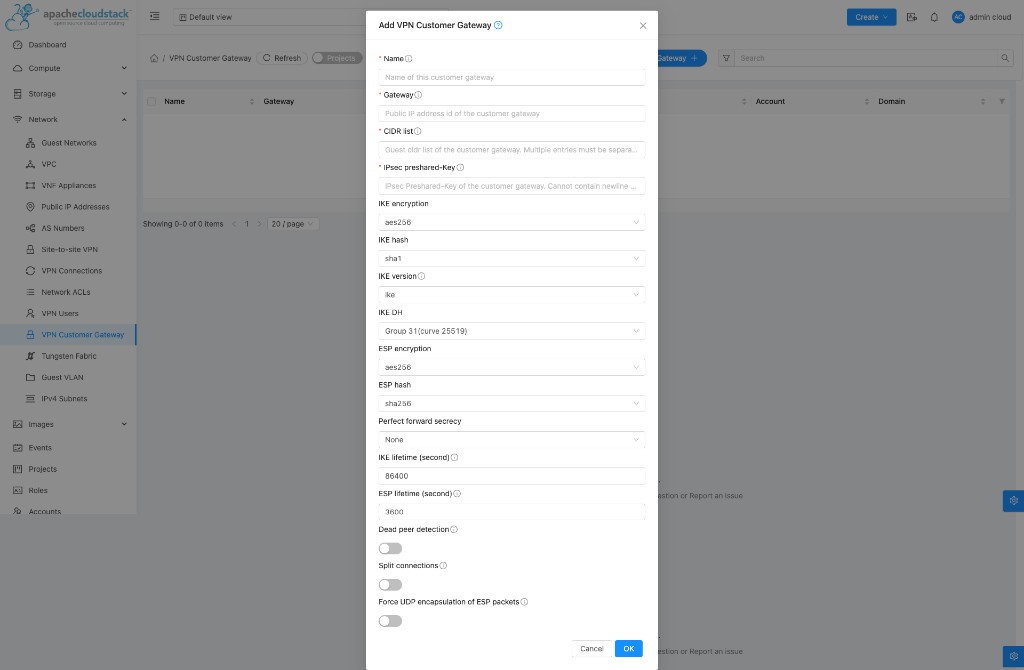
| CloudStack field | CMP field | What to enter |
|---|---|---|
| Name | Name | Gateway label |
| Gateway | Gateway | Customer VPN device public IP |
| CIDR list | CIDR List | Customer private network CIDR(s) |
| IPsec preshared-Key | IPsec Preshared Key | Shared secret |
| IKE / ESP settings | Same | Must match customer VPN device |
Field reference — Gateway vs CIDR List
| Field | Question it answers | Example | Not this |
|---|---|---|---|
| Gateway | Where is the customer's VPN device on the internet? | Customer VPN gateway public IP | CloudStack VPN gateway public IP; private IP such as 192.168.10.1 |
| CIDR List | What private networks are behind that device? | 192.168.10.0/24 | Public IP; CloudStack VPC CIDR 10.10.0.0/16 |
Multiple customer subnets behind one VPN gateway:
Customer VPN Gateway (<customer public IP>)
    |
    +--- 192.168.10.0/24
    |
    +--- 192.168.20.0/24
CIDR List: 192.168.10.0/24,192.168.20.0/24
CloudStack uses these CIDRs as remote encryption domains / traffic selectors for the VPN connection.
Supported IPsec parameters (CloudStack)
Match these on the customer firewall. If your operator has configured excluded or obsolete algorithms, some options may be hidden or shown with warnings in the UI.
| Phase | Parameter | Supported values |
|---|---|---|
| IKE (phase 1) | Encryption | AES128, AES192, AES256, 3DES |
| IKE | Hash | SHA1, SHA256, SHA384, SHA512, MD5 |
| IKE | Version | ike (autoselect — initiates IKEv2, accepts any on respond), IKEv1, IKEv2 |
| IKE | DH group | None, Group 2, 5, 14, 15, 16, 17, 18 |
| IKE | Lifetime | Default 86400 seconds (1 day) |
| ESP (phase 2) | Encryption | AES128, AES192, AES256, 3DES |
| ESP | Hash | SHA1, SHA256, SHA384, SHA512, MD5 |
| ESP | PFS | Same DH groups as IKE, or None |
| ESP | Lifetime | Default 3600 seconds (1 hour) |
| Other | DPD | Recommended — enable on both sides |
| Other | Force UDP encapsulation | NAT traversal for ESP when required |
Defaults (CMP form): IKE lifetime 86400, ESP lifetime 3600.
Admin — excluded and obsolete parameters
CloudStack operators can enforce modern crypto by marking VPN Customer Gateway parameters as excluded (hidden from create/update forms) or obsolete (shown with warnings):
| Global / domain setting | Purpose |
|---|---|
vpn.customer.gateway.excluded.encryption.algorithms | Hide weak encryption (IKE and ESP) |
vpn.customer.gateway.excluded.hashing.algorithms | Hide weak hashes |
vpn.customer.gateway.excluded.ike.versions | Hide IKE versions |
vpn.customer.gateway.excluded.dh.group | Hide DH groups |
vpn.customer.gateway.obsolete.* | Same categories — shown with deprecation warnings |
vpn.customer.gateway.obsolete.check.interval | Hours between compliance checks (0 = disabled) |
Domain-level settings override global for that domain only (no cascade to child domains).
Existing gateways using excluded/obsolete values show a warning icon in CloudStack until updated.
Update and remove
You can update a VPN Customer Gateway only when it has no VPN connection, or the related connection is in error state.
CloudStack path: Network → VPN Customer Gateway → select gateway → Edit or Delete
After creating the customer gateway
- Create a VPN Gateway on the VPC (CloudStack-side public IP)
- Create a VPN Connection linking the VPC VPN Gateway to this customer gateway
- Configure the customer's VPN device (Palo Alto, Fortinet, etc.) with:
- CloudStack VPN Gateway public IP as the peer
- Matching IPsec preshared key and IKE/ESP parameters
- Local private subnets and remote CloudStack VPC CIDRs
For individual laptop → VPC access, use Remote Access VPN (Source NAT IP → Enable VPN + VPN User) — not VPN Customer Gateway.