VPN Connection
Workflows on this page follow CloudStack documentation and general Site-to-Site VPN practice. Not practically reviewed end-to-end in CMP — see Site-to-Site VPN.
A VPN Connection creates the IPsec tunnel between a VPN Customer Gateway (customer side) and a VPN Gateway (CloudStack VPC side).
VPN Connection is not used for Remote Access VPN. Remote Access uses Source NAT IP → Enable VPN + VPN User.
- CMP — open VPC → VPN Connections tab → + Create Site To Site VPN.
- CloudStack — VPC → Configure → Site-to-Site VPNs → VPN Connection → Create VPN Connection.
Relationship
VPN Customer Gateway
          |
          | VPN Connection
          |
CloudStack VPN Gateway
          |
          v
        VPC
Limits
CloudStack supports up to 8 Site-to-Site VPN connections. A VPN Customer Gateway can connect to only one VPN gateway at a time.
Create VPN Connection (CMP)
CMP path: Networking → Networks → VPC Network → open the VPC → VPN Connections tab → + Create Site To Site VPN
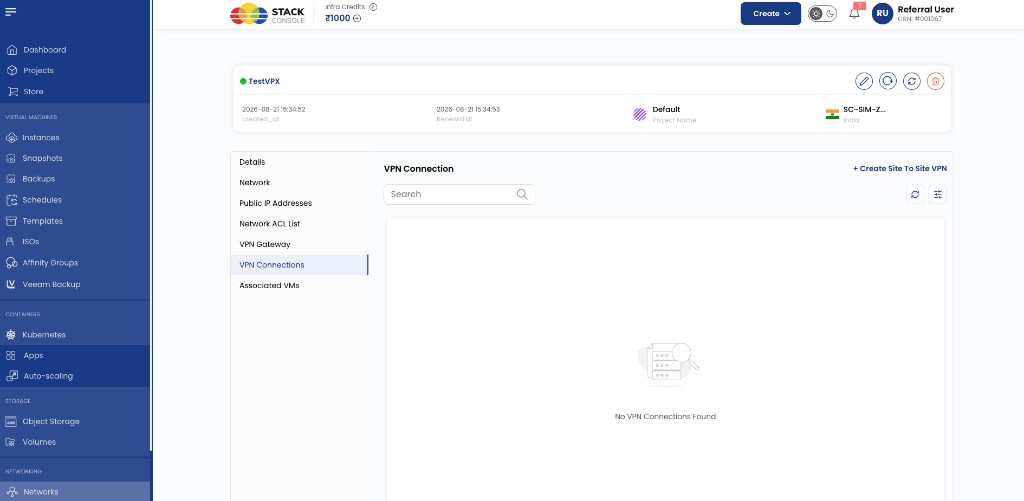
Requires a VPN Gateway on the VPC first.
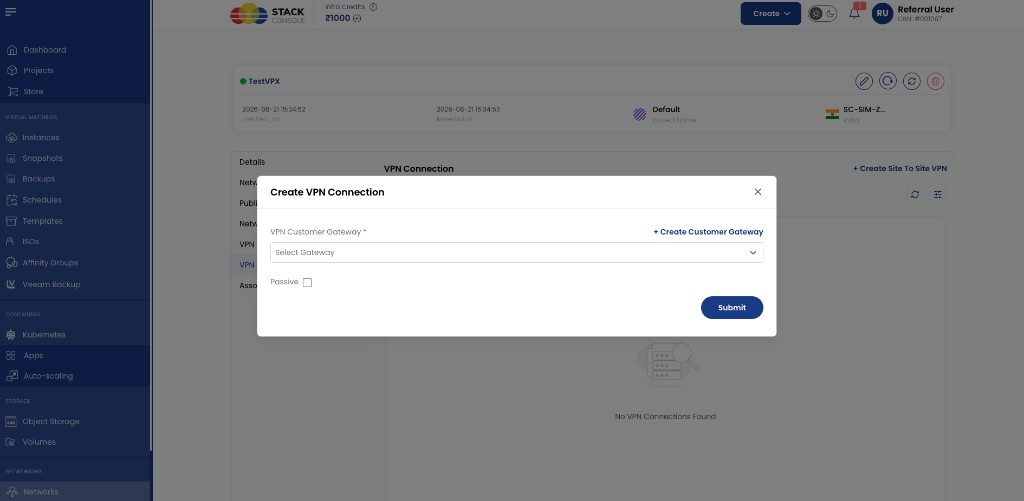
VPN Customer Gateway Required. Select an existing customer gateway. Use + Create Customer Gateway in the dialog to add one without leaving the flow — see VPN Customer Gateway.
Passive Optional. Enable when connecting two CloudStack VPCs — select Passive on one VPC only (the side that waits for the peer to initiate). Leave unchecked for customer firewall → CloudStack VPC.
Click Submit.
Create VPN Connection (CloudStack reference)
CloudStack path: VPC → Configure → Site-to-Site VPNs → VPN Connection view → Create VPN Connection
Or: Network → VPN Connections → Add VPN Connection
| Field | Detail |
|---|---|
| VPN Customer Gateway | Customer firewall public IP and private CIDRs |
| VPN Gateway | CloudStack VPC VPN gateway (implicit when created from VPC context) |
| Passive | One side only for CloudStack VPC ↔ VPC |
After creation, CloudStack shows IP Address, Gateway, State, IPsec Preshared Key, IKE Policy, and ESP Policy.
After creating the connection
- Configure the customer firewall with the CloudStack VPN Gateway public IP as peer
- Match PSK, IKE, and ESP with the VPN Customer Gateway
- Verify IKE Phase 1 and IPsec Phase 2
- Test from a customer LAN host to a VM private IP
- Adjust Network ACL if needed — VPC Network
Restart or remove (CloudStack reference)
CloudStack path: VPC → Configure → Site-to-Site VPNs → VPN Connection → select connection
| Action | Use when |
|---|---|
| Reset VPN connection | Tunnel stuck — renegotiates IKE/IPsec |
| Delete VPN connection | Remove before reconfiguring gateways |
CloudStack-to-CloudStack
- VPN Gateway on each VPC (CMP: VPN Gateway tab on each VPC)
- VPN Customer Gateway on each side for the other VPC's gateway IP and CIDR
- VPN Connection on VPC A with Passive; gateway points to VPC B
- VPN Connection on VPC B without Passive; gateway points to VPC A
- Both reach Connected within about 30 seconds
See Site-to-Site VPN — CloudStack-to-CloudStack.
Related
CloudStack reference: Creating a VPN Connection.