VPN Users
VPN Users provide username/password credentials for Remote Access VPN. Users connect with an L2TP/IPsec client to the Source NAT public IP (VPC or Isolated network) where Remote Access VPN is enabled.
VPN User = person connecting from a laptop.
VPN Customer Gateway = customer firewall for Site-to-Site VPN.
Create VPN User (CMP)
CMP path: Networking → Networks → VPN Users → Add User
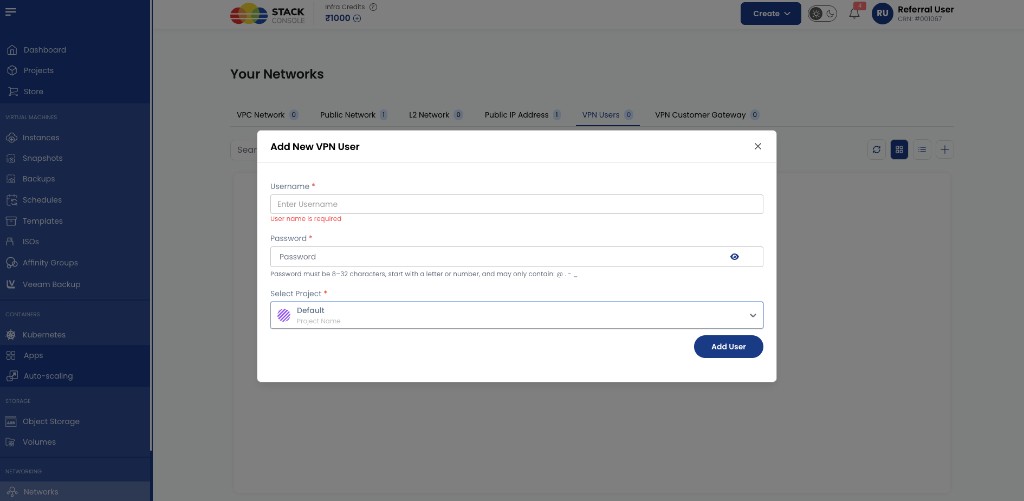
Username Required. VPN login name.
Password
Required. Password rules shown in CMP: 8–32 characters, must start with a letter or number, and may only contain @, ., -, _.
Select Project Required. Project that owns this VPN user.
Click Add User.
Create VPN User (CloudStack reference)
The same object exists in CloudStack for troubleshooting.
CloudStack path: Network → VPN Users → Add VPN User
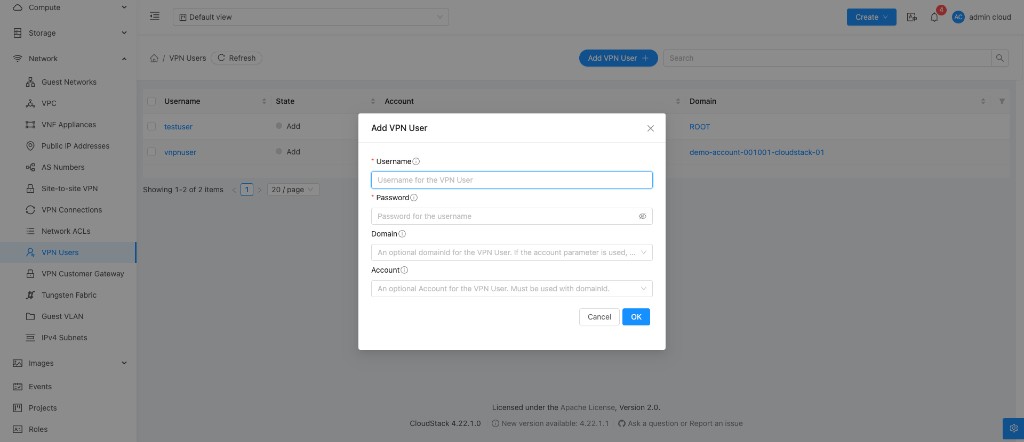
Username Required.
Password Required.
Domain Optional.
Account Optional. Use with Domain when required.
Click OK.
Account-wide VPN user behaviour
CloudStack stores VPN users separately from the main account user database.
| Behaviour | Detail |
|---|---|
| Shared pool | VPN users apply to all Remote Access VPNs the account owner has enabled (VPC and Isolated) |
| Access | Every VPN user can connect to every such VPN |
| Limit | Maximum users per account: CloudStack global setting remote.access.vpn.user.limit |
See Limitations and Prerequisites.
How VPN User fits in the flow
Laptop
   |
   | Username + Password
   |
   v
Remote Access VPN (Source NAT IP)
   |
   v
Private VM
Combined with:
| Item | From |
|---|---|
| Server IP | Source NAT public IP (VPC or Isolated) |
| IPsec PSK | Enable VPN on that Source NAT IP |
| Username / password | VPN User (this page) |
Full workflow: Remote Access VPN — Workflow.
Related
- Remote Access VPN
- Workflow
- Limitations and Prerequisites
- VPN Customer Gateway (Site-to-Site only)
CloudStack reference: Configuring Remote Access VPN.