L2 Network
An L2 Network in Apache CloudStack provides Layer 2 connectivity only (switching / VLAN). CloudStack attaches VMs to the VLAN or broadcast domain and does not deploy a virtual router for Layer 3 services.
Routing, DHCP, DNS, firewall, NAT, load balancing, and VPN must come from external infrastructure (physical gear or a network appliance VM) — not from a CloudStack virtual router.
- This page — when to use L2, what CloudStack does and does not provide, CMP create and details pages, and how L2 differs from isolated networks.
- Packages — Network packages (Isolated and L2).
- Related — Isolated Network, VPC Network, Cloud Provider Setup.
L2 networks do not support UserData. Password-enabled templates that rely on UserData for password injection cannot be used on L2 networks. Plan templates and guest setup accordingly.
What is an L2 Network?
| Concept | Behaviour |
|---|---|
| Layer | Layer 2 only — same VLAN / broadcast domain |
| Virtual router | Not created |
| IP addressing | External DHCP or static config on the guest |
| Security / NAT / LB | External firewall, router, or appliance |
| CloudStack role | Attach VMs to the L2 segment |
For most public-cloud style tenants who want CloudStack to handle DHCP, NAT, and public IPs automatically, prefer an Isolated Network or VPC. Use L2 for advanced networking where the provider or customer controls Layer 3.
Typical use cases
1. Integrate with existing enterprise networks
Enterprises often already have physical routers, firewalls (FortiGate, Palo Alto, Cisco ASA), DHCP servers, and DNS.
Instead of an isolated network with a CloudStack virtual router, create an L2 Network and connect VMs to the existing VLAN.
Example: VLAN 200 exists in the datacenter. Corporate DHCP assigns IPs. Corporate firewall controls traffic. CloudStack only attaches VMs to VLAN 200.
2. VNF / network appliance deployments
VNF (Virtual Network Function) appliances — virtual firewalls and routers such as FortiGate, pfSense, VyOS, Cisco CSR, or MikroTik — often need a plain L2 segment. CloudStack attaches guest VMs (and the appliance) to that VLAN while the VNF handles routing and security.
VM1 ----\
VM2 -----  VLAN / L2 segment  ---- VNF appliance ---- Internet
VM3 ----/
CloudStack does not create a virtual router for that segment.
3. Stretch a broadcast domain across hypervisors
L2 keeps VMs on different hosts in the same broadcast domain and subnet.
Example: Web server on Host A and database on Host B, both on VLAN 400, same subnet — they communicate as if on one LAN.
4. Bare-metal or hybrid environments
Use L2 when VMs must talk directly to physical servers, storage appliances, or existing VLANs without CloudStack routing in the path.
What CloudStack does not provide on L2
Because there is no virtual router, L2 networks do not include:
| Service | On L2? |
|---|---|
| DHCP | No — use external DHCP or static IPs |
| DNS | No — external |
| Source NAT | No — external |
| Firewall rules (CloudStack VR) | No — external |
| Port forwarding | No — external |
| Load balancing (CloudStack VR) | No — external |
| VPN (CloudStack VR) | No — external |
| UserData | No — see warning above |
L2 vs Isolated Network
| Feature | L2 Network | Isolated Network |
|---|---|---|
| VLAN / L2 connectivity | Yes | Yes |
| Virtual router | No | Yes |
| DHCP | External | CloudStack VR |
| DNS | External | CloudStack VR |
| NAT | External | CloudStack VR |
| Firewall | External | CloudStack VR |
| Public IP management (CloudStack) | No | Yes |
| Enterprise / existing network fit | Strong | Limited |
| Best for most public-cloud tenants | No | Yes |
See Isolated Network for VR, Source NAT reuse, and CMP billing behaviour.
When providers use L2 in CMP / CloudStack
L2 is commonly used when you need to:
- Offer VLAN-backed private networks
- Let customers bring their own firewall / router VM
- Integrate CloudStack with enterprise networking
- Build topologies with external appliances instead of CloudStack virtual routers
For typical public cloud users, Isolated or VPC networks are preferred because CloudStack automatically provides DHCP, NAT, firewalling, and public IP management. L2 is for advanced scenarios where full Layer 3 control stays outside CloudStack.
L2 packages in CMP
Configure L2 (and Isolated) packages under Settings → Billing Setup → Rate Cards → Default → Packages → Network. Packages are compulsory — set pricing to 0 if L2 is free. Set enable_network_billing = true globally when you want network billing on; that applies to all Network packages, not one package at a time.
See Network packages.
Create L2 Network (CMP)
Customers create an L2 network from Networking → Networks (or Create → network type L2, depending on portal navigation).
CMP intro text on the form: L2 provides connectivity across instances while customers bring their own firewalls for maximum configurability.
img/screenshots/cmp-l2-network-create.png
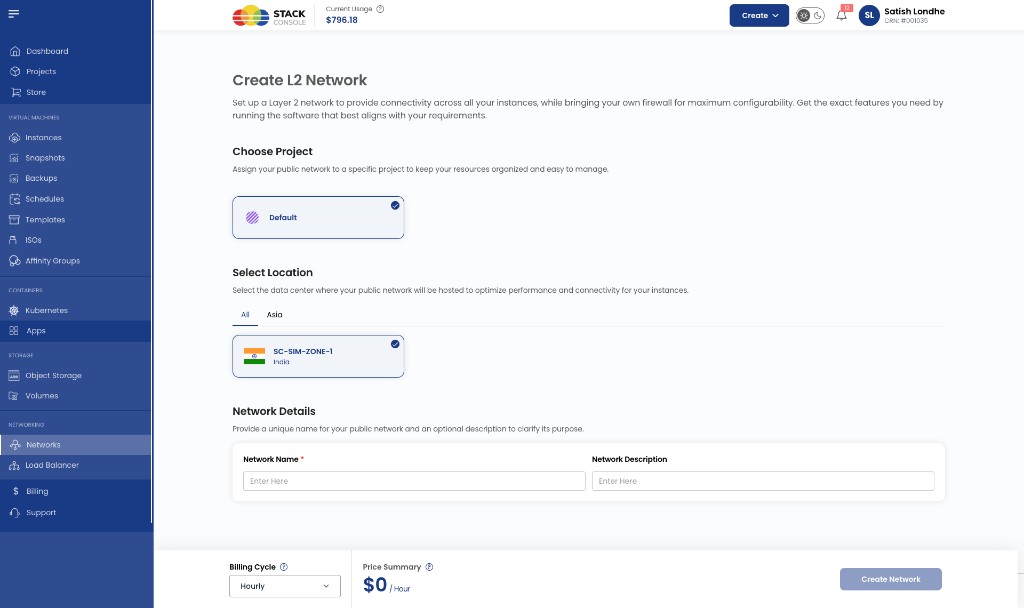
Create form
Choose Project
Required. Project that owns the network (for example Default).
Select Location
Required. Zone / datacenter where the L2 network is created (for example SC-SIM-ZONE-1).
Network Name
Required. Display name for the L2 network.
Network Description
Optional. Short description for the customer and admin views.
Billing Cycle
Required. Cycle used for network package pricing (for example Hourly). Price shown comes from the Network package for that zone ($0 if the package is free).
Click Create Network to provision. CMP creates the L2 guest network in CloudStack using the L2 network offering mapped on the rate card — customers do not enter Gateway, Netmask, or CIDR (those stay external).
After create, Gateway / Netmask / CIDR show as NA on the details page. Configure guest IPs via external DHCP or static addressing, and use your own firewall/VNF for routing and security.
L2 network details page (CMP)
Open the network from Networking → Networks. The details page shows summary actions and tabs for that L2 network.
img/screenshots/cmp-l2-network-details.png
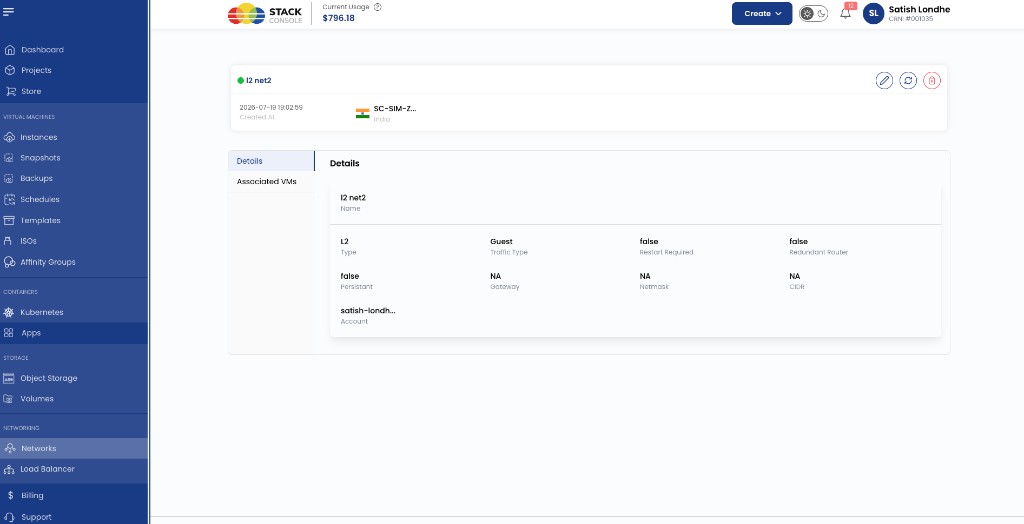
Header actions
| Action | Purpose |
|---|---|
| Edit | Update display details where allowed |
| Refresh | Reload status from CloudStack |
| Delete | Delete the L2 network (when no longer needed and policy allows) |
The header also shows name, status, created time, project, and zone.
Tabs
| Tab | What customers manage here |
|---|---|
| Details | Read-only summary of the L2 network (see fields below) |
| Associated VMs | VMs attached to this L2 network |
Unlike VPC or Isolated networks, L2 details typically do not include Public IP, Network ACL, or VPN tabs — CloudStack is not providing VR-based L3 services on this network.