Kubernetes Access documents (admin)
Admins can create version-specific user guides that end customers see on the cluster Access tab — for example how to use the CLI, open the dashboard, and run common commands.
Documentation Config for Kubernetes versions is available from May 13, 2026 after deployments that include this feature.
CMP path: Settings → Orchestrator → Kubernetes Version
Configure documentation while:
- Creating a new Kubernetes version
- Updating an existing Kubernetes version
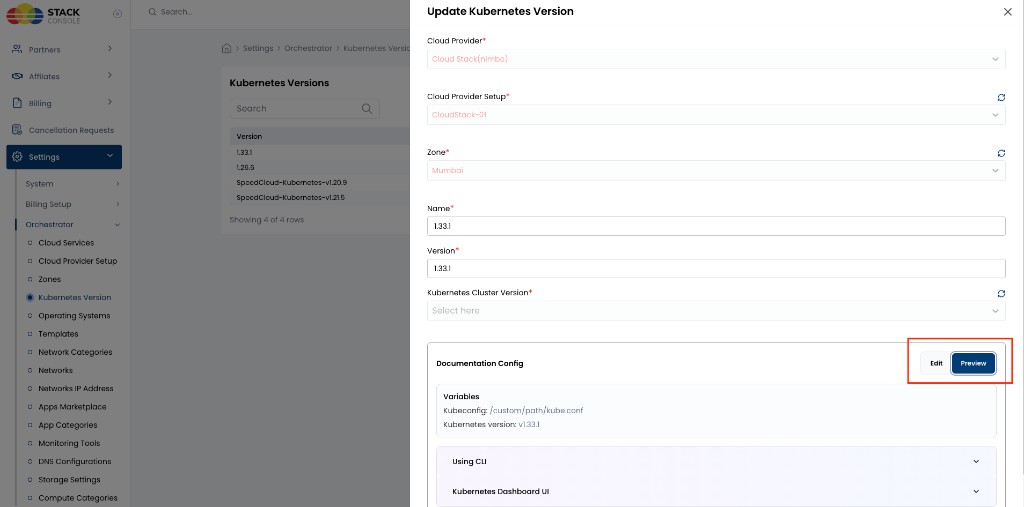
The Documentation Config section is on the Kubernetes Version form (create or Update Kubernetes Version). Use Edit to author content and Preview to see the end-user layout before saving.
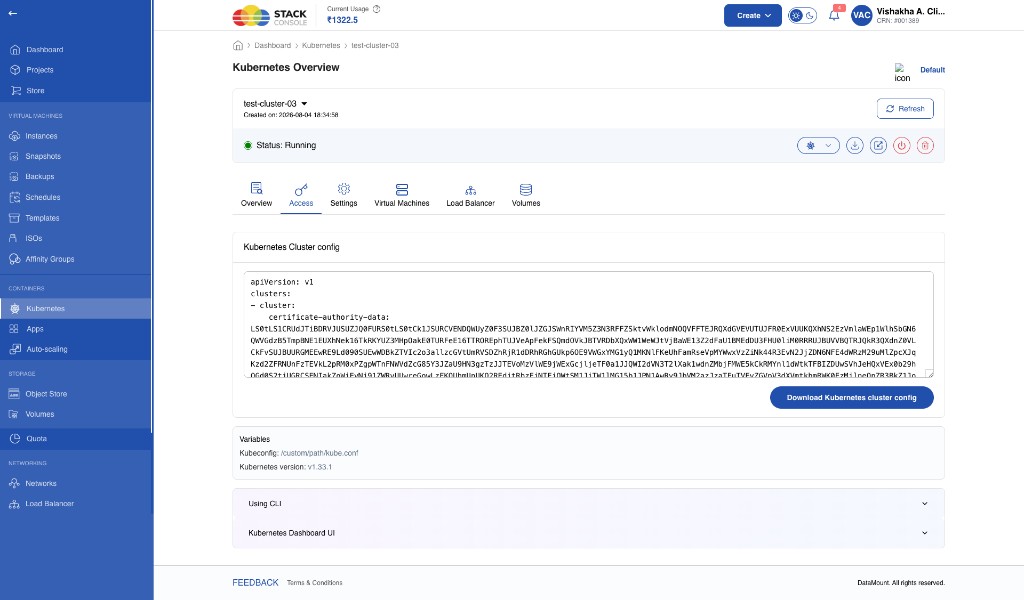
End users see the published content under the cluster Access tab (alongside kubeconfig download).
Why this feature exists
Previously:
- Documentation was static
- Content updates required development effort
- Version-specific documentation was hard to maintain
With Documentation Config:
- Admins manage content without code changes
- Documentation is version-aware (tied to each Kubernetes version)
- Repeated values stay consistent through global placeholders
- End-user Access guides are easier to maintain
Edit / Preview
Documentation Config has two modes.
Edit
Edit is the main configuration mode. Use it to create and modify documentation.
Administrators can:
- Configure global variables (placeholders)
- Create sections
- Add steps
- Add content blocks
- Update existing documentation
Preview
Preview (selected in the Documentation Config toolbar next to Edit) shows how the documentation will appear to end users. Use it to verify:
- Layout structure
- Accordion sections
- Step flow
- Command rendering
- Links
- Placeholder values
In Preview, CMP shows a Variables summary from the configured sample values — for example:
- Kubeconfig:
/custom/path/kube.conf(from{{kubeconfigPath}}) - Kubernetes version:
v1.33.1(from{{kubernetesVersion}})
Below Variables, configured sections appear as collapsible accordions — for example Using CLI and Kubernetes Dashboard UI — matching what customers expand on the cluster Access tab.
Switch back to Edit to change content, then use Preview again before you save the Kubernetes version.
Global placeholders
Global placeholders are reusable variables configured once and used throughout the documentation.
Currently supported:
| Placeholder | Typical sample / runtime use |
|---|---|
{{kubeconfigPath}} | Path to the kubeconfig file — for example /custom/path/kube.conf |
{{kubernetesVersion}} | Version string — for example v1.33.1 |
Example
If sample / runtime values are:
- Kubeconfig Path:
/custom/path/kube.conf - Kubernetes Version:
v1.33.1
Then this command template:
kubectl --kubeconfig {{kubeconfigPath}} get pods
Renders as:
kubectl --kubeconfig /custom/path/kube.conf get pods
Use placeholders instead of hard-coding paths and versions so updates stay consistent across all sections.
Sections
Documentation is organised into sections. Each section appears as an accordion on the end-user Access tab.
Examples:
- Using CLI
- Dashboard Login
- Cluster Access
- Troubleshooting
For each section, administrators can:
- Set a section title
- Mark the section as Default Open (expanded by default for end users)
- Add new sections
- Remove existing sections
Steps
Each section contains one or more steps — ordered instructional items for end users.
Example for Using CLI:
- Download Kubeconfig
- Install kubectl
- Run cluster commands
For each step:
- Title is mandatory
- Multiple content blocks can be added
- Steps can be added or removed
Content block types
Each step supports multiple block types:
| Block type | Use for |
|---|---|
| Paragraph | Plain explanatory text |
| Code | Short command or code snippet |
| Code Block | Longer formatted command / code examples |
| Single Link | One standalone hyperlink |
| Link List | Group of related links |
| Command Template | Reusable command pattern with placeholders |
| Labeled Commands | Short label + command pairs |
| Inline Mixed Content | Text with embedded links in one line |
Paragraph
Standard explanatory text — for example what kubectl does, access instructions, or general setup guidance.
Code / Code Block
Command snippets or code examples, with formatted display for readability.
Examples:
kubectl get pods --all-namespaces
kubectl get nodes
Single Link
One standalone hyperlink — for example Download kubectl, Open Kubernetes Dashboard, or external documentation.
Link List
Multiple related links in one group — for example kubectl download links for Linux, macOS, and Windows.
Command Template
Reusable command formats with placeholders.
Example:
kubectl --kubeconfig {{kubeconfigPath}} {COMMAND}
Useful for generic operational commands where the path or version is injected automatically.
Labeled Commands
A short label paired with its command — useful for quick operational reference.
Example:
| Label | Command |
|---|---|
| List Pods | kubectl get pods |
| List Nodes | kubectl get nodes |
Inline Mixed Content
Text and links in a single sentence — for example: Download the latest kubectl binary from the Kubernetes release page (with the release page as a link).
End-user experience
Configured documentation appears on the cluster Access tab in a structured format:
- Expandable accordion sections
- Ordered steps
- Formatted command blocks
- Clickable links
- Dynamic placeholder rendering (for example kubeconfig path and Kubernetes version)
Customers also use the same tab to view and Download Kubernetes cluster config (kubeconfig). Admin-authored guides sit alongside that access material.
Admin checklist
- Open Settings → Orchestrator → Kubernetes Version
- Create or edit the version customers will use
- In Documentation Config, set sample values for
{{kubeconfigPath}}and{{kubernetesVersion}}as needed - Add sections (for example Using CLI, Kubernetes Dashboard UI)
- Add steps and content blocks; use placeholders in commands
- Switch to Preview and confirm layout, links, and rendered commands
- Save the Kubernetes version
Related
- Kubernetes overview — cluster UI, billing, operations
- Accessing the Kubernetes Dashboard — kubectl token login walkthrough
- Kubernetes Node Packages
- CloudStack Features