Kubernetes on CloudStack
Managed Kubernetes (CKS) in CMP for Apache CloudStack 4.20+, with admin panel behaviour from 4.21.0 onward: separate control and worker plans, resource-based billing, and cluster management tabs for VMs, volumes, load balancers, and access.
- Admin packages — Kubernetes Node Packages
- Access documents (admin) — Access documents — Documentation Config on Kubernetes Version
- Volumes / LB / IP / Networks — configure related packages so underlying resources can be billed
- This page — customer cluster UI, billing model, operations, and sync behaviour
Pages in this section
| Page | Description |
|---|---|
| Kubernetes overview | Create form, example provisioning, resource-based billing, network/LB/firewall/PF ops, autoscaling sync |
| Access documents | Admin Documentation Config for end-user Access tab guides |
| Accessing the Kubernetes Dashboard | kubectl, token login, admin user, common issues |
New Kubernetes behaviour (separate node plans, resource-based billing, related create/scale options) requires CloudStack 4.20+. Older CloudStack versions will not show the full set of changes.
Cluster overview in CMP
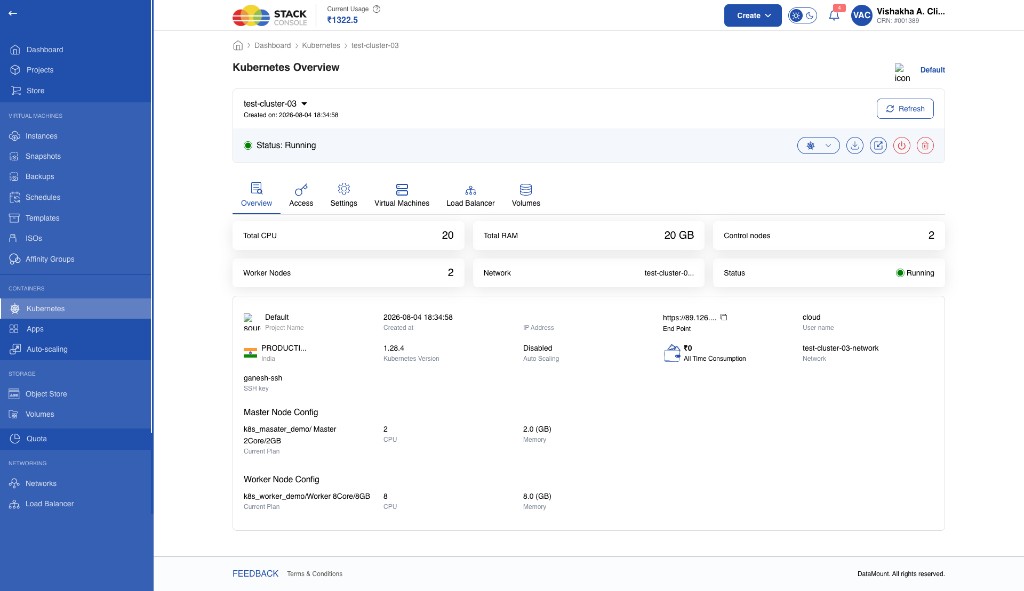
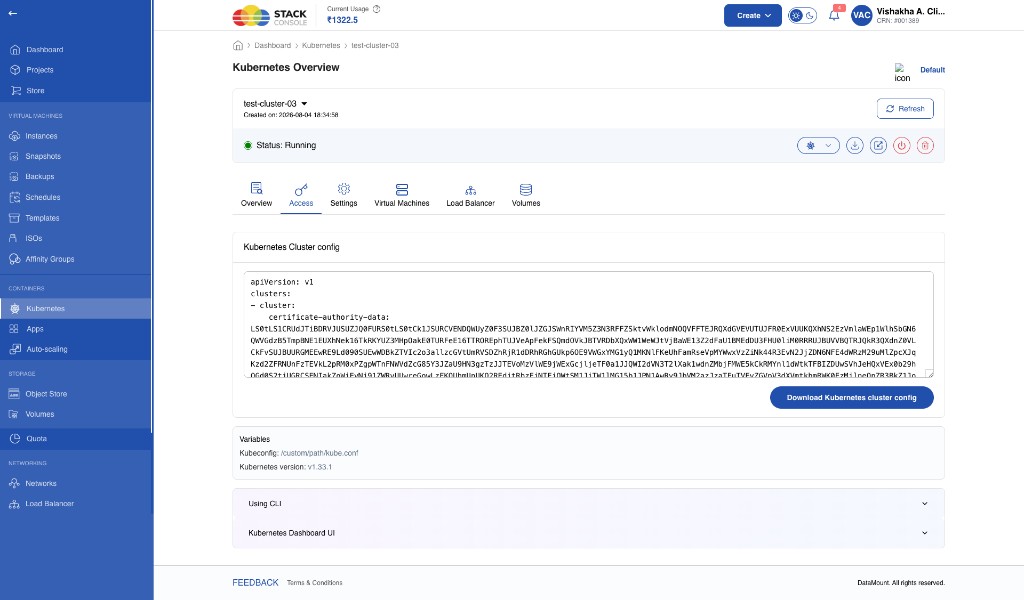
Customers open clusters under Kubernetes. The overview shows totals (CPU, RAM, control node count, worker count, network, status) plus general details (project, created time, endpoint, username, region, Kubernetes version, auto scaling, consumption, network, SSH key) and separate Master Node Config and Worker Node Config cards.
Tabs on the cluster page:
| Tab | Purpose |
|---|---|
| Overview | Summary, general details, master/worker plans |
| Access | Kubeconfig, download, CLI / dashboard guides |
| Settings | Change plan, upgrade version, firewall, port forwarding |
| Virtual Machines | Control and worker node VMs |
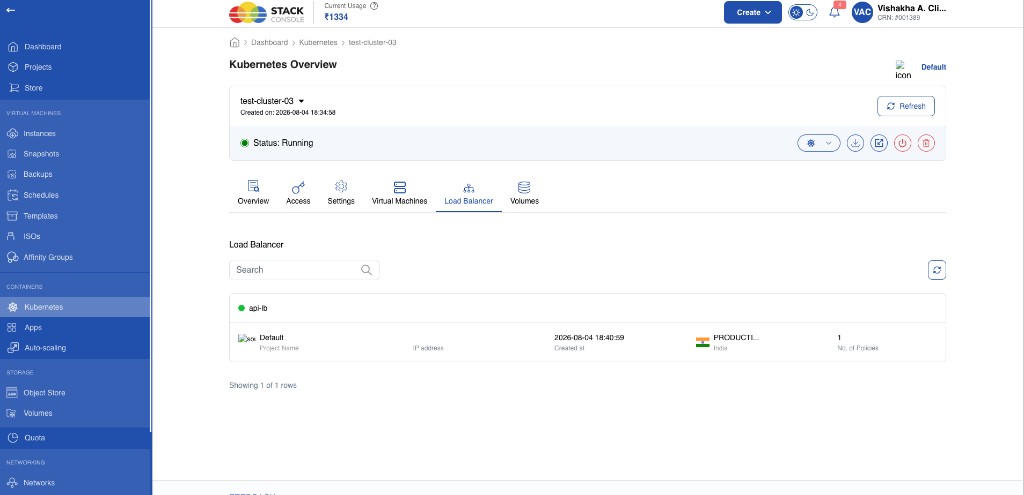
| Load Balancer | Cluster load balancers (for example api-lb) |
| Volumes | Root / block volumes for nodes |
Resource-based billing
The billing model for Kubernetes clusters is resource-based. The cluster object itself is not charged. CMP bills the cloud resources the cluster creates.
Previous behaviour
| Resource | Billing |
|---|---|
| Kubernetes Cluster (all nodes) | Charged |
| Virtual Machines | Included (not billed separately) |
| Block Storage | Included |
| Networks | Included |
| Load Balancer | Included |
| Public IP | Included |
A recurring charge applied only to the cluster plan; infrastructure under the cluster was not billed as separate subscriptions.
New behaviour
| Resource | Billing |
|---|---|
| Kubernetes Cluster | Not charged |
| Virtual Machines (control & worker) | Charged — each node gets its own subscription |
| Block Storage (root volumes) | Charged — separate subscriptions |
| Networks | Charged when network billing is enabled |
| Load Balancer | Charged when LB billing is enabled |
| Public IP | Charged when IP billing is enabled |
Why the change
- Aligns billing with the lifecycle of underlying CloudStack resources
- Supports resize, replace, delete, and other resource-level operations without depending on a single cluster charge
- Matches how other CloudStack resources are billed in Stack Console
- Master/control compute — each control node VM → separate billing subscription
- Worker compute — each worker node VM → separate billing subscription
- Volumes — each root (and related) volume → separate subscription
- IP / LB / Network — separate billing where packages and feature flags are enabled; rollout for all K8s paths may still be completing
Separate plans for control and worker nodes
Administrators configure different Kubernetes Node Packages for:
- Master/Control Node
- Worker Node
Customers can size the control plane differently from workers (for example, 2 vCPU / 2 GB masters and 8 vCPU / 8 GB workers in the same cluster).
When configuring the CloudStack compute offering for Kubernetes nodes, do not put customer root disk size on the offering. If storage size is set on the compute offering, CloudStack ignores root_disk_size / CMP volume selection and uses the offering’s disk size instead. See Kubernetes packages.
Custom plans are not supported for Kubernetes (CloudStack limitation).
Root volume plan: at create, one storage plan applies to both control and worker nodes. CloudStack does not accept separate root disk plans for control vs worker on the same create.
Create Kubernetes cluster (customer / portal)
Customer path: Containers → Kubernetes → Create (breadcrumb: Home → Kubernetes → Create Kubernetes)
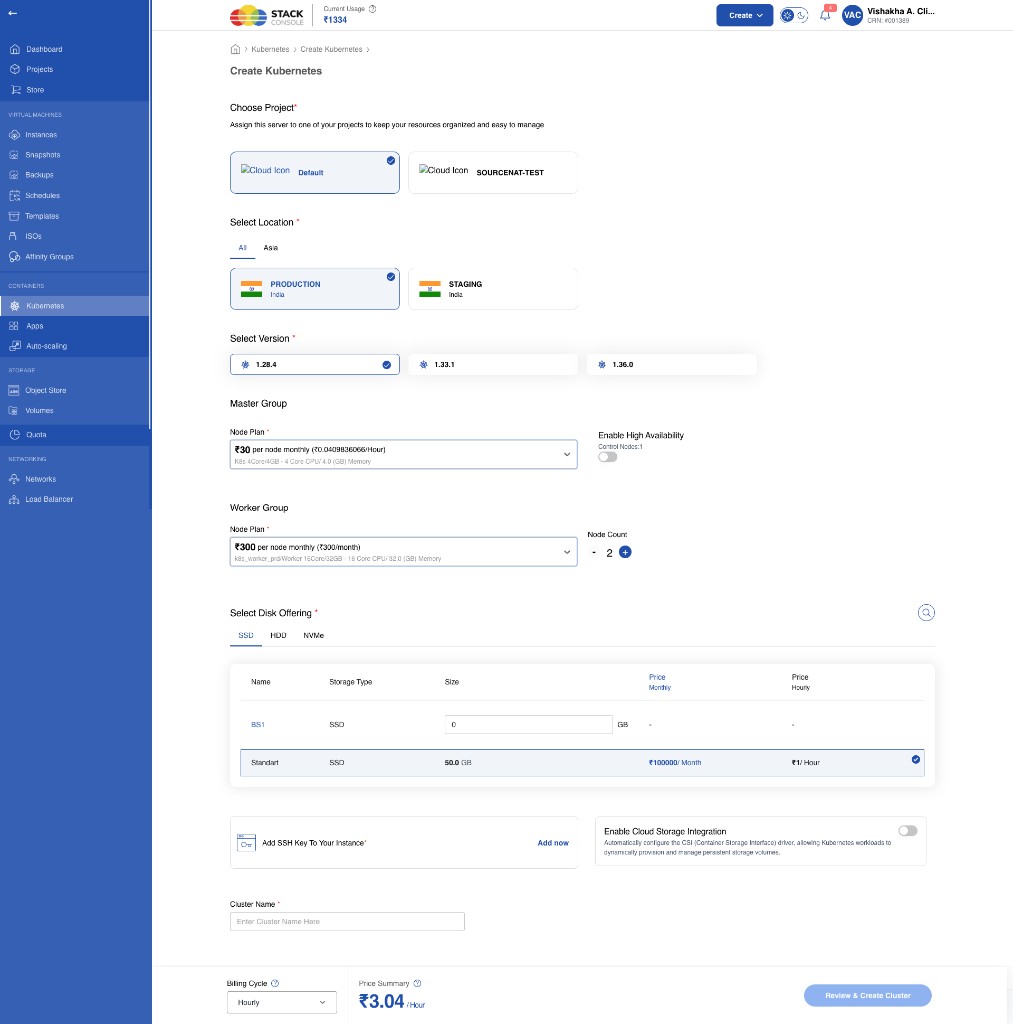
The create form uses separate Master Group and Worker Group plans, one shared disk offering for all nodes, and optional Cloud Storage (CSI) integration.
Form fields
Choose Project
Required. Select the CMP project that will own the cluster — for example, Default.
Select Location
Required. Zone / region where the cluster is created — for example, PRODUCTION (India). Only zones with active Kubernetes node packages and volume packages appear.
Select Version
Required. Kubernetes version offered by CloudStack CKS for that zone — for example, 1.28.4, 1.33.1, 1.36.0. Versions depend on what is registered in CloudStack.
Master Group — Node Plan
Required. Control-plane compute plan from Kubernetes Node Packages with Package For = Master/Control Node. Shows price per node and CPU/memory — for example, K8s 4Core/4GB.
Master Group — Enable High Availability
Optional. Toggle for a multi-control-plane layout. When off, the UI shows Control Nodes: 1. When on, CloudStack / CMP provisions additional control nodes for HA (exact count depends on product configuration).
Worker Group — Node Plan
Required. Worker compute plan from packages with Package For = Worker Node — for example, Worker 16Core/32GB. May differ from the master plan.
Worker Group — Node Count
Required. Number of worker nodes to create (stepper). Each worker becomes a separate VM subscription under resource-based billing.
Select Disk Offering
Required. Root / block storage plan for all nodes (control and worker share the same selection). Choose a storage tier tab (SSD, HDD, NVMe) and a volume package row — for example, Standard, 50 GB.
Apache CloudStack does not accept separate root disk plans for control vs worker on the same create. Customers pick one disk offering; it applies to every node in the cluster. Resize individual volumes later if needed.
Add SSH Key To Your Instance
Required. Attach an existing SSH key or use Add now to register one. Applied to cluster nodes for access where CloudStack/CMP supports it.
Enable Cloud Storage Integration
Optional. When enabled, configures the CloudStack CSI Driver for dynamic storage provisioning in the cluster.
CSI / cloud storage integration options do not have separate CMP billing yet. Compute and root volume packages still apply; treat extra CSI storage charges as out of band until product support is complete.
Cluster Name
Required. Display name for the cluster — for example, test-cluster-03.
Billing Cycle
Required. Cycle used for pricing the selected node and disk plans on create — for example, Hourly or Monthly.
Price Summary
Read-only. Estimated cost for the selected configuration (node plans × counts + disk offering) before review.
Click Review & Create Cluster to confirm and provision.
Create notes
- Custom plans are not available — only predefined master and worker packages.
- CMP does not yet let customers pick separate templates for control vs worker (CloudStack may support this; CMP does not expose it yet).
- Where the UI offers attaching an existing network or existing load balancer, those options appear in addition to the fields above.
- After submit, the parent cluster may stay Starting for a while before CMP syncs VMs and volumes — see Sync behaviour.
Example cluster provisioning
Example create selection (same size for master and worker for a simple lab):
| Setting | Value |
|---|---|
| Master / worker node plan | 2 CPU, 4 GB RAM each |
| Worker nodes | 2 |
| Disk offering | 20 GB |
| High Availability | Disabled |
Provisioned resources
| Resource | Count / size |
|---|---|
| Control nodes | 1 |
| Worker nodes | 2 |
| Per-VM config (this example) | 2 CPU, 4 GB RAM, 20 GB storage |
| Total CPU | 6 cores |
| Total memory | 12 GB |
| Total storage | 60 GB |
With separate master and worker plans, totals follow each plan × node count (plus HA control nodes if enabled). Overview cards show aggregated CPU, RAM, and node counts for the running cluster.
Cluster services and components
When a cluster is created, CloudStack / CMP typically provision:
| Component | What is created |
|---|---|
| Control node VMs | Master/control plane instances |
| Worker node VMs | Worker instances (fixed count + any autoscaled workers) |
| Volumes | Root (and related) block volumes per node |
| Network | One isolated (elastic) network |
| Public IP | One public IP on that network with Source NAT |
| Load balancer | Default LB using that public IP (for example api-lb) |
| Firewall | Required SSH rules for cluster access |
| Port forwarding | SSH-related rules for control and worker nodes |
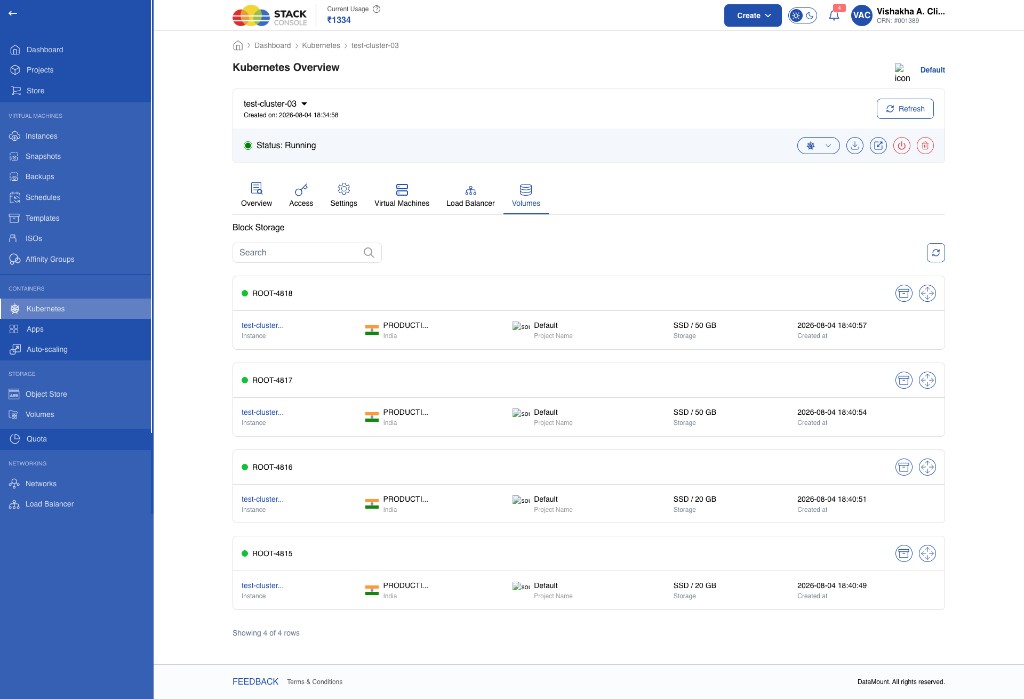
Sync behaviour while status is Starting
The Kubernetes parent group can stay in Starting for a long time. CMP syncs child resources (VMs, volumes, and related objects) when the main Kubernetes group moves from Starting to Running.
As a CloudStack admin you may already see VMs and services in ACS while CMP still shows the cluster as Starting and has not listed those resources yet.
While the parent remains Starting, CMP jobs may time out. Background tasks periodically re-check clusters that are still Starting with no VMs synced, then re-query status and sync again. Timing depends on the job schedule — expect a delay, not instant visibility.
A power-off option is available while the Kubernetes cluster is in the Starting state (use carefully; prefer waiting for Running unless you intend to stop the create path).
Kubernetes operations
Virtual Machines (VMs)
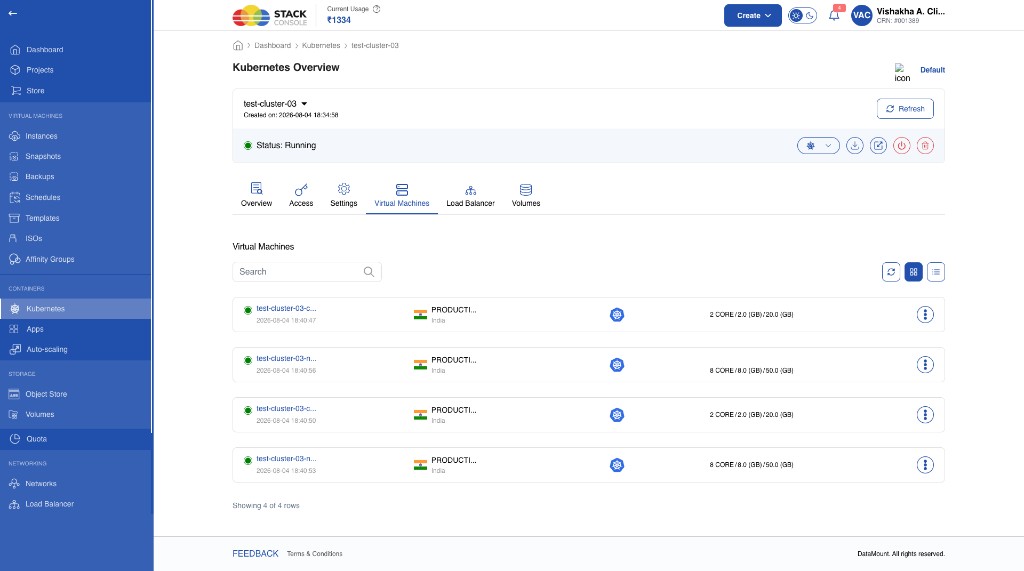
The Virtual Machines tab lists all VMs tied to the cluster (control and worker).
- Normal VM operations such as start, stop, and delete are available.
- Change plan on an individual K8s VM is not offered from this path (billing complexity). Use cluster Change plan / scale instead.
- If autoscaling is enabled and policies fire, additional worker VMs are provisioned and synced into CMP — see Auto scaling.
Network
On cluster create, CMP/CloudStack typically:
- Creates one isolated network for the cluster
- Associates one public IP with Source NAT
- Creates a default load balancer on that IP
Customers can usually:
- Configure egress rules
- Acquire additional public IP addresses
- Edit the network name
- Delete the network (when no longer required / allowed by product rules)
IP Addresses
By default, one public IP is acquired on the Kubernetes isolated network (Source NAT). From that IP (or related network/IP pages), customers can:
- Configure firewall rules
- Create VPN connections (where enabled)
- Configure load balancer policies
- Create port forwarding rules
Billing for public IPs follows resource-based billing when IP charging is enabled — not the older “IP included in a single cluster package” model.
Load Balancer
When the network and public IP exist, a default load balancer is created.
Policies
- A default LB policy is created
- The control node is attached to that policy
Operations
Customers can typically:
- Create new load balancer policies
- Attach or detach VMs from policies
- Configure related firewall rules
Firewall rules
Settings → Firewall lists ingress rules for the cluster network. Cluster create typically opens the ports required for access — for example:
| Example | Source CIDR | Protocol | Ports |
|---|---|---|---|
| Kubernetes API | 0.0.0.0/0 | TCP | 6443–6443 |
| SSH (public PF range) | 0.0.0.0/0 | TCP | 2222–2225 (range covers nodes) |
Use + Add A New Firewall Rules to add more rules. Delete with the row trash icon. Rules can also be managed from the Network / IP address details page.
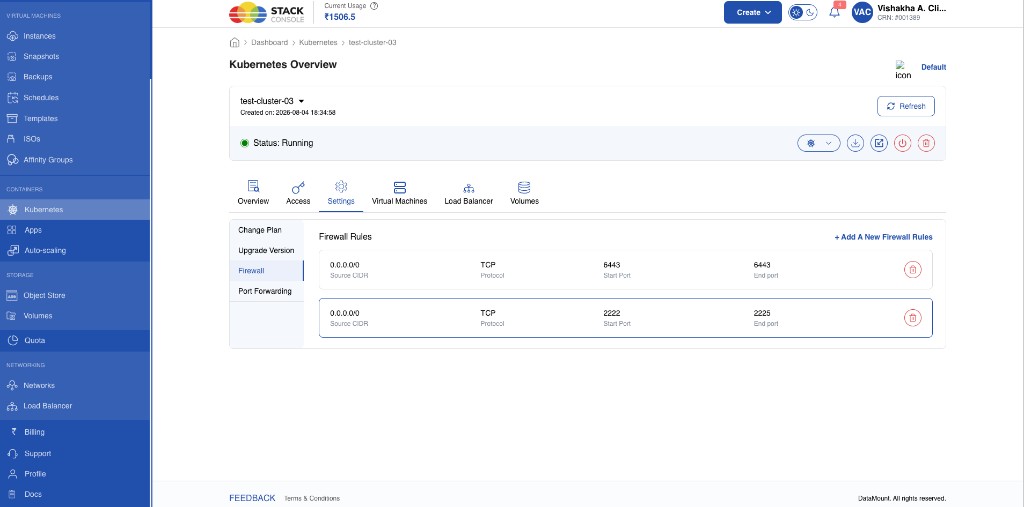
Port forwarding rules
Settings → Port Forwarding lists rules that map a public port to a node’s private SSH port.
By default, Kubernetes creates port forwarding for SSH access:
- Private port: 22 (on the node)
- Public port: 2222, 2223, 2224, 2225, and so on — typically one public port per node (control and worker)
- Protocol: TCP
- VM guest IP: private IP of the target node (for example
10.1.1.165)
Use + Add Port Forwarding Rule for additional mappings. Delete with the row trash icon. Rules can also be managed from the Network / IP address details page.
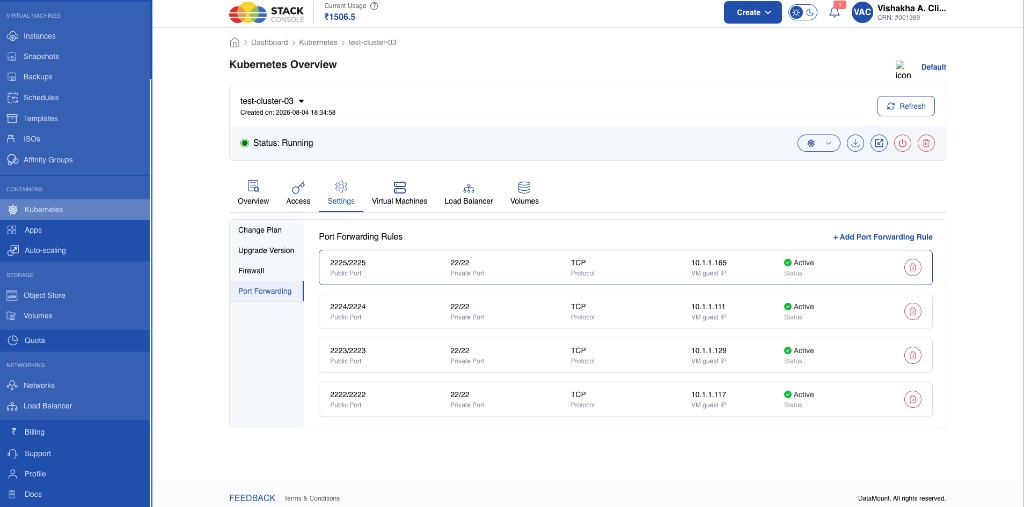
Change plan / scale cluster
Settings → Change Plan lets customers select new Master Group and Worker Group node plans and a billing cycle, then review price and apply.
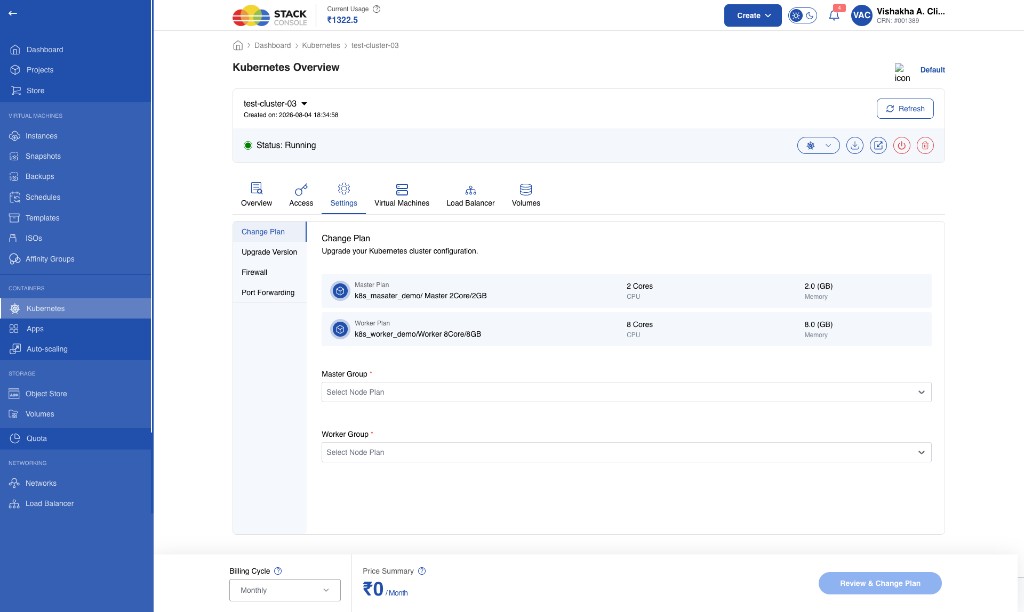
- Scale / change plan upgrades CPU and memory for nodes via the selected node packages and updates billing for those offerings under the resource-based model.
- CMP does not offer per-VM change plan from the Kubernetes UI. Use this cluster-level path instead.
Volume resize
Customers must manually resize volumes (Volumes tab / volume actions). Cluster change plan does not automatically resize root disks.
Auto scaling
When auto scaling is enabled and scaling policies are triggered:
- New worker nodes are provisioned automatically
- Those VMs are synchronised with CMP after CloudStack creates them
- Billing follows the same per-VM (and related volume) subscriptions as other nodes — typically on an hourly lifecycle basis for short-lived autoscaled VMs
How autoscaled VMs sync with CMP
Autoscaled workers appear in CloudStack first, then CMP imports/syncs them onto the cluster (Virtual Machines tab and billing) once sync runs. Timing can lag if the parent cluster is still settling or background jobs have not run yet — similar to Starting-state sync.
What configuration autoscaled VMs use
Autoscaled worker nodes use the cluster’s worker node plan / offering (CPU, memory) and the storage model defined for workers in that cluster path — not a custom unconstrained size. They do not invent a new package; they follow the worker configuration already selected for the cluster.
Kubernetes autoscaling UX and edit-worker-count flows in CMP may still be in progress. Confirm behaviour on your deployed build.
Practical application readiness (horizontal scale, golden template) is the same pattern as CloudStack AutoScale considerations.
Cluster upgrade (Kubernetes version)
Settings → Upgrade Version upgrades the cluster Kubernetes version. Associated node VMs are updated according to the upgrade path. After a Change Plan, node CPU/memory follow the newly selected master/worker packages and billing updates for those subscriptions.
Access documents
Access tab: view kubeconfig, Download Kubernetes cluster config, and admin-configured guides (accordion sections such as Using CLI and Kubernetes Dashboard UI).
Admins author those guides per Kubernetes version under Settings → Orchestrator → Kubernetes Version → Documentation Config. See Access documents.
For a full CLI walkthrough to open the Dashboard (token login, optional admin user, troubleshooting), see Accessing the Kubernetes Dashboard.
In progress
| Capability | Status |
|---|---|
| Autoscaling (Kubernetes) | In progress |
| Edit worker node counts | In progress |
| Full separate billing for IP / LB / Network on all K8s paths | In progress |
Admin checklist
- CloudStack 4.20+ with CKS enabled in target zones
- Fixed compute offerings for control and worker — ≥ 2 vCPU / ≥ 2 GB, CPU + memory only, no fixed customer root disk on the offering
- Kubernetes Node Packages for Master/Control and Worker per zone (predefined only); free trial off
- Volumes packages for the shared root disk plan
- Network / LB / IP packages as you enable billing for those components
- Configure end-user Access guides per version — Access documents
- Expect delayed CMP sync until the cluster parent reaches Running