Snapshot Schedules
Volume Snapshot Schedules are CMP policies that automatically create block storage volume snapshots on a recurring interval. Each run produces a snapshot under Virtual Machines → Snapshots → Volumes Snapshot.
Volume snapshot schedules are not VM Backup. They do not use the VM Backup package or appear under Backups. For scheduled VM recovery, use Backup schedules (Instances Backup Schedules tab).
Backup schedule vs snapshot schedule
| Instances Backup Schedules | Volume Snapshot Schedules | |
|---|---|---|
| Tab | Instances Backup Schedules | Volume Snapshot Schedules |
| Target | Virtual machine (instance) | Block storage volume |
| Output | Backups list | Snapshots → Volumes Snapshot |
| Billing | VM Backup (BACKUP) | Volumes Snapshot |
| Use case | Scheduled VM backup and restore | Scheduled disk snapshot (root or data volume) |
Both use the same Schedules menu and the same scheduler overview pattern (Overview, Resources, Actions, Activity logs).
Where to go
| Scope | Path |
|---|---|
| All volume snapshot schedules | Virtual Machines → Schedules → Volume Snapshot Schedules |
| Snapshot copies | Virtual Machines → Snapshots → Volumes Snapshot |
There is no per-volume Schedules tab on the volume detail page in the current CMP UI — create schedules from the global Schedules screen.
List snapshot schedules
Switch to the Volume Snapshot Schedules tab on Virtual Machines → Schedules.
The list layout matches Backup schedules (name, location, project, timezone, policy, retention, actions).
Create a volume snapshot schedule
Virtual Machines → Schedules → Volume Snapshot Schedules → +
img/screenshots/cmp-create-volume-snapshot-schedule.png
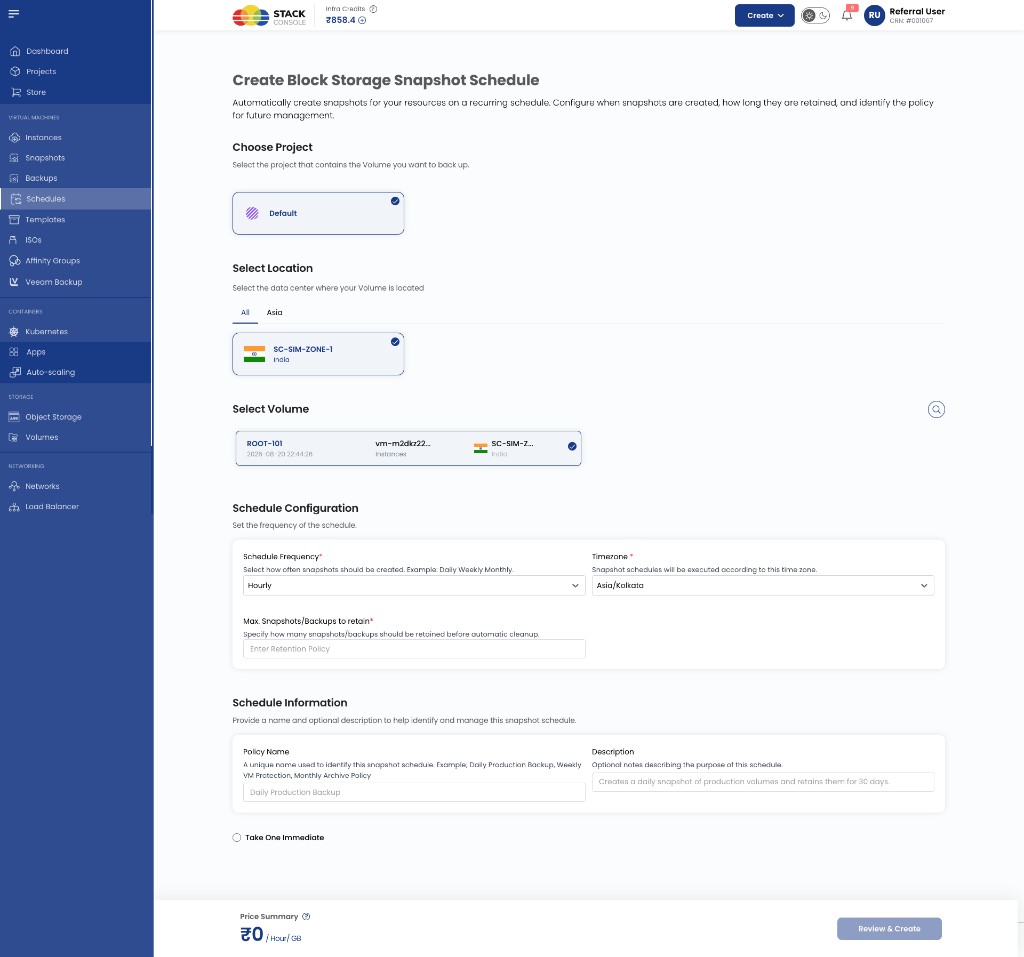
The form mirrors the VM backup schedule flow but targets a volume instead of an instance.
Choose Project
Required. CMP project for the schedule.
Select Location
Required. Zone where the volume exists.
Select Volume
Required. Block storage volume to snapshot (root or data disk).
Schedule Frequency
Required. How often CMP creates a snapshot — Hourly, Daily, Weekly, Monthly.
Timezone
Required. Timezone for schedule interpretation.
Max Snapshots/Backups to retain
Required. Maximum snapshots to keep for this policy. Oldest snapshots are removed when the limit is exceeded.
Policy Name
Required. Display name (placeholder example: Daily Production Backup).
Description
Optional. For example: Creates a daily snapshot of production volumes and retains them for 30 days.
Take One Immediate
Optional. Creates one snapshot immediately when the schedule is saved.
Click Review & Create.
View scheduled snapshots
Scheduled snapshots appear on Virtual Machines → Snapshots → Volumes Snapshot alongside manual snapshots.
img/screenshots/cmp-snapshots-global-list.png
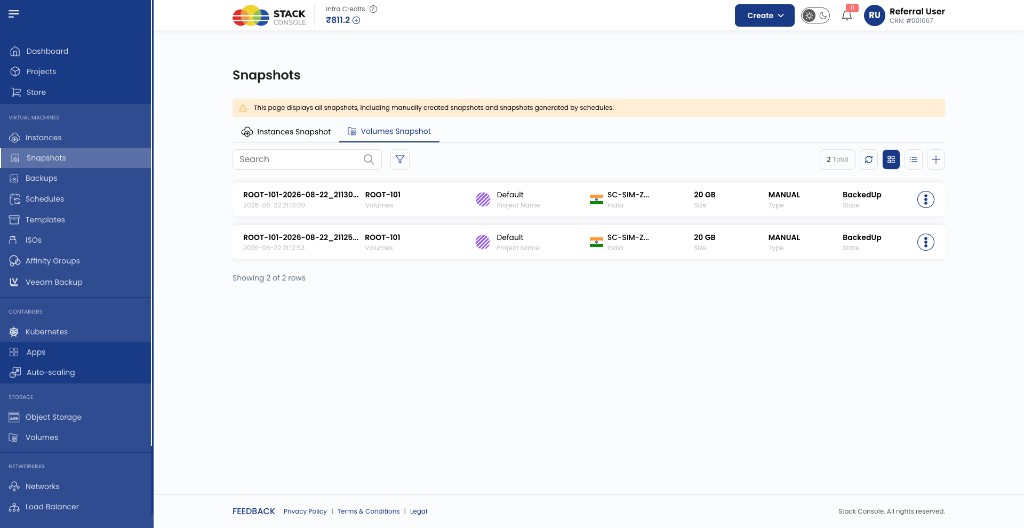
The banner notes that the page includes manually created snapshots and snapshots generated by schedules. Use the Type column to distinguish manual vs schedule-created entries where shown.
Scheduler overview
Open a volume snapshot schedule from the list to manage it — same tabs as backup schedules:
- Overview — policy and target volume
- Resources — snapshot copies from this schedule
- Actions — execution history
- Activity logs — create and run audit trail
Edit, pause, run now, and delete behave the same as backup schedules.
Billing
Retained volume snapshots are billed via the Volumes Snapshot package — not VM Backup. See Volumes Snapshot packages.
Related
- Schedules (overview)
- Backup schedules
- Snapshots
- Manage backups — VM backups only