Schedules
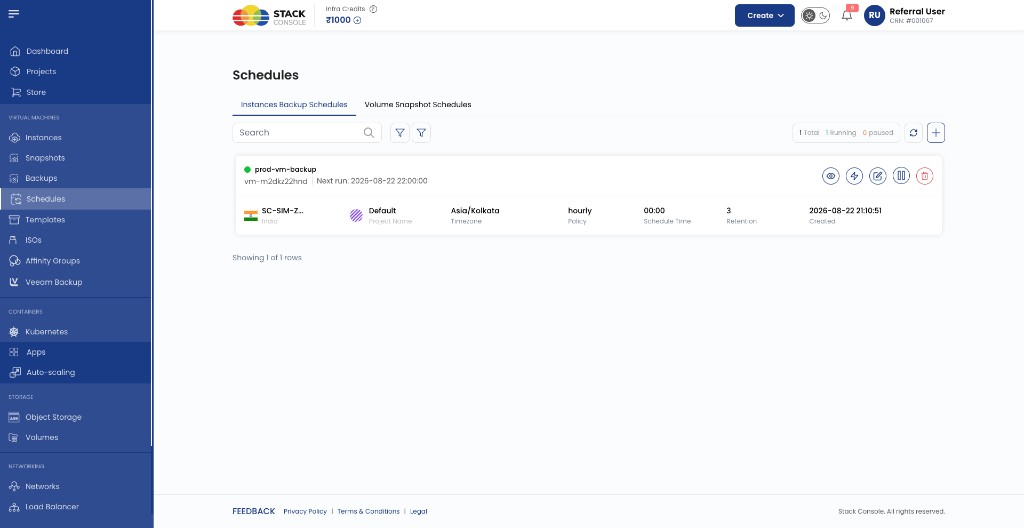
CMP uses its own scheduler to run recurring jobs — separate from CloudStack cron or backup-provider schedules. Customers define a schedule policy (frequency, timezone, retention); CMP executes it and stores the results as backups or snapshots.
| CMP concept | What it is | Example menu |
|---|---|---|
| Schedule | The policy — when to run, how often, how many to keep | Virtual Machines → Schedules |
| Backup | A VM backup object — from a schedule timer (Type: Schedule) or Run now (Type: Manual) | Virtual Machines → Backups |
| Snapshot | A volume or instance snapshot created manually or by a snapshot schedule | Virtual Machines → Snapshots |
A backup schedule creates entries under Backups. A volume snapshot schedule creates entries under Snapshots. They share the same Schedules screen but use different tabs — do not mix them up.
Two schedule types in CMP
Virtual Machines → Schedules
        |
   +----+----+
   |         |
   v         v
Instances        Volume Snapshot
Backup           Schedules
Schedules        (block storage)
(VM backup)
| Tab in Schedules | Schedules | Creates | Billing package |
|---|---|---|---|
| Instances Backup Schedules | VM backup policies | Rows in Backups | VM Backup (BACKUP) |
| Volume Snapshot Schedules | Volume snapshot policies | Rows in Snapshots → Volumes Snapshot | Volumes Snapshot |
Instances Backup Schedules work with whichever VM backup backend is configured for the CloudStack connection — Automated Volume Snapshot as Backup or CloudStack B&R-Based Backup. The CMP scheduler UI is the same; CloudStack handles the underlying API.
Volume Snapshot Schedules only create volume snapshots — they are not VM Backup. See Snapshot schedules.
Where to work in CMP
Global (all VMs / volumes)
| Task | Path |
|---|---|
| List or create backup schedules | Virtual Machines → Schedules → Instances Backup Schedules |
| List or create snapshot schedules | Virtual Machines → Schedules → Volume Snapshot Schedules |
| View backup copies (manual + scheduled) | Virtual Machines → Backups — Manage backups |
| View snapshot copies (manual + scheduled) | Virtual Machines → Snapshots |
img/screenshots/cmp-schedules-menu.png
Per VM
From Virtual Machines → Instances → [VM], use the instance tabs:
| Tab | Shows |
|---|---|
| Schedules | Backup schedules for this VM only |
| Backups | Backup copies (Manual = triggered on demand; Schedule = automatic run) |
| VM Snapshot | Instance snapshots (manual; separate from backup schedules) |
Schedule lifecycle (both types)
After a schedule is created, open it from the list to use Scheduler Overview:
| Tab | Purpose |
|---|---|
| Overview | Policy, target VM/volume, next run, retention |
| Resources | Backup or snapshot copies produced by this schedule |
| Actions | Per-run execution log (success/failure) |
| Activity logs | Audit trail (create, execute, user/system) |
Common row actions on the schedule list: View, Run now, Edit, Pause, Delete.
Pages in this section
| Page | Focus |
|---|---|
| Backup schedules | Create and manage Instances Backup Schedules |
| Snapshot schedules | Create and manage Volume Snapshot Schedules |
Related
- Manage backups — global and VM-level backup listing
- Backup (concepts)
- Snapshots
- Automated Volume Snapshot as Backup