WHM / cPanel Web Hosting
WebHost Manager (WHM) and cPanel provide industry-standard multi-tenant web hosting management. In StackConsole CMP, the WHM integration establishes an automated bridge between CMP's commercial billing, subscription management, and customer self-service capabilities, and WHM's underlying server-level account provisioning and hosting infrastructure.
StackConsole CMP acts as the commercial system of record for plans, prices, invoices, subscriptions, rate cards, and customer lifecycle policies. WHM serves as the infrastructure execution engine, executing operations such as account provisioning (createacct), package changes (changepackage), suspension (suspendacct), unsuspension (unsuspendacct), termination (removeacct), and Single Sign-On (SSO) session creation.
Configuration Guides → Supported Features →
Getting Started
- Prerequisites & Architecture — Verify WHM network access, SSL certificates, port 2087 reachability, and API tokens.
- Server Preparation — Generate least-privilege WHM API tokens and configure lowercase hosting packages.
- Provider Connection — Complete the 4-step CMP Cloud Provider Setup wizard to link WHM endpoints and default account configurations.
- Package Mapping — Map WHM packages to CMP sellable Web Hosting plans within customer rate cards.
- Customer Journeys — Onboard customers, provision hosting accounts, manage domains, access cPanel via SSO, and automate billing renewals.
Integration Architecture
The integration decouples customer portal requests from server-level hosting execution using an asynchronous message queue. When a customer orders or modifies a hosting account, CMP validates billing and records the service state immediately, then dispatches background worker jobs to interact with WHM's JSON-API over HTTPS.
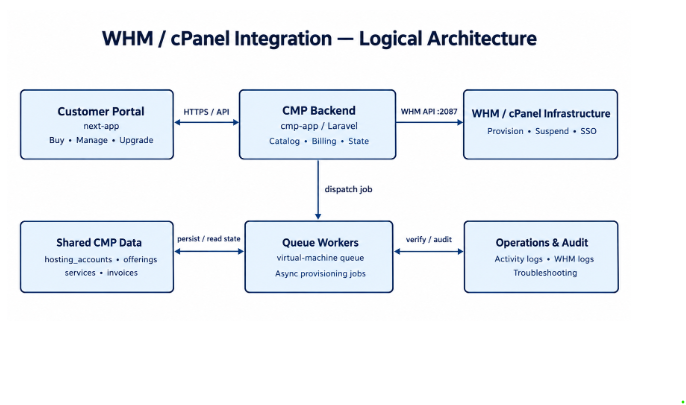
Architectural Separation of Concerns
To maintain operational integrity, the integration strictly separates three tiers:
| Tier | Primary System | Responsibilities |
|---|---|---|
| Commercial Tier | StackConsole CMP | Plan definition, pricing, rate cards, prepaid/postpaid balances, recurring invoices, subscription lifecycle, and customer activity logs. |
| Orchestration Tier | CMP Queue Workers (virtual-machine) | Asynchronous request processing, idempotency verification (accountsummary), retry handling, state transitions (creating → active / failed), and email notifications. |
| Infrastructure Tier | WHM / cPanel Server | Virtual host creation, Apache/Nginx vhost setup, DNS zone creation, mail routing, MySQL/PostgreSQL databases, cPanel user SSO, and quota enforcement. |
Configuration & Setup Guides
Step-by-step guides for connecting and configuring WHM in StackConsole:
| Guide | Description | Status |
|---|---|---|
| WHM Requirements | Pre-installation network, firewall, port 2087, and SSL checklist | Ready |
| Requirements Deep Dive | Comprehensive review of infrastructure, OS, and permission requirements | Ready |
| Server Preparation | WHM-side preparation, API token generation, and ACL assignment | Ready |
| Connecting CMP to WHM | Complete 4-step wizard walkthrough in CMP Admin Portal | Ready |
| Package & Plan Configuration | WHM package creation, space vs underscore rules, and rate card mapping | Ready |
| Package Naming | End-user limitation and naming rules for WHM packages in CMP | Ready |
| Client Registration & WHMCS | Customer onboarding, rate card assignment, and WHMCS trusted registration API | Ready |
Supported Features
Capabilities available to administrators and customers after WHM is connected:
| Feature Area | Capabilities | Documentation |
|---|---|---|
| Features Overview | Complete capability matrix and operational boundaries | Overview |
| Hosting Account Management | Overview tab, real-time disk usage, cPanel SSO, DNS guidance, activity audit | Account Management |
| Customer Provisioning | Domain validation, username/password rules, async queue provisioning | Provisioning |
| Lifecycle & Billing | Plan upgrades, proration preview, overdue suspensions, cancellation | Billing & Lifecycle |
| Troubleshooting & Recovery | Diagnostic matrices for connection, package sync, provisioning, and SSO | Troubleshooting |
Platform & Version Compatibility
| Component | Supported Version / Specification | Notes |
|---|---|---|
| WHM / cPanel Version | cPanel & WHM Version 110 LTS, 118, 120+ | Standard JSON-API v1 compatibility required. |
| Operating Systems | AlmaLinux 8/9, Rocky Linux 8/9, CloudLinux 8/9, Ubuntu 20.04/22.04 LTS | Standard cPanel-supported Linux distributions. |
| API Protocol | WHM JSON-API over HTTPS (Port 2087) | TLS 1.2 / 1.3 required. Plain HTTP (port 2086) is strongly discouraged. |
| Authentication | WHM API Tokens | Token-based authentication using root or reseller credentials. |
| cPanel Themes | Jupiter (Recommended), Paper Lantern (Deprecated) | Configured globally during provider setup. |
| CMP Backend | CMP Application Service: AppServices::WEB_HOSTING | Queue worker alias: virtual-machine. |
Key Integration Boundaries & Limitations
Before deploying WHM in production, note the following architectural boundaries:
- Upgrade Only: Plan changes in CMP only support upgrades (selecting a plan with higher
disk_quota_gb). Downgrades are blocked by both UI and backend validation. - Package Naming Constraint:
basic_hostingwill not appear in the CMP dropdown.basic hostingandBasic Hostingwill. Use an underscore only with aroot_or reseller-username prefix. See WHM Package Naming. - DNS Guidance: The customer DNS tab provides DNS record pointers and nameserver guidance; it does not replace a dedicated authoritative DNS editor.
- Custom Plans: Customer-defined "build-your-own" hosting plans are not supported; all offerings must map to pre-defined WHM packages.
- Administrative Reconciliation: If a background provisioning job fails after invoice generation, CMP records a
failedstate. Operators must inspect logs and reconcile infrastructure manually rather than clicking an automated retry button.