Customer Provisioning Workflow
This guide details the complete customer onboarding and provisioning journey for Web Hosting in StackConsole CMP. It explains how customers select plans, configure domain details, satisfy billing checks, and how CMP asynchronously provisions accounts on WHM via background queue workers.
1. Prerequisites for Ordering
Before a customer can order Web Hosting:
- The Hosting Module and Billing Module must be active for the tenant.
- The customer account must have the
hosting.accounts.createpermission assigned. - The customer's assigned rate card must include active Web Hosting packages.
- Prepaid Accounts: The customer's wallet balance must equal or exceed the initial invoice total.
- Postpaid Accounts: The customer's credit limit must accommodate the initial charge.
2. Customer Order Workflow
Customer Portal Path: /app/web-hosting/create
The purchase wizard guides customers through two simple steps:
Step 1: Select Region & Package
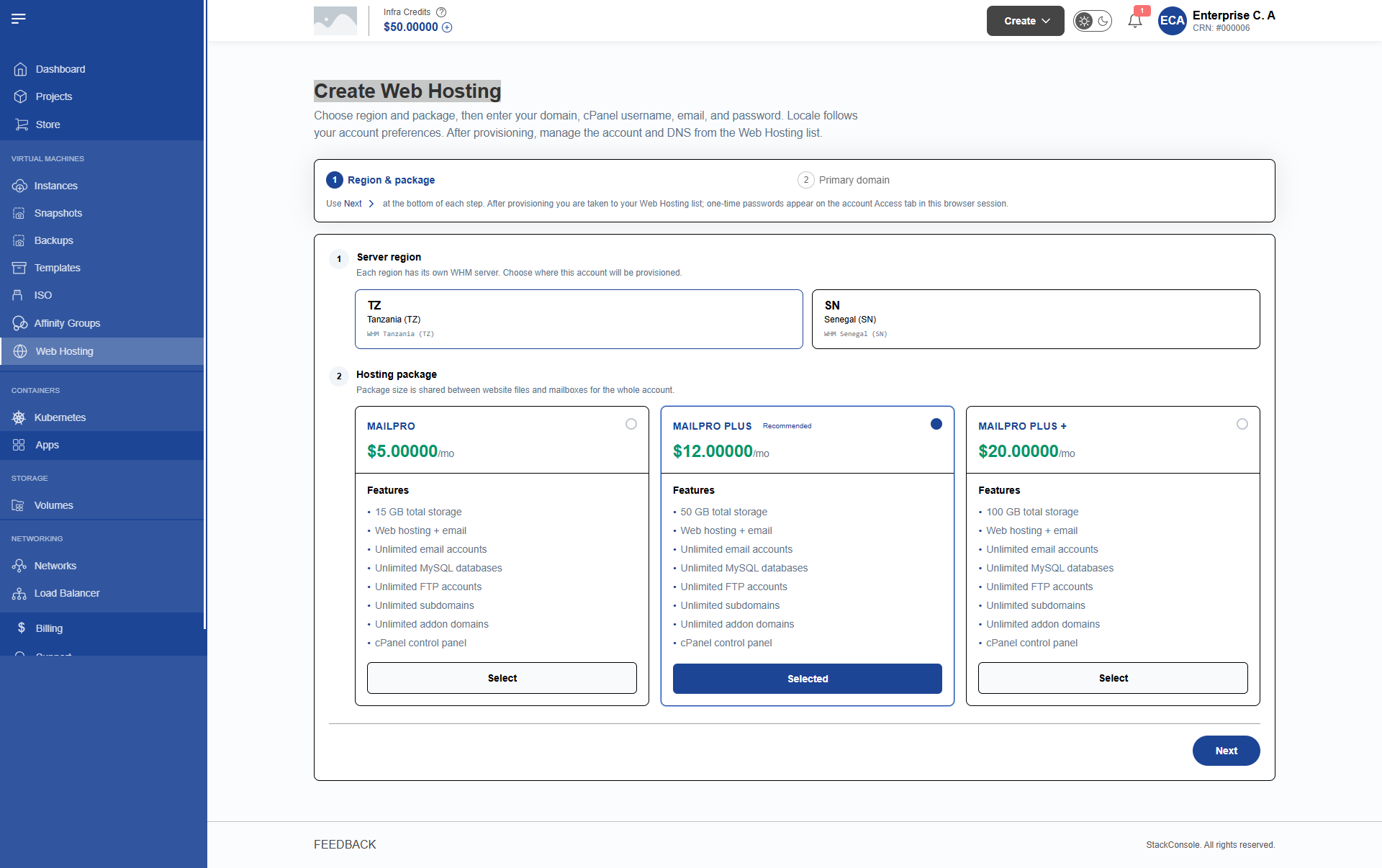
- Select Region: The customer selects their desired datacenter location (e.g.,
Default Zone,Region 1, orSenegal DC).- CMP requests available plans via
GET /api/hosting/plans?region={region_id}.
- CMP requests available plans via
- Select Plan: The portal renders plan cards showing customer-facing plan names, disk storage quotas, included features, and recurring monthly prices.
- The customer clicks Select on their preferred plan and clicks Next.
Step 2: Primary Domain & Account Details
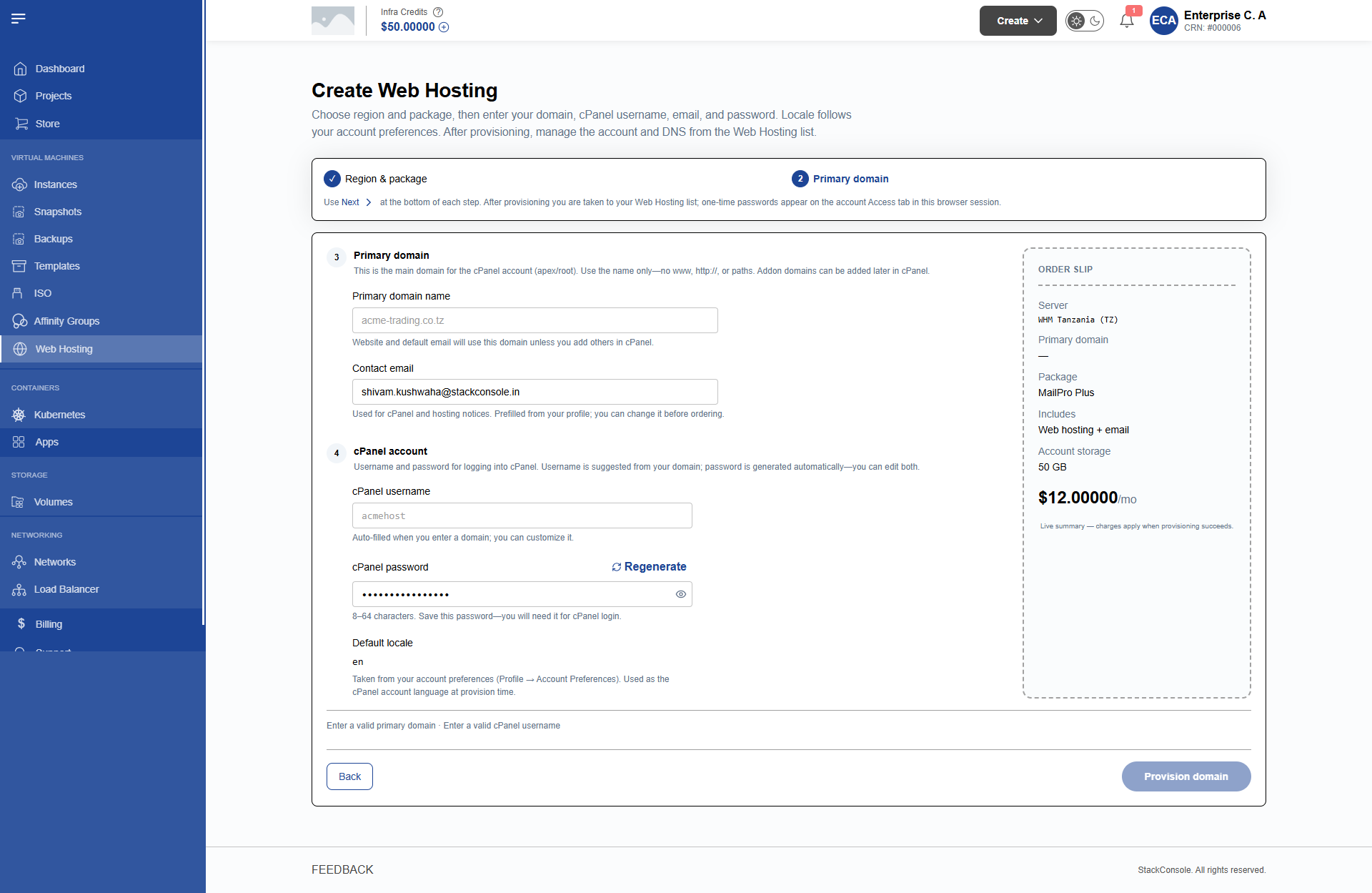
In this step, the customer enters domain and cPanel authentication settings:
Form Fields
Primary Domain
Required. The root domain for the hosting account (e.g., myexamplebusiness.com).
- Validation Rule: Must be entered without
http://,https://, orwww.prefixes. Must be a syntactically valid Fully Qualified Domain Name (FQDN).
Contact Email
Required. The email address used for cPanel system alerts, quota warnings, and SSL notifications.
- Passed directly to WHM as the
contactemailparameter. Defaults to the customer's CMP login email.
cPanel Username
Required. The system username used to log in to cPanel, FTP, and SSH.
- Validation Rules:
- Lowercase letters and numbers only.
- Maximum length: 16 characters (enforced by WHM).
- Auto-generated from the primary domain name by default, but fully editable by the customer.
cPanel Password
Required. The master password for the hosting account.
- Can be entered manually or generated using the Generate Password button.
- Must satisfy CMP's password complexity rules (minimum 12 characters, uppercase, lowercase, numbers, special characters).
Locale
Optional. Language interface for the cPanel control panel (defaults to the customer account preference).
Click Order Now / Provision to submit the request.
3. Provisioning Execution Architecture
When the customer clicks Provision, CMP executes an orchestrated flow between synchronous API validation and asynchronous queue execution:
Detailed Execution Stages
- Validation & Balance Check:
CreateServiceSummaryUtil::hostingAccount()verifies that the plan exists and is active in the selected region.validate_account()confirms that the customer has sufficient prepaid credit or postpaid headroom to pay the initial invoice.
- Database Persistence:
- CMP records a new row in
hosting_accountswithstate = creating. - An offering row and central service record are established to link commercial subscriptions with infrastructure.
- CMP records a new row in
- Invoice Generation:
InvoiceService::createInvoice()generates the first billing invoice and deducts funds from the customer's prepaid wallet (or adds to outstanding balance).
- Queue Worker Execution:
CreateHostingAccountJobis dispatched to thevirtual-machinequeue.- The queue worker first executes an idempotency check via WHM's
accountsummaryendpoint. If an account with the specified username already exists, CMP links to it rather than crashing. - If the account is new, the worker calls WHM's
createacctAPI with all parameters (domain, username, password, plan, contact email, and provider defaults such as CGI, SpamAssassin, theme). - The worker verifies successful creation and updates
hosting_accounts.statefromcreatingtoactive.
- Welcome Email Dispatch:
- Upon successful activation,
HostingAccountCreateEmailJobsends a welcome email containing cPanel login instructions, nameserver records, and access URLs to the customer's contact email.
- Upon successful activation,
4. Handling Provisioning Failures
If the background job encounters an infrastructure error (e.g., WHM API token revoked, username collision, or invalid package name):
- The worker records the detailed error message in the internal job logs.
- The account state in CMP transitions to
failed. - The initial invoice remains recorded in the billing ledger.
Because a commercial invoice has already been generated by the time the worker executes, CMP does not provide an automated "retry" button in the customer UI. This prevents duplicate invoices and race conditions.
Platform administrators must inspect the failure reason in CMP activity logs, rectify the underlying WHM condition (e.g., fix a package name or delete an orphaned directory), and reconcile the state. See Troubleshooting for recovery procedures.