Ceph RGW Multi-Storage Configuration
This guide details the technical and rollout requirements for configuring storage-tier-based object storage provisioning in StackConsole CMP using Ceph RADOS Gateway (RGW) placement targets, placement tags, and storage pools mapped to physical OSD device classes.
This document is intended for Ceph storage administrators, cloud infrastructure engineers, and the StackConsole platform operations team deploying tier-based object storage.
1. Purpose & Overview
To enable storage-tier-based object storage provisioning in StackConsole CMP, the Ceph provider must configure the required physical storage pools, CRUSH rules, RGW placement targets, and placement tags on the Ceph cluster.
StackConsole CMP uses these configurations to assign each customer an authorized storage destination based on their purchased object storage plan.
The implementation supports discrete storage categories such as:
- Standard
- HDD
- SSD
- NVMe
This architecture introduces placement-based access restrictions. Customers will only be able to create new buckets using the storage placement authorized for their object storage account. Any attempt to create buckets in unauthorized storage tiers (via the CMP customer portal or direct S3 API requests) is rejected by Ceph RGW.
1.1 Storage Account Provisioning Workflow
When a customer purchases an object storage package:
- Category Identification: CMP identifies the selected storage category from the package definition.
- Placement Target Resolution: CMP resolves the corresponding Ceph placement target configured in Storage Settings.
- User Creation: CMP creates the RGW user account on the Ceph cluster via the Dashboard / Admin API.
- Tier Placement Assignment (No Generic Default): Once multi-storage placement and tags are configured, CMP does not assign a generic cluster default placement. Instead, CMP configures the user's
default_placementspecifically to match the selected storage type (e.g.,ssd-placement). - Decided Placement Authorization Tags: CMP assigns the matching
placement_tags(e.g.,["ssd-placement"]) strictly according to the decided placement target for that storage tier. - Multi-Bucket Creation: The user can create multiple buckets under their object storage account.
- Tier Inheritance: All new buckets automatically inherit the account's decided placement target.
- Access Enforcement: Attempts to create buckets using unauthorized placement targets are rejected by Ceph RGW.
In a multi-storage tier architecture, CMP never assigns a generic default placement by default. Accounts are provisioned exclusively according to the customer's selected storage type (HDD, SSD, or NVMe). The decided placement target and its matching tag are assigned together, ensuring the account is restricted to that specific tier from creation.
| CMP Storage Category | Default Placement | Placement Tag |
|---|---|---|
| HDD | hdd-placement | hdd-placement |
| SSD | ssd-placement | ssd-placement |
| NVMe | nvme-placement | nvme-placement |
| Standard | default-placement | default-placement (where offered) |
2. Storage Architecture
Understanding multi-storage configuration in Ceph requires distinguishing between the distinct architectural layers that connect customer accounts to physical drives:
Customer Object Storage Account → RGW User → Authorized Placement Target → Zone Pool Mapping → CRUSH Rule → Eligible OSDs → Physical Storage Devices
These architectural concepts serve specific, non-overlapping roles:
- OSD Device Class: Physical storage media classification assigned to OSD daemons.
- CRUSH Rule: Algorithmic policy determining which OSDs are eligible to store data for a specific pool.
- Ceph Pool: Logical storage boundary providing replication, quotas, and hashing.
- RGW Placement Target: Bucket-level storage destination configured in the Ceph zonegroup and zone.
- Placement Tag: Authorization token assigned to RGW users to control access to specific placement targets.
An RGW placement target is a logical routing destination, not a physical disk or OSD. The physical storage tier is determined solely by the Ceph pool to which the placement target maps and the CRUSH rule governing that pool. A placement target name (such as nvme-placement) does not guarantee NVMe performance unless the underlying data pool is bound to a CRUSH rule targeting nvme OSDs.
2.1 Ceph OSDs and Device Classes
In Ceph, an OSD (Object Storage Daemon) process manages an underlying storage device or configured storage volume, executing read, write, replication, and heartbeat operations.
Ceph automatically detects device characteristics to assign an initial Device Class:
nvme: Solid-state drives utilizing the Non-Volatile Memory Express interface for ultra-low latency and high IOPS.ssd: Enterprise Solid State Drives (SATA/SAS) providing high performance and predictable random I/O.hdd: Rotational Hard Disk Drives providing cost-effective sequential throughput and bulk capacity.
Ceph infers device classes based on underlying Linux kernel device properties. In certain hardware configurations (such as NVMe drives behind hardware RAID controllers or virtualized controllers), Ceph may default to classifying NVMe drives as ssd. Ceph administrators must manually verify OSD device classes and explicitly reclassify drives where necessary.
Viewing OSD Device Classes in Ceph Dashboard
In the Ceph Dashboard, navigate to Cluster → OSDs (under the OSDs List tab):
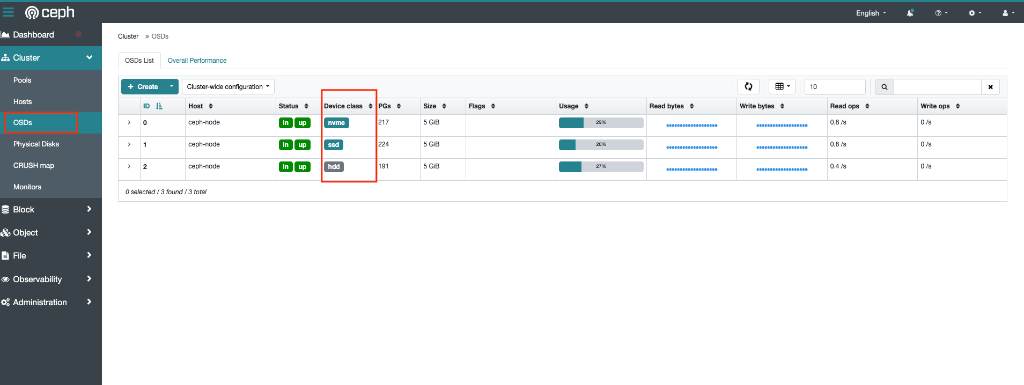
The Device class column displays the assigned media badge (nvme, ssd, or hdd) for every active OSD across cluster hosts.
Managing OSD Device Classes via CLI
Execute the following commands from any Ceph administrative node:
# View the full cluster OSD tree with device classes, weights, and status
ceph osd tree

# View OSD hierarchy grouped by device class
ceph osd crush tree

# List all recognized device classes in the cluster
ceph osd crush class ls
If an OSD requires explicit assignment or reclassification:
# Assign or override an OSD device class
ceph osd crush set-device-class nvme osd.0
ceph osd crush set-device-class ssd osd.1
ceph osd crush set-device-class hdd osd.2

# Remove a device class assignment (resets to unclassified)
ceph osd crush rm-device-class osd.0
2.2 CRUSH Rules and Storage Pool Isolation
Ceph pools do not write data to unconstrained storage; they rely on CRUSH rules that restrict placement to OSDs matching a specific device class. This isolates storage tiers at the hardware level.
1. Inspect existing CRUSH rules
ceph osd crush rule ls
ceph osd crush rule dump
2. Create replicated CRUSH rules by device class
# Rule targeting NVMe OSDs
ceph osd crush rule create-replicated rule-nvme default host nvme

# Rule targeting SSD OSDs
ceph osd crush rule create-replicated rule-ssd default host ssd

# Rule targeting HDD OSDs
ceph osd crush rule create-replicated rule-hdd default host hdd
3. Create storage pools using the CRUSH rules
Do not blindly prescribe fixed PG counts (e.g., 128 128) for production environments. Ceph 19.2.x uses PG Autoscaling by default (pg_autoscale_mode on). Pool sizing, PG counts, and replication factors must be designed to align with your cluster's total OSD count, raw capacity, and expected object distribution.
# Create pools with CRUSH rule bindings
ceph osd pool create pool-nvme replicated rule-nvme
ceph osd pool create pool-ssd replicated rule-ssd
ceph osd pool create pool-hdd replicated rule-hdd

# Enable the RGW application on each pool
ceph osd pool application enable pool-nvme rgw
ceph osd pool application enable pool-ssd rgw
ceph osd pool application enable pool-hdd rgw

# Inspect pool details and confirm CRUSH rule bindings
ceph osd pool ls detail
2.3 RGW Placement Targets and Storage-Tier Isolation
Ceph RGW placement targets determine the storage destination used by a bucket. Each placement target is mapped to specific Ceph data and index pools.
In StackConsole CMP, placement targets are used to enforce the purchased storage category of an object storage account.
Examples:
hdd-placementssd-placementnvme-placement
Once placement targets and tags are used, CMP does not assign a generic or cluster default placement by default.
Instead, an account receives its placement and tags exclusively based on the customer's selected storage type and according to the decided placement targets:
- HDD plan: Assigned
default_placement: "hdd-placement"andplacement_tags: ["hdd-placement"]. - SSD plan: Assigned
default_placement: "ssd-placement"andplacement_tags: ["ssd-placement"]. - NVMe plan: Assigned
default_placement: "nvme-placement"andplacement_tags: ["nvme-placement"].
The assigned placement target acts as the user's account-level default for newly created buckets, while the placement tag restricts the user strictly to that tier. CMP does not assign any unconstrained generic fallback placement.
Each object storage account receives one default placement and the corresponding placement authorization tag.
The default placement determines where newly created buckets are stored. Placement tags determine which placement targets the RGW user is authorized to use.
For the current StackConsole implementation:
- An HDD object storage account uses HDD placement (
hdd-placement). - An SSD object storage account uses SSD placement (
ssd-placement). - An NVMe object storage account uses NVMe placement (
nvme-placement). - All new buckets created under an account use its decided placement target.
- Customers cannot create buckets in unauthorized placement targets, including through direct S3 API requests.
- CMP calculates usage using the storage category selected when the object storage account was provisioned.
Placement Authorization Mechanics
To configure strict isolation, three distinct values must be distinguished:
default_placement: The default placement target applied when an RGW user creates a bucket without specifying an explicitLocationConstraint.placement_tags: The list of authorization tags assigned to an RGW user.- Zonegroup placement target tags: The tags configured on each placement target in the Ceph zonegroup (
--tags).
default_placement alone is not an authorization restrictionConfiguring default_placement: "ssd-placement" on an RGW user without setting placement_tags does not restrict the user. An untagged user can issue an S3 CreateBucket request with <LocationConstraint>nvme-placement</LocationConstraint> and successfully write data to more expensive storage pools. Strict isolation requires matching tags on both the zonegroup placement target and the RGW user.
An RGW user JSON profile enforcing SSD placement:
{
  "user_id": "cust-101",
  "display_name": "Customer 101",
  "default_placement": "ssd-placement",
  "placement_tags": [
    "ssd-placement"
  ]
}
S3 API Behavior & LocationConstraint Enforcement
Customers interact with Ceph via standard S3 clients (AWS CLI, s3cmd, Cyberduck) or the StackConsole customer portal:
- Normal Portal / S3 Creation: The customer specifies only the bucket name. The bucket automatically inherits the RGW user's
default_placement(e.g.,ssd-placement) and is provisioned inpool-ssd. - Unauthorized S3 API Override: If a tenant attempts to circumvent their tier by supplying an unauthorized location constraint:
# Example: Customer authorized only for ssd-placement attempts to create an NVMe bucket
aws s3api create-bucket \
  --bucket unauthorized-nvme-bucket \
  --create-bucket-configuration LocationConstraint=nvme-placement \
  --endpoint-url https://s3.example.com
Result: Ceph RGW verifies the user's placement_tags. Because nvme-placement is not present in the user's tags, Ceph RGW rejects the operation with a 403 Access Denied response (InvalidLocationConstraint).
3. Responsibilities
3.1 Ceph Provider / Infrastructure Team
The Ceph provider is responsible for:
- Identifying and preparing physical devices across storage nodes (HDD, SSD, NVMe).
- Verifying OSD device classes in Ceph Dashboard or CLI (
ceph osd tree). - Creating or validating CRUSH rules for the required device classes (
rule-hdd,rule-ssd,rule-nvme). - Creating the corresponding Ceph storage pools with appropriate replication and autoscaling.
- Ensuring pools use the intended CRUSH rules and enabling the
rgwpool application. - Creating RGW placement targets in the Ceph zonegroup.
- Assigning placement tags to each restricted placement target.
- Mapping every placement target to the correct zone-level data and index pools.
- Verifying the complete zonegroup and zone configuration.
- Verifying RGW daemon health and reloading daemons to pick up changes.
- Sharing confirmed placement target names, tags, and pool mappings with the StackConsole operations team.
3.2 StackConsole Development / Operations Team
The StackConsole team is responsible for:
- Configuring storage categories under StackConsole Storage Settings.
- Mapping each storage category to the provider's verified Ceph placement target.
- Using the exact placement target name as the placement tag, adhering strictly to agreed naming conventions.
- Assigning
default_placementand matchingplacement_tagsautomatically when creating new RGW users. - Migrating existing RGW users to their correct placement configuration using Artisan CLI tools.
- Verifying placement authorization across customer tenants in all active environments.
- Ensuring customers cannot create buckets in unauthorized storage tiers.
- Aligning usage collection, telemetry, and billing with the purchased storage category.
4. Ceph Provider Configuration Requirements
The Ceph provider must configure the required placement targets across the cluster. The table below illustrates the standard mappings connecting physical storage to CMP:
| CMP Storage Category | OSD Device Class | CRUSH Rule | RGW Data Pool (Example) | Placement Target | Zonegroup Placement Tag |
|---|---|---|---|---|---|
| HDD | hdd | rule-hdd | pool-hdd | hdd-placement | hdd-placement |
| SSD | ssd | rule-ssd | pool-ssd | ssd-placement | ssd-placement |
| NVMe | nvme | rule-nvme | pool-nvme | nvme-placement | nvme-placement |
| Standard | hdd / ssd | rule-default | Standard pool | default-placement | default-placement |
The names in the table above (ssd-placement, hdd-placement, pool-ssd, etc.) are examples, not hardcoded requirements. Ceph providers may use different naming conventions to match organizational standards.
However, two critical operational rules must be followed:
- Exact character-for-character match: The zonegroup placement target name, zonegroup tag, user placement tag, and CMP storage setting must match identically. For example, if the target is
ssd-placement, the tag must bessd-placement(not the shorthandSSD). Mismatched tags will cause immediate authorization failure. - Do not modify tags after deployment: Once placement targets and tags are mapped in StackConsole CMP and assigned to customer accounts, they must not be renamed. These strings are bound directly to active customer accounts in the CMP database. Renaming them breaks authorization for existing tenants and requires coordinated database migrations.
4.1 Create or Update Zonegroup Placement Targets
Inspect the existing zonegroup placement targets:
radosgw-admin zonegroup placement list \
  --rgw-zonegroup default
1. Add new placement targets with authorization tags
# Add SSD placement target
radosgw-admin zonegroup placement add \
  --rgw-zonegroup default \
  --placement-id ssd-placement \
  --tags ssd-placement

# Add HDD placement target
radosgw-admin zonegroup placement add \
  --rgw-zonegroup default \
  --placement-id hdd-placement \
  --tags hdd-placement

# Add NVMe placement target
radosgw-admin zonegroup placement add \
  --rgw-zonegroup default \
  --placement-id nvme-placement \
  --tags nvme-placement
2. Modify existing placement targets
If a placement target already exists, update its authorization tags using modify:
radosgw-admin zonegroup placement modify \
  --rgw-zonegroup default \
  --placement-id ssd-placement \
  --tags ssd-placement
The default-placement target must also be tagged (default-placement) if it is not intended to be universally accessible. Leaving default-placement untagged allows any user—including untagged accounts—to fall back to standard storage without restriction.
4.2 Configure Zone-Level Pool Mappings
Every placement target defined in the zonegroup must have a corresponding mapping in the zone pointing to the physical data and index pools.
Inspect existing zone placement mappings:
radosgw-admin zone placement list \
  --rgw-zone default
Add zone placement mappings
# Map SSD placement target
radosgw-admin zone placement add \
  --rgw-zone default \
  --placement-id ssd-placement \
  --data-pool pool-ssd \
  --index-pool default.rgw.buckets.index

# Map HDD placement target
radosgw-admin zone placement add \
  --rgw-zone default \
  --placement-id hdd-placement \
  --data-pool pool-hdd \
  --index-pool default.rgw.buckets.index

# Map NVMe placement target
radosgw-admin zone placement add \
  --rgw-zone default \
  --placement-id nvme-placement \
  --data-pool pool-nvme \
  --index-pool default.rgw.buckets.index
If a placement target already exists in the zone, use radosgw-admin zone placement modify instead of add. Verify all referenced data and index pools exist and are healthy before applying the configuration.
4.3 Verify Complete Configuration
Confirm cluster readiness by listing both zonegroup and zone placement configurations:
# 1. Verify zonegroup targets and tags
radosgw-admin zonegroup placement list \
  --rgw-zonegroup default

# 2. Verify zone pool mappings
radosgw-admin zone placement list \
  --rgw-zone default
Confirm the following verification checklist:
- All expected placement targets are present in the zonegroup (
ssd-placement,hdd-placement,nvme-placement). - Every placement target has an explicit tag matching its target name.
- Every zonegroup target has a corresponding mapping in the zone.
- Each placement target points to the correct data pool and index pool.
- Underlying pools exist and are bound to the intended CRUSH rules (
rule-ssd,rule-hdd,rule-nvme).
A placement target existing only in the zonegroup is incomplete and invalid. If a user assigned to that target attempts to create a bucket before the zone mapping is added, RGW fails with internal pool resolution errors.
4.4 Restart RGW Where Required
The reference deployment environment operates on:
- Ceph version:
19.2.3(Squid) - Deployment orchestrator:
cephadm - RGW topology: Non-multisite (single realm / zonegroup / zone)
- Default zone:
default - Default zonegroup:
default
In this standalone, non-multisite environment, restart the RGW daemons using ceph orch to reload configuration:
# Restart RGW daemons
ceph orch restart rgw.default

# Confirm daemon health and running status
ceph orch ps --daemon_type rgw
Do not execute radosgw-admin period update --commit to apply local placement changes in a non-multisite environment. Period updates are designed for multi-site zone replication synchronization; executing them on a standalone cluster is unnecessary and can introduce configuration sync errors.
5. StackConsole Storage Settings
After the Ceph provider completes cluster configuration, the StackConsole operations team configures the corresponding storage tiers in CMP under Settings → Orchestrator → Storage Settings (or during initial onboarding in Wizard Step 4).
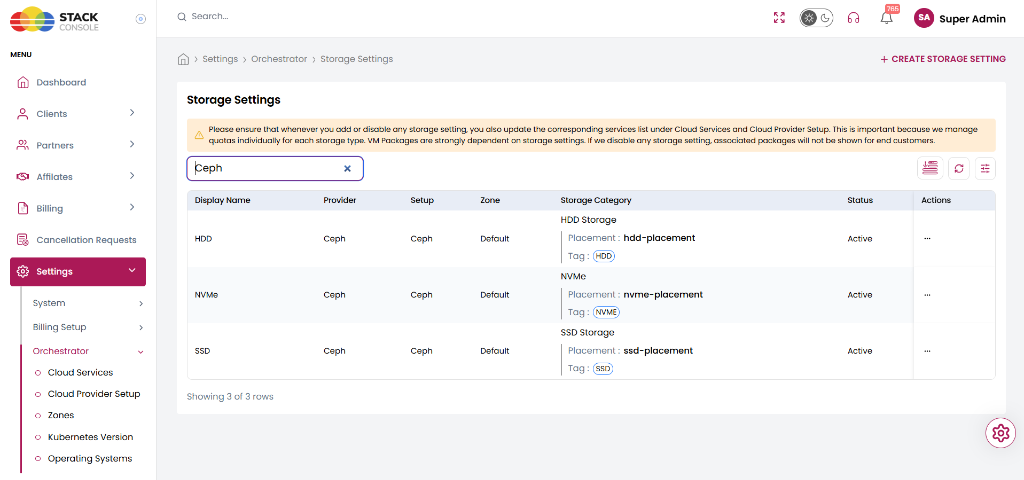
Storage Settings List Overview
The Storage Settings listing displays all configured storage tiers and their Ceph placement mappings:
| Column | Description | Example in UI |
|---|---|---|
| Display Name | Administrative label for the storage tier | HDD, SSD, NVMe |
| Provider | Cloud orchestrator provider | Ceph |
| Setup | The configured Cloud Provider Setup name | Ceph |
| Zone | The mapped CMP zone | Default |
| Storage Category | Shows the category name, resolved RGW placement target, and user placement tag | SSD StoragePlacement : ssd-placementTag : ssd-placement |
| Status | Provisioning availability status | Active |
| Actions | Manage or edit the storage setting | ... |
Add Storage Settings
To map a new storage tier to a Ceph RGW placement target, click + CREATE STORAGE SETTING (or + ADD STORAGE SETTING).
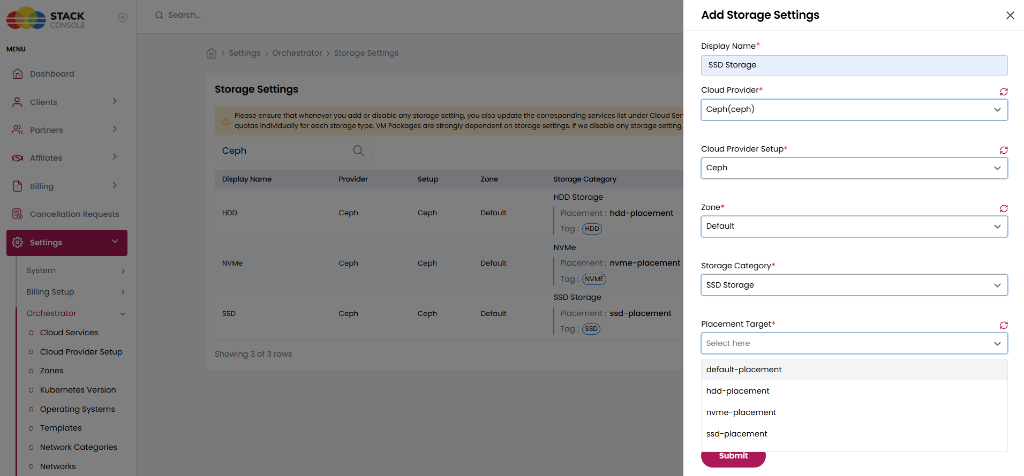
Configure each field in the drawer:
Display Name
Required. Enter a human-readable display name for this storage tier — for example, SSD Storage or NVMe Storage.
Cloud Provider
Required. Select Ceph(ceph) from the dropdown.
Cloud Provider Setup
Required. Select the active Ceph provider connection — for example, Ceph.
Zone
Required. Select the CMP zone where this storage tier applies — for example, Default.
Storage Category
Required. Select the logical category for packages — for example, SSD Storage, HDD Storage, or NVMe.
Placement Target
Required. Select the Ceph RGW placement target from the dropdown.
This dropdown dynamically queries the Ceph cluster via the Dashboard/Admin API and lists all discovered placement targets (e.g., default-placement, hdd-placement, nvme-placement, ssd-placement).
Click Submit to save the mapping.
When an object storage package is purchased:
- CMP never assigns a generic default placement by default.
- CMP resolves the specific Placement Target and matching Placement Tag mapped to the customer's selected Storage Category (e.g.,
ssd-placement). - CMP configures that decided target as the RGW user's
default_placementand assigns the exact same string inplacement_tags. - Character-for-character consistency between Ceph and CMP is strictly mandatory.
6. Existing Customer Account Alignment
6.1 Why Existing Accounts Require an Update
Existing Ceph RGW users may have been provisioned before placement-based access restrictions were established on the cluster.
These legacy accounts may have:
- No default placement configured.
- No placement tags assigned.
- An existing default placement without the corresponding placement tag.
- A historical placement configuration that does not match their current CMP package tier.
Once all placement targets are tagged on the Ceph cluster, any user without a matching placement tag will be unauthorized to create buckets in those targets.
Therefore, existing customer accounts must be aligned using the migration utility before enforcing new placement restrictions.
6.2 Account Alignment Workflow
StackConsole CMP provides a dedicated Artisan command to inspect and update RGW user accounts:
php artisan ceph:restrict-user-placement
Review Mode (Dry-Run)
Running the command without the --update flag inspects user accounts against their current CMP object storage package and displays proposed changes without altering cluster state:
# Review all object storage accounts in the default context
php artisan ceph:restrict-user-placement

# Review a specific object storage account by slug
php artisan ceph:restrict-user-placement --object-storage=ACCOUNT_SLUG
- Accounts that already possess matching
default_placementandplacement_tagsare reported as skipped. - Accounts requiring updates are listed with their current vs. proposed placement configuration.
Apply Mode (--update)
To apply the resolved configuration to the Ceph cluster, pass the --update flag:
# Apply updates to a specific account
php artisan ceph:restrict-user-placement --object-storage=ACCOUNT_SLUG --update

# Apply updates across all accounts
php artisan ceph:restrict-user-placement --update
- The command prompts for interactive human confirmation before executing updates against the Ceph API.
- The update operation replaces the user's RGW placement configuration with the CMP-defined values.
Multi-Tenant Execution
In multi-tenant SaaS deployments of StackConsole, execute the command through the tenants:run harness:
# Review accounts for a specific tenant
php artisan tenants:run ceph:restrict-user-placement --tenants=TENANT_ID

# Review a single account within a tenant
php artisan tenants:run ceph:restrict-user-placement --tenants=TENANT_ID --option=object-storage=ACCOUNT_SLUG

# Apply updates to all accounts in a tenant
php artisan tenants:run ceph:restrict-user-placement --tenants=TENANT_ID --option=update=1

# Apply updates to a single account in a tenant
php artisan tenants:run ceph:restrict-user-placement --tenants=TENANT_ID --option=object-storage=ACCOUNT_SLUG --option=update=1
6.3 Migration Considerations
- Existing buckets do not move: Updating a user's
default_placementdoes not migrate existing buckets or data. - Data placement persistence: Existing buckets remain in their original storage pools and CRUSH rules.
- New buckets use updated default: All subsequent buckets created by the user automatically use the updated default placement.
- Objects remain with their bucket: Objects uploaded to existing buckets remain in the storage placement of those buckets.
- Least privilege placement tags: Never assign all placement tags to customer accounts. Each customer must receive only the specific tag corresponding to their purchased plan tier.
- Sample validation: Always validate a representative sample of test accounts using
radosgw-admin user info --uid=USER_IDbefore cluster-wide rollout. - Bucket inventory: Perform a comprehensive inventory of existing bucket placements prior to enforcing restrictions.
7. Rollout Sequence
The deployment and migration must follow this coordinated 10-step sequence:
- Ceph provider confirms physical OSD device classes, pools, and CRUSH mappings: Verify OSD device classes (
nvme,ssd,hdd) in Ceph Dashboard orceph osd tree, and confirm CRUSH rules route to the intended drive classes. - Ceph provider creates or updates zonegroup placement targets and tags: Run
radosgw-admin zonegroup placement add/modifywith matching--tags. - Ceph provider creates or updates zone placement pool mappings: Run
radosgw-admin zone placement add/modifymapping each target to its respective data and index pools. - Provider validates all placement targets and RGW health: Inspect
zonegroup placement listandzone placement list, then restart RGW daemons viaceph orch restart rgw.default. - StackConsole team configures corresponding storage settings: Map storage categories to default placements and tags in CMP under Storage Settings.
- StackConsole team inventories existing customer accounts and bucket placements: Record existing user configurations and bucket distributions.
- StackConsole team tests account alignment on sample accounts: Run
php artisan ceph:restrict-user-placement --object-storage=TEST_SLUG --updateand verify viaradosgw-admin user info. - StackConsole team executes account migration across production tenants: Apply placement configuration across all active customer environments using
php artisan tenants:run. - Both teams validate bucket creation and cross-tier restrictions: Confirm authorized bucket creation succeeds and unauthorized target creation fails with
403 Access Denied. - Enable restrictions for agreed customer scope: Transition new signups and existing customer tiers to enforced placement mode.
8. Acceptance Criteria
The multi-storage rollout is considered complete and production-ready when:
- All physical drives have their OSD device classes (
nvme,ssd,hdd) verified and healthy in Ceph Dashboard (Cluster → OSDs). - All required physical storage pools exist and are associated with the correct Ceph CRUSH rules and device classes.
- All expected placement targets exist in both the Ceph zonegroup and zone.
- All placement tags match the corresponding placement target names character-for-character.
- Each CMP storage category maps to the verified placement target and tag.
- Newly provisioned RGW users receive the correct
default_placementandplacement_tags. - Existing customer RGW users have been migrated successfully without errors.
- Customers can create buckets in their authorized storage tier without manual placement inputs.
- Customers cannot create buckets in unauthorized storage tiers, including through direct S3 requests.
- Existing buckets remain accessible and retain their original data placement.
- CMP usage collection and billing telemetry are aligned with actual bucket placement.