Impossible Cloud Requirements
Requirements before Stack Console can connect CMP to Impossible Cloud object storage. Complete the common prerequisites first.
Impossible Cloud is independent of compute orchestrators (CloudStack, VMware, and others). You can run it alongside any compute setup so customers can provision object storage, buckets, and S3 credentials through CMP.
To integrate Impossible Cloud object storage with CMP, StackConsole needs your Partner API key, API endpoints, and S3 region / endpoint details for each zone you sell.
Send the values below to the StackConsole team (fill in your real values). Partner Portal access, API key generation, and connectivity checks further down this page are for you to prepare and verify so these values work.
| Requirement | Detail | Your value |
|---|---|---|
| Partner API key (Bearer token) | Generated in the Impossible Cloud Partner Portal — shown only once at creation | |
| Beta API endpoint | Partner API base URL — for example https://api.partner.impossiblecloud.com/beta | |
| V1 ICMC API endpoint | Account-management API base URL — for example https://api.partner.impossiblecloud.com/v1 | |
| S3 region | Region code per zone — for example eu-central-2 | |
| S3 endpoint | Regional S3 URI per zone — for example https://eu-central-2.storage.impossibleapi.net |
Add one S3 region and S3 endpoint row per zone if you sell multiple locations.
1. Requirements to provide
Required — share with StackConsole. CMP uses these to connect to Impossible Cloud and provision customer object storage.
| Requirement | Detail |
|---|---|
| Partner API key (Bearer token) | Partner Portal API key used as Bearer token in Provider Setup |
| Beta API endpoint | For example https://api.partner.impossiblecloud.com/beta |
| V1 ICMC API endpoint | For example https://api.partner.impossiblecloud.com/v1 — entered in Provider Config |
| S3 region | Region code for each CMP zone — for example eu-central-2 |
| S3 endpoint | S3 URI for each zone — for example https://eu-central-2.storage.impossibleapi.net |
| Cloud Provider Services | Object Storage |
CMP VM must reach the Partner API and S3 endpoints from your network. Use Check Connection in Provider Setup after StackConsole configures CMP.
2. Impossible Cloud Partner Portal access
You need access to the Impossible Cloud Partner Portal to generate API keys and manage partner-level configuration.
| Requirement | Detail |
|---|---|
| Partner account | Active Impossible Cloud partner relationship |
| Portal access | Ability to create and manage Partner API keys |
3. Partner API key (Bearer token)
Authentication to the Impossible Cloud Partner API uses a Bearer token (Partner API key).
Generate a key in the Partner Portal
- Sign in to the Impossible Cloud Partner Portal as a partner admin
- Open API Keys in the left menu
- Click + Create new API Key
- Enter a description and set validity
- Copy the key immediately — it is shown only once at creation
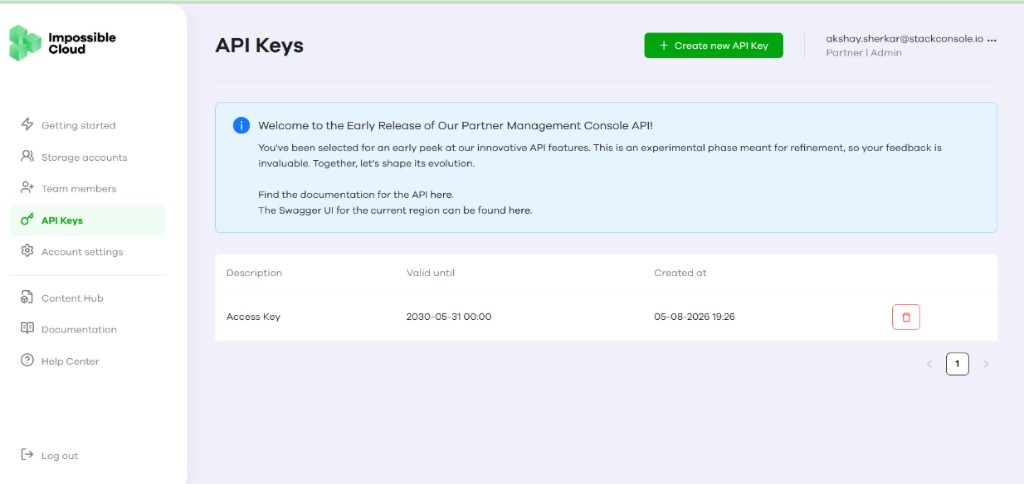
The portal lists existing keys with Description, Valid until, and Created at. Use the trash icon to revoke a key you no longer need.
Impossible Cloud may show an early-release banner on the API Keys page with links to Partner Management Console API documentation and regional Swagger UI. Use those references when validating Beta and V1 endpoints before entering credentials in CMP.
The API key value is displayed only once at creation. Store it securely immediately. If the key is lost, it cannot be retrieved — generate a new key. Expired keys (past Valid until) no longer authenticate API requests.
| Field | Value |
|---|---|
| API key (Bearer token) | (paste into CMP Provider Setup → API Key (Bearer Token)) |
4. API endpoints
Stack Console uses two Impossible Cloud API bases:
| Endpoint | Purpose | Example |
|---|---|---|
| Beta Partner API | Primary integration — account and storage operations | https://api.partner.impossiblecloud.com/beta |
| V1 (ICMC) API | Legacy / account-management APIs referenced in Provider Config | https://api.partner.impossiblecloud.com/v1 |
Enter the Beta URL in Provider Setup → API Endpoint. Enter the V1 URL in Provider Config → ICMC API Endpoint — see Connecting CMP to Impossible Cloud.
The current integration uses the Impossible Cloud Beta API. Some APIs are still unavailable in beta — for example, the storage account deletion API is not yet provided. Account deletion behaviour is documented under Provider limitations.
5. Cloud Provider services
Enable Object Storage only when configuring Impossible Cloud in CMP. Impossible Cloud integration in Stack Console is object-storage focused.
6. S3 region and endpoint configuration
S3-compatible regions and endpoints must be configured so CMP can perform bucket and object operations through S3 APIs.
| Area | Detail |
|---|---|
| S3 region | Region code used for bucket placement — for example eu-central-2 |
| S3 endpoint | Regional S3 URI — for example https://eu-central-2.storage.impossibleapi.net |
| Access | CMP must reach S3 endpoints from the CMP VM and customers must reach them for S3 CLI / SDK access |
Map each region to a CMP Zone during Provider Setup — Step 3.
7. CMP VM connectivity
From all CMP VMs, the Impossible Cloud Partner API and S3 endpoints must be reachable over the network.
# Partner Beta API — replace with your deployment URL
curl -I https://api.partner.impossiblecloud.com/beta

# S3 endpoint — replace with your region endpoint
curl -I https://eu-central-2.storage.impossibleapi.net
Use Check Connection in CMP Provider Setup after entering the API endpoint and key.
8. Provider limitations
Understand these Impossible Cloud constraints before go-live:
Storage accounts (partner-managed IAM)
Storage accounts are created as partner-managed IAM (API-only) users. S3 credentials (access key and secret key) can only be generated for IAM users — CMP requires these credentials for bucket and object operations.
Customer console login to the Impossible Cloud storage account is not supported by the current Partner API integration. Console login could only be enabled through AWS-compatible IAM APIs outside this integration path.
Bucket limit
Each object storage service supports a maximum of 100 buckets. This is a fixed Impossible Cloud provider limit — it cannot be increased or decreased in CMP or through the Partner API. More than 100 buckets cannot be created per storage account; plan customer workloads accordingly.
Object Lock
Disabling Object Lock after bucket creation is not supported — consistent with AWS S3 behaviour. Object Lock cannot be removed once enabled on a bucket.
Bucket emptying
There is no API to enable or trigger bucket emptying. Emptying is available only through the Impossible Cloud UI. Programmatically, delete objects individually with standard S3 Delete Object / Delete Objects APIs.
Storage account deletion
Immediate deletion of a storage account is not supported. Deletion always starts a 30-day grace period during which the account is read-only and no new data can be written. Status can be viewed or updated through V1/Beta account management APIs, but the grace period cannot be bypassed.
9. Checklist
Requirements to provide (send to StackConsole)
- Partner API key (Bearer token)
- Beta API endpoint — for example
https://api.partner.impossiblecloud.com/beta - V1 ICMC API endpoint — for example
https://api.partner.impossiblecloud.com/v1 - S3 region and S3 endpoint for each zone
- Cloud Provider Services — Object Storage
Requirements to configure
- Impossible Cloud Partner Portal access
- Partner API key (Bearer token) generated and stored securely
- Beta API endpoint:
https://api.partner.impossiblecloud.com/beta(or your partner URL) - V1 ICMC API endpoint noted for Provider Config:
https://api.partner.impossiblecloud.com/v1 - At least one S3 region and S3 endpoint mapped to a CMP zone
- Object Storage selected as the cloud provider service
- CMP VM can reach Partner API and S3 endpoints
Verification
- Check Connection succeeds in Provider Setup
- Zone mapping includes correct Region and S3 URI
- Storage setting created for object storage packages
- Object Storage packages configured on the rate card