Threshold (Spending Cap)
A Threshold (Spending Cap) is a safety limit that restricts unbilled usage exposure for accounts that consume resources before paying. It protects cloud providers from runaway usage, fraudulent provisioning, and bad debt by enforcing early invoicing or service creation restrictions before the standard billing cycle ends.
Threshold applies to Postpaid and Manual payment modes.
Why Threshold Matters
In Postpaid and Manual billing modes, customers are billed in arrears (after resource consumption). Without a threshold:
- An account could run compute-heavy instances or large volumes for an entire month without paying.
- If payment fails at cycle end or the customer abandons the account, the provider absorbs significant financial loss.
By enforcing a threshold, CMP monitors accumulated unbilled charges in real time and takes immediate action as soon as the threshold limit is reached.
Threshold Hierarchy
Thresholds can be defined at two tiers in CMP: Global Currency Level and Client-Specific Override.
1. Global Currency Thresholds
Configured per currency at the platform level. CMP allows providers to establish separate spending caps based on customer account classification:
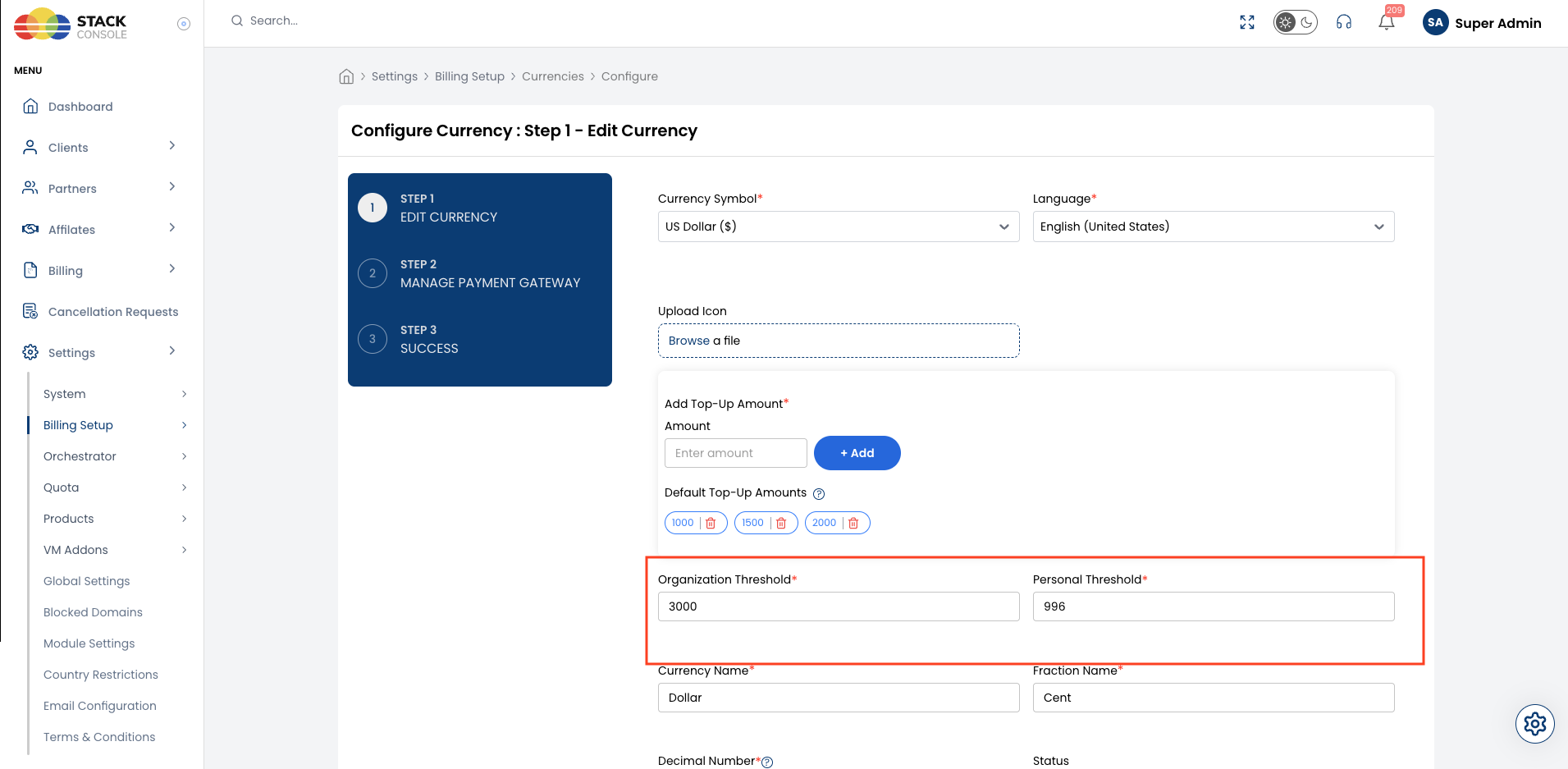
- Organization Threshold* — Spending cap applied to registered enterprise and business accounts (e.g.
$3,000). Corporate customers generally require higher compute flexibility to avoid frequent mid-month billing interruptions. - Personal Threshold* — Spending cap applied to individual personal accounts (e.g.
$995). Tighter limits are enforced to protect against credit card fraud and inadvertent resource sprawl.
Admin path: Settings → Billing Setup → Currencies → Configure (Step 1 - Edit Currency)
| Field | Description | Requirement |
|---|---|---|
| Organization Threshold* | Spending cap applied to customer accounts classified as Organization. | Mandatory |
| Personal Threshold* | Spending cap applied to customer accounts classified as Personal. | Mandatory |
2. Client-Level Override
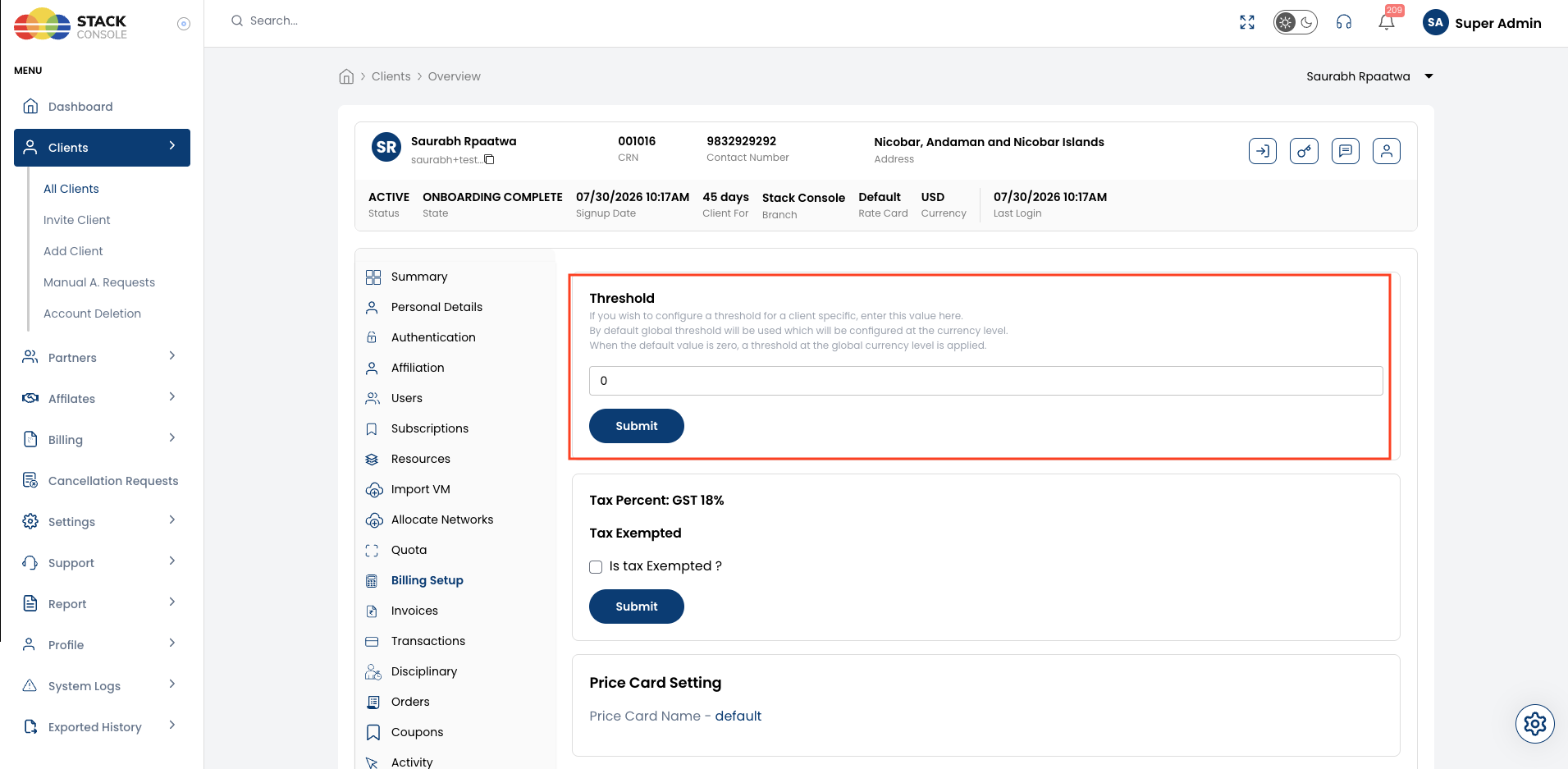
Admins can override the global currency threshold for specific clients who need custom spending caps (e.g., VIP enterprise clients needing higher allowances, or high-risk accounts requiring stricter limits).
Admin path: Clients → [Select Customer] → Billing Setup → Threshold
| Value Entered | Effective Threshold |
|---|---|
0 (Default) | The client inherits the global threshold configured for their currency and account type (Organization or Personal). |
> 0 (Custom Value) | The entered value overrides the global currency threshold specifically for this customer. |
Admins can also assign the client-specific threshold during initial customer creation in Clients → Register Client (Step 2 — Payment Mode & Pricing Settings).
System Behaviour on Threshold Breach
When a customer's unbilled usage reaches their defined threshold limit, CMP's response depends on the platform configuration setting generate_threshold_invoice.
Configuration Flag: generate_threshold_invoice
Providers configure this setting in Admin Panel → Global Settings (or verify it via Billing → Invoices → Billing Settings).
Scenario A: generate_threshold_invoice = true (Default)
When generate_threshold_invoice is set to true, CMP immediately generates an invoice as soon as the threshold limit is reached, regardless of whether the monthly billing cycle has ended.
Postpaid Accounts
- Invoice Generation: CMP generates a payable invoice for the accumulated threshold amount.
- Automatic Charge: CMP automatically attempts to charge the customer's saved payment method (e.g., credit card via payment gateway).
- Threshold Reset: The customer's accumulated threshold usage counter resets to 0.
- Uninterrupted Operations: Because the invoice is generated and payment is initiated, the customer can continue creating and using cloud services up to the threshold amount again.
Manual Accounts
- Invoice Generation: CMP generates a payable invoice for the threshold amount.
- Threshold Reset: The accumulated threshold usage counter resets to 0.
- Notification & Settlement: An invoice notification is sent to the customer. Payment is settled offline (bank transfer, cheque, etc.), and an administrator manually marks the invoice as paid upon receipt.
- Uninterrupted Operations: The customer can continue provisioning resources within their renewed threshold limit.
If a high-usage customer reaches the threshold multiple times in a month, CMP generates a separate invoice each time and resets the counter each time. Any remaining usage at the end of the month is billed in the standard month-end renewal invoice.
Scenario B: generate_threshold_invoice = false (Service Creation Blocked)
When generate_threshold_invoice is set to false, CMP acts as a strict spending ceiling without early invoice generation:
- No Invoice Generated: CMP does not create an invoice when the threshold is reached.
- Notification Alert: CMP sends automated threshold notification emails to the customer and platform administrators.
- Service Creation Blocked: The customer is prevented from creating new services (cannot deploy new VMs, storage volumes, or network resources).
- Existing Services: Currently active instances and services continue running, but new provisioning remains blocked until:
- The month-end billing cycle generates an invoice and it is settled, or
- An administrator increases the customer's threshold override in Clients → [Customer] → Billing Setup.
generate_threshold_invoice = falseUse this mode when you want to enforce strict hard spending limits before allowing customers to deploy more infrastructure, rather than automatically billing cards mid-cycle.
Threshold Behaviour Comparison
| Feature / Behavior | generate_threshold_invoice = true (Default) | generate_threshold_invoice = false |
|---|---|---|
| Invoice on Threshold Hit | ✅ Generated immediately | ❌ Not generated |
| Postpaid Auto-Charge | Auto-charges saved payment method immediately | N/A (no invoice generated) |
| Threshold Reset | Resets counter to 0 upon invoice creation | Does not reset until cycle invoice or admin adjustment |
| Customer Notifications | Invoice generated and payment receipt notifications sent | Threshold limit breach notification sent |
| Service Creation Impact | ✅ Allowed — customer can continue deploying services | ❌ Blocked — customer cannot create new services |
| Existing Services Impact | Uninterrupted | Uninterrupted (active services continue running) |
| Primary Use Case | Continuous billing & collection for active workloads | Hard budgetary limits and risk containment |
Threshold vs. Monthly Billing Cycle
Threshold billing works in synergy with periodic billing cycles:
| Trigger | Timing | Purpose |
|---|---|---|
| Threshold Hit | Any time unbilled usage reaches the cap | Limits exposure during the active billing period |
| Cycle Renewal (e.g. Month End) | 1st of every month (or cycle renewal date) | Invoices any remaining usage accrued since the last threshold reset |
Example Flow:
- Customer has a threshold of $1,000.
- On Day 12, accrued usage reaches $1,000:
- CMP generates Invoice #1 for $1,000.
- Saved card is charged, and threshold resets to $0.
- On Day 24, accrued usage reaches $1,000 again:
- CMP generates Invoice #2 for $1,000.
- Saved card is charged, and threshold resets to $0.
- On Day 31 (Month End), accrued usage is $450:
- Standard monthly renewal triggers.
- CMP generates Invoice #3 for $450.
- Total billed for the month across all invoices: $2,450.