Preparing for Contract Billing
Complete this setup before customers can deploy VMs (and related packages) on a contract cycle. Work in staging first — these settings drive live billing jobs.
1. Prerequisites
- DATE_TO_DATE is acceptable for contract cycles (enforced when Enable Service Contract is on).
- You know which payment modes should offer contracts (Prepaid, Postpaid, Manual — independently).
- You are configuring regular customer accounts (not reseller sub-tenants).
- Rate card Yearly (and other long-cycle) prices are set for every package customers can put on a contract.
- You understand that existing services created before enablement stay non-contract.
2. Rate card pricing
CMP path: Settings → Billing Setup → Rate Cards → [Rate Card] → Packages → [Service] → Edit (for example VM Package)
Contract billing does not use the Monthly column as the installment. It uses:
Baseline monthly installment = Yearly price ÷ 12
Final monthly charge         = Baseline × (1 − Contract Discount % / 100)
Billing cycle and pricing
Required. Enter Hourly, Monthly, Quarterly, and Yearly (and any other enabled cycles) for the package currency.
- Yearly must be a real price.
0means CMP cannot compute the monthly installment. - Monthly is used for standard Monthly billing (a fixed recurring charge for the entire month). It is not the contract baseline.
- Do not pre-discount the Yearly price. Put the list Yearly amount here; Contract Discount % on the billing rule applies the reduction.
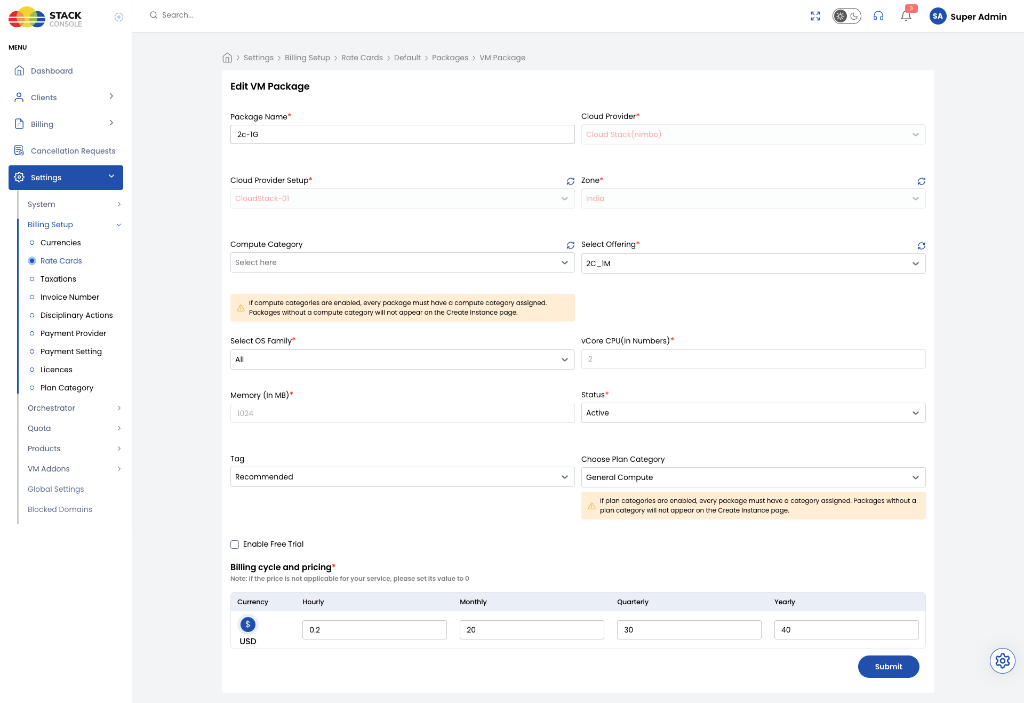
Repeat Yearly (and other contract-cycle) prices on volume, IP, and network packages if those lines appear on Review & Deploy.
You do not need duplicate packages for prepaid vs postpaid.
- Enter the full Yearly list price on the rate card.
- On Update Billing Rule:
- Prepaid — Contract Status = Disable if prepaid should pay the full Yearly amount up front (normal cycle, no contract lock).
- Postpaid (and/or Manual) — Enable, set Contract Discount (%) (for example
10) and Cancellation Deadline (Months).
Prepaid then charges Yearly up front. Postpaid takes the same Yearly price, divides by 12, applies the discount, and bills monthly.
3. Update Billing Rule
CMP path: Settings → Billing Setup → open Update Billing Rule for the target Provider Service.
These values feed calculation jobs. Change them on a test account or staging portal first. After customers have active contract services, you cannot disable contracts for that service until those contracts finish or an admin terminates the services.
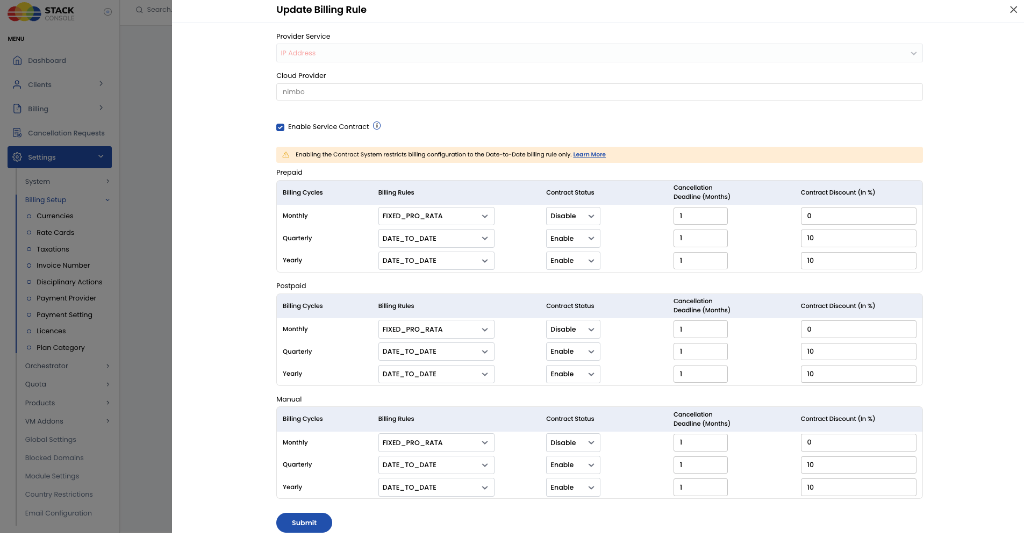
Provider Service
Required. The resource this rule applies to (for example IP Address, Virtual Machine, Storage). Enable contracts on each service you want itemized on Review & Deploy.
Cloud Provider
Read-only. Orchestrator for this rule (for example nimbo / CloudStack).
Enable Service Contract
Required to offer contracts. Check to turn on the contract workflow for this service.
The UI then shows:
Enabling the Contract System restricts billing configuration to the Date-to-Date billing rule only.
Contract rows (Quarterly, Yearly, …) must use DATE_TO_DATE. Monthly typically stays FIXED_PRO_RATA with Contract Status = Disable.
Payment mode grids
The same columns repeat under Prepaid, Postpaid, and Manual. Set each mode separately.
Billing Cycles
Read-only per row. Cycles enabled for this service (commonly Monthly, Quarterly, Yearly).
Billing Rules
Required. For contract rows use DATE_TO_DATE. For Monthly use the non-contract rule you already run (usually FIXED_PRO_RATA).
Contract Status
Required.
| Value | Behaviour |
|---|---|
| Disable | Normal cycle (uses the standard cycle price configured in the rate card without contract commitments or monthly installment splitting). |
| Enable | Term lock, monthly installment, discount, deletion rules, auto-renewal deadline. Use on Quarterly / Yearly (and other long cycles you offer as contracts). |
Cancellation Deadline (Months)
Required when Contract Status is Enable. Integer notice window before the contract end date. Example: 12-month term, deadline 1 → customer must schedule End of billing period before the last month (the Review & Deploy modal shows the exact timestamp). After that instant, cancellation does not stop compulsory renewal.
Contract Discount (in %)
Required when Enable. Percent off the Yearly ÷ 12 baseline. Use 0 if you want the lock-in without a discount. Typical commitment discounts are 5–20. Monthly rows stay 0.
Click Submit.
- Cancellation before the deadline → no auto-renewal; service runs to the To date, then CMP tears it down.
- Cancellation after the deadline → compulsory renewal for another full term.
- Customers cannot choose Immediate destroy. For an early exit, an administrator deletes the VM (or uses admin destroy). Bill any buyout with a custom invoice — CMP does not auto-charge a penalty.
4. Contract terms URL (optional)
If your portal exposes a contract documentation or terms URL in Settings (system / profile / terms), point it at your MSA or cancellation policy. When configured, CMP can show that link on deploy / Review & Deploy so customers see the legal terms next to the deadline timestamp.
Use your existing Terms and Conditions setup for registration T&C; do not assume it automatically covers contract buyout language unless you add it.
5. Verify
- Use a Postpaid test customer (and a Prepaid one if you enabled that mode).
- Instances → Create Instance — confirm Quarterly / Yearly tabs and monthly prices ≈
(Yearly ÷ 12) × (1 − discount %). - Review & Deploy — line items, discount %, term, From / To, cancellation deadline.
- Deploy — Yearly Contract / Quarterly Contract badge; record under Billing → Subscriptions and Account Statement → Service Contracts.
- Try Request To Destroy Service — Immediate must fail; End of billing period must succeed (when still before the deadline).
- Confirm a VM created before enablement has no contract badge.
Admin: open Cancellation Requests after a customer submits destroy-at-end-of-period.
Next steps
- Calculations & Lifecycle — formulas, upgrades, renewal window, admin delete
- Overview — Hourly PAYG vs fixed cycle pricing vs contracts