Contract Billing Calculations & Lifecycle
How CMP prices a contract month, handles a mid-month start or upgrade, renews or ends the term, and what you do for an early exit.
1. Monthly installment
CMP reads the Yearly (or matching long-cycle) rate card price and ignores the Monthly column for the installment.
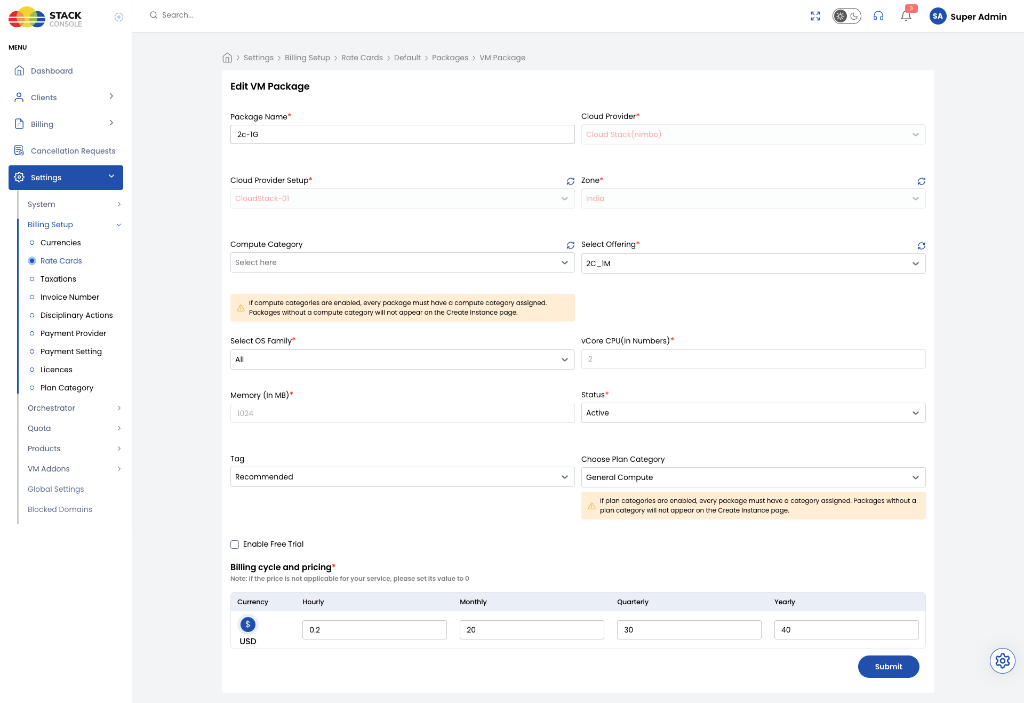
Contract monthly baseline = Yearly price ÷ 12
Discount amount           = Baseline × (Discount % ÷ 100)
Final monthly charge      = Baseline − Discount amount
Example (annual contract, 10% discount)
| Input | Value |
|---|---|
| Rate card Yearly | $1,000.00 |
| Rate card Monthly | $30.00 (not used for the contract) |
| Contract Discount | 10% |
Baseline = 1000 ÷ 12 = 83.333
Discount = 83.333 × 10% = 8.333
Final    = 75.00 per month for 12 months
The customer-facing Review & Deploy copy may say “discount on the original monthly price”. That monthly figure is this Yearly ÷ 12 baseline, not the Monthly rate-card cell.
Discounts are taken from Update Billing Rule for that payment mode (Prepaid / Postpaid / Manual). Same Yearly list price; different % per mode if you configured it that way.
2. First month (pro-rata)
Review & Deploy states monthly services use:
(Monthly installment / Avg days in month) × days remaining in the current month
CMP’s usual average month length is 30.5 days (same basis as pricing formulas). Use 30.5 in admin examples unless a portal screen shows a different divisor.
Example (start 15 January, baseline $83.333 before discount)
Daily rate     = 83.333 ÷ 30.5
January charge = daily rate × remaining days in January (inclusive of start day)
Later full months bill the discounted installment (for example $75.00), until the DATE_TO_DATE To date.
3. Invoicing vs wallet
| Mode | At deploy | Recurring |
|---|---|---|
| Postpaid / Manual | No full-term upfront invoice; billed monthly | Monthly invoice (or OAOI line) for the installment, including first-month pro-rata |
| Prepaid | Wallet / infra credits; monthly deduction rather than deducting the full-term cycle price upfront | Monthly deduction of the installment (first period can be pro-rata) |
The From / To dates on Review & Deploy are the contract term (DATE_TO_DATE). They are not “one invoice covering From–To”.
4. Mid-term plan upgrades
Upgrade keeps the original end date. CMP does not restart a new 12-month clock.
- Immediate / current-period charge for the old plan up to the upgrade instant.
- Old contract marked closed.
- New contract starts at upgrade time with the same To date.
- New plan is pro-rated from upgrade through month end, then full installments.
Worked example
- Old plan: $120/year → 10% off → $9.00/month. Term 1 Jan 2026 – 31 Dec 2026.
- Upgrade 15 Mar 2026 to $200/year → 10% off → $15.00/month.
| Step | When | Period | Plan | Amount |
|---|---|---|---|---|
| Prior months | 1 Feb / 1 Mar | Jan, Feb | Old | $9.00 each |
| Old plan close | 15 Mar | 1–15 Mar | Old | 15 × (9.00 ÷ 30.5) ≈ $4.43 |
| New plan start | Next invoice run | 15–31 Mar | New | 17 × (15.00 ÷ 30.5) ≈ $8.36 |
| Ongoing | From April | Full months | New | $15.00/month through original end date |
Downgrade / scale-down is for hourly and pay-as-you-go services. Do not promise self-service VM size-down on an active contract. If the customer must reduce capacity, treat it as a commercial exception (admin process), not a portal Change Plan to a smaller package.
5. Renewal and cancellation deadline
Cancellation deadline timestamp = Contract end date − Cancellation Deadline (Months)
The exact clock time is shown on Review & Deploy (example: cancelled before 01:59 20 Nov, 2026).
| Setup | Window that stops auto-renewal |
|---|---|
| 12-month term, deadline 1 | Roughly months 1–10; requests in the last month do not stop renewal |
| 12-month term, deadline 4 | Roughly months 1–7; later requests apply only after a renewed term (they do not cancel the current compulsory renewal) |
If the customer does not submit End of billing period before the deadline, CMP renews for another full term.
6. Customer cancellation flow
Customer path: instance overview → destroy / trash → Request To Destroy Service
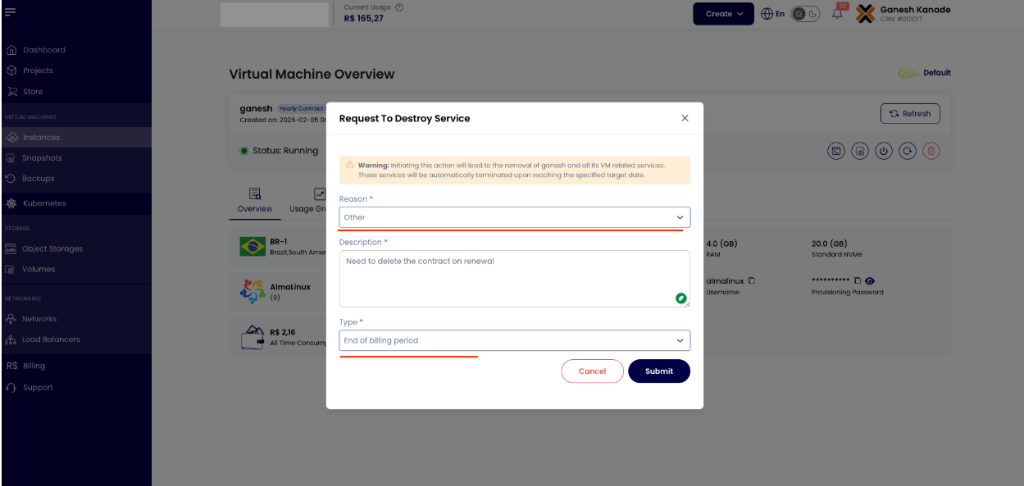
Reason
Required. Dropdown (for example Other, project completion, cost).
Description
Required. Free text for the audit trail.
Type
Required.
| Value | Contract service |
|---|---|
| End of billing period | Allowed. Service stays up and billed until To. No renewal. Then CMP deletes. |
| Immediate | Blocked. Error: Immediate cancellation is not allowed for contract service. Please choose End of Billing Period to proceed. |
After a valid request:
- Confirmation email to the account owner
- Listed as Scheduled for deletion under Billing → Subscriptions
- Admin can review Cancellation Requests
- Monthly installments continue until maturity
- On the end date, CMP tears down the instance and closes the contract
The contract does not end while the VM still exists. Deletion (scheduled or admin) is what closes it.
7. Admin early termination
When the customer must leave before the To date:
- Customer contacts you (portal cannot Immediate-destroy).
- Admin deletes via admin instance management or login as the customer.
- Infrastructure is removed; the contract will not renew; further installments stop.
CMP does not compute remaining-term buyout. If your MSA charges an early-termination fee, create a custom invoice.
Lifecycle FAQ
Does stopping a VM pause contract charges?
Stoppable service billing (compute pause while stopped) is for hourly stoppable resources. A contract installment is a term commitment — do not assume stop = no monthly contract charge. Storage and IPs on the contract continue as configured.
What appears on One Account One Invoice?
For postpaid/manual, the monthly installment (rather than the full yearly cycle price) can appear on the consolidated invoice. Prepaid is not OAOI. Plain DATE_TO_DATE without contracts still does not consolidate — see OAOI.
Can I change discount % on a running contract?
Treat billing-rule changes as forward-looking for new deploys. Do not expect a live contract’s locked installment to follow a later discount edit. Change running commercials with a documented admin process.
Hourly snapshots on a contract VM?
Snapshot/backup/bandwidth/ISO remain hourly service types. They are not converted into the VM’s yearly contract installment.
Related
- Service Contracts Overview
- Preparing for Contract Billing
- DATE_TO_DATE
- Pricing formulas
- VM Downgrade — pay-as-you-go / hourly, not contracts
- Custom invoice
- Account Statement