Service Contracts Overview
A service contract is a fixed-term commitment between you (the cloud provider) and the customer. The customer keeps the service for a defined term (for example 3 or 12 months) in exchange for a contract discount. Rather than charging the full multi-month cycle price at create or renew, CMP bills a predictable monthly installment based on your rate card pricing for the length of the term.
CMP paths
| Who | Path |
|---|---|
| Admin — enable contracts | Settings → Billing Setup → Update Billing Rule (per provider service) |
| Admin — package prices | Settings → Billing Setup → Rate Cards → [Rate Card] → Packages |
| Admin — cancellation queue | Cancellation Requests |
| Customer — deploy | Create Instance → billing cycle tabs → Review & Deploy |
| Customer — statement | Billing → Account Statement → Service Contracts |
| Customer — subscriptions | Billing → Subscriptions |
- Missed cancellation deadline = compulsory renewal. You set Cancellation Deadline (Months) on the billing rule. If the customer does not schedule cancellation before that deadline, CMP renews the contract for another full term.
- Customers cannot immediately destroy a contract service. They can only choose End of billing period (before the deadline). Immediate is blocked.
- Early destruction is admin-only. If the customer must leave before the term ends, an administrator deletes the service (admin portal or login-as-customer). CMP does not auto-calculate a penalty — raise a custom invoice if your MSA requires a buyout.
What a contract is (and is not)
| Pay as you go (Hourly only) | Fixed recurring cycle (Monthly, or Quarterly / Yearly without contract) | Service contract (Term commitment) | |
|---|---|---|---|
| Customer UI | Hourly tab | Monthly, or long cycle tabs with Contract Status = Disable | Quarterly / Yearly (and other enabled long cycles) with Contract Status = Enable |
| Charge pattern | Usage-based: charged only for hours used | Fixed charge for the entire month or cycle (based on admin rate card pricing) | Monthly installment for the term (derived from Yearly ÷ 12 minus discount) |
| Lock-in | No lock-in; delete anytime | Delete anytime (full month/period charged; no refund for unused time) | Binding term; delete blocked; badge on the instance |
| Discount | Standard hourly rate | Rate card cycle price | Rate card Yearly ÷ 12, then Contract Discount % |
| Billing rule | Enforced FIXED_PRO_RATA | Any supported rule (e.g. FIXED_PRORATA, DATE_TO_DATE) | DATE_TO_DATE only for contract cycles |
| Who should use it | Flexible, bursty, or short-lived workloads | Steady production VMs (Monthly) or upfront prepaid long cycles | Postpaid/manual (and prepaid) customers committed to a term with monthly billing |
Why contracts exist for postpaid: a normal yearly cycle on postpaid can mean up to 12 months of unbilled consumption. A contract still binds the customer for 12 months, but you invoice (or deduct) every month.
Standard Annual vs. Contract Annual
The difference between Standard Annual (Billing Cycle) and Contract Annual (Service Contract) is the most critical distinction for providers:
| Dimension | Standard Annual (Billing Cycle) (Recommended for Prepaid only) | Contract Annual (Service Contract) (Prepaid, Postpaid & Manual) |
|---|---|---|
| Recommended payment mode | ✅ Recommended for PREPAID only (payment collected upfront) | ✅ Prepaid, Postpaid, and Manual (installments collected monthly) |
| Pricing basis | Rate card package Yearly price | Baseline Yearly ÷ 12 minus Contract Discount % |
| Payment collection | Full 12-month rate card price charged at create / renewal | Divided into 12 monthly installments billed each month |
| Postpaid risk | ⚠️ High risk — up to 12 months of unbilled consumption | ✅ Safe — predictable monthly invoice generated each month |
| Customer deletion | Customer can delete instance anytime self-service | Deletion blocked — only scheduled cancellation permitted |
| Commitment lock-in | Paid subscription period; no contractual badge or lock | Binding legal term; instance tagged with Yearly Contract badge |
| Renewal rules | Normal subscription renewal | Compulsory auto-renewal for another full year if deadline is missed |
| Cancellation cutoff | Cancel anytime prior to renewal | Strict Cancellation Deadline (Months) window before end date |
| Early termination | Customer deletes VM directly in portal | Administrator only (admin deletes VM and invoices any buyout fee) |
| Where to configure | Billing → Rate Cards (Package Yearly price) | Settings → Billing Setup → Update Billing Rule (Contract Status = Enable) |
Requirements
Configure this before customers can pick a contract cycle.
| Requirement | Supported value | Notes |
|---|---|---|
| Billing cycle | Quarterly or longer | Hourly is pay-as-you-go, and Monthly is a fixed charge for the entire month. On Update Billing Rule, keep Contract Status = Disable for Monthly. |
| Billing rule | DATE_TO_DATE only | Enabling Enable Service Contract restricts contract cycles to Date-to-Date. The term runs creation date → anniversary. |
| Payment mode | Prepaid, Postpaid, and Manual | Each mode has its own Contract Status / discount / deadline rows. You can enable Postpaid only and leave Prepaid disabled. |
| Account type | Regular provider → customer accounts | Not supported for partner / reseller multi-tier tenant models. |
| Rate card | Yearly price (and other long-cycle prices you offer) | Contract math uses Yearly ÷ 12, not the standalone Monthly price. A Yearly price of 0 blocks the installment calculation. |
| Scope | Per provider service | Enable separately for Virtual Machine, IP Address, Storage, and so on. |
After customers have active contract services, you cannot disable contract billing for that service until those contracts end or an administrator terminates the services.
Enabling contracts does not convert VMs that were created before the flag was on. Those remain normal (non-contract) services. Only new deployments after enablement pick up the contract workflow.
Supported term lengths
Term length is the billing cycle the customer selects:
| Cycle tab | Term |
|---|---|
| Quarterly | 3 months |
| Semi-annually | 6 months (when that cycle is enabled on the service) |
| Annually / Yearly | 12 months |
| Bi-annually | 24 months (when enabled) |
| Tri-annually | 36 months (when enabled) |
The Update Billing Rule grid lists the cycles enabled for that provider service. Typical deployments show Monthly / Quarterly / Yearly; extra long cycles appear only if they are enabled for you.
Customer experience
1. Cycle tabs at deploy
On Create Instance, customers see Pay as you go (Hourly), standard fixed cycles (Monthly), and commitment tabs such as Quarterly and Yearly. Choosing a contract tab recalculates the monthly installment amount using your discount.
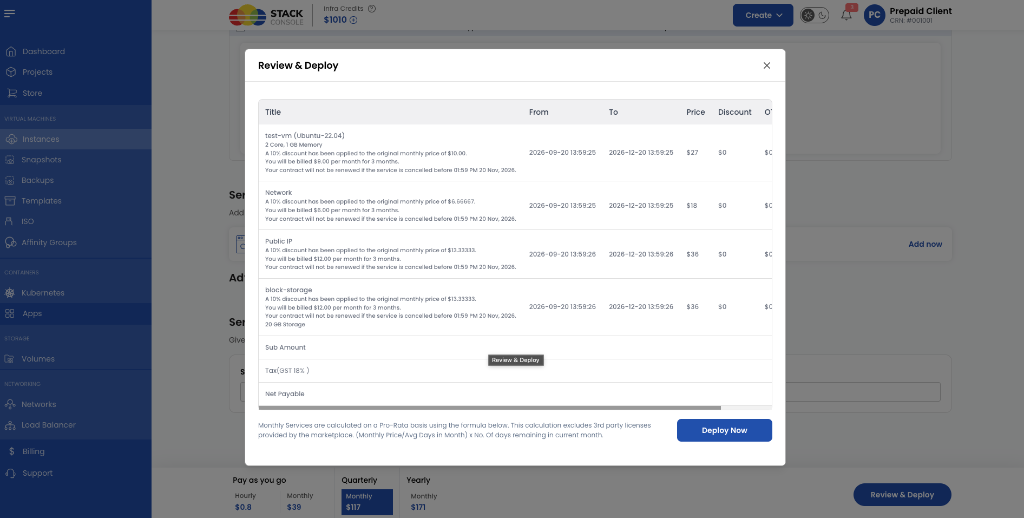
2. Review & Deploy
The Review & Deploy modal itemizes each component (compute, network, public IP, block storage) with:
- Original monthly baseline vs Contract Discount %
- Amount billed per month and term length (for example “for 3 months”)
- Contract From / To (DATE_TO_DATE window)
- Cancellation deadline timestamp (“will not be renewed if cancelled before …”)
- First-period pro-rata note using average days in the month
3. After deploy
| Place | What the customer sees |
|---|---|
| Instance listing / overview | Badge such as Quarterly Contract or Yearly Contract |
| Billing → Subscriptions | Term, dates, and services Scheduled for deletion |
| Account Statement → Service Contracts | Contract audit trail, monthly amounts, lifecycle state |
| Destroy / delete | Request To Destroy Service — Immediate blocked; End of billing period allowed |
How monthly installments are billed
The contract term is DATE_TO_DATE (for example 20 Sep → 20 Dec). The money is still a monthly installment, not one invoice for the whole term.
| Payment mode | Typical collection |
|---|---|
| Postpaid / Manual | Monthly invoice run (and OAOI line items when that feature is on). Invoices monthly installments rather than the whole term at deploy. |
| Prepaid | Monthly installment deducted from infra credits / wallet, rather than deducting the full multi-month cycle price at creation. First days in the month can be pro-rata (see Review & Deploy footer). |
Full formulas: Calculations & Lifecycle.
Provider FAQ
Can prepaid customers use contracts?
Yes. Update Billing Rule has Prepaid, Postpaid, and Manual blocks. Set Contract Status = Enable only on the modes you want. A common pattern is Postpaid Enable + Prepaid Disable, so prepaid customers still pay the full Yearly rate card price up front as a normal cycle.
Do I need two rate cards (one prepaid, one postpaid)?
No. Put the full Yearly price on the package. Discounts and enablement are per payment mode on the billing rule.
Are hourly or monthly services contracts?
No. Hourly is pay-as-you-go, and Monthly is a fixed charge for the entire month. Keep Contract Status = Disable on Monthly.
Can the customer downgrade / scale down on a contract?
No. Plan scale-down is for hourly (pay-as-you-go). Contract services do not support customer self-service downgrade. Upgrades close the old contract and open a new one that keeps the original end date — see Calculations & Lifecycle.
What if the customer deletes the VM?
The contract stays in force until the VM is deleted. Customer self-delete is blocked until End of billing period (and only if they cancelled before the deadline). Admin delete ends the contract.
Do snapshots, backups, bandwidth, or ISO use contracts?
Those service types stay hourly in CMP. Contracts apply to the provider services you enable (typically VM, volume, IP, network packages).
Is this the same as Store “Enable Service Contract” on a product?
No. Store products have a separate optional Enable Service Contract flag for catalogue items. This section is orchestrator service contract billing (VMs, IPs, disks).
Can resellers use this?
No. Regular provider-to-client accounts only.
Where do I see destroy requests?
Admin Cancellation Requests. Customers submit Request To Destroy Service from the instance.
Next steps
- Preparing for Contract Billing — rate cards, Update Billing Rule fields, test checklist
- Calculations & Lifecycle — Yearly ÷ 12, pro-rata, upgrades, renewal deadline, admin early delete
Related
- DATE_TO_DATE
- Billing cycles — Quarterly · Annually
- Payment modes — Prepaid · Postpaid · Manual
- One Account One Invoice
- Account Statement
- Custom invoice — manual early-termination fees
- Billing overview