Postpaid
In postpaid mode, customers consume services first and pay invoices later. Saved payment methods can be auto-charged when invoices are due.
Postpaid is available only when both are true:
- The payment gateway natively supports saving a payment method via hosted checkout, charging it without user interaction (merchant-initiated), and variable amounts for recurring payments (for example, Stripe)
- Has Autocharge is enabled for that provider in CMP (Settings → Billing Setup → Payment Provider)
Postpaid is applicable only if those capabilities are available on the gateway. Tokenisation without a hosted save flow is a common limitation — see New Payment Gateway Requirements. Enabling Has Autocharge in CMP alone is not enough.
Use postpaid only with hourly and monthly billing cycles — not quarterly or longer.
| Risk | Why it matters |
|---|---|
| Revenue delay | Waiting months or years to collect on a long committed period |
| Fraud exposure | Customer can use services for the full cycle and leave before paying |
For quarterly and longer cycles, use prepaid or manual. See Billing Cycles — payment modes by cycle.
Set payment mode: Clients → Register Client (Step 2 — new onboarding) or Clients → [Customer] → Billing Setup (existing account)
Admin onboarding
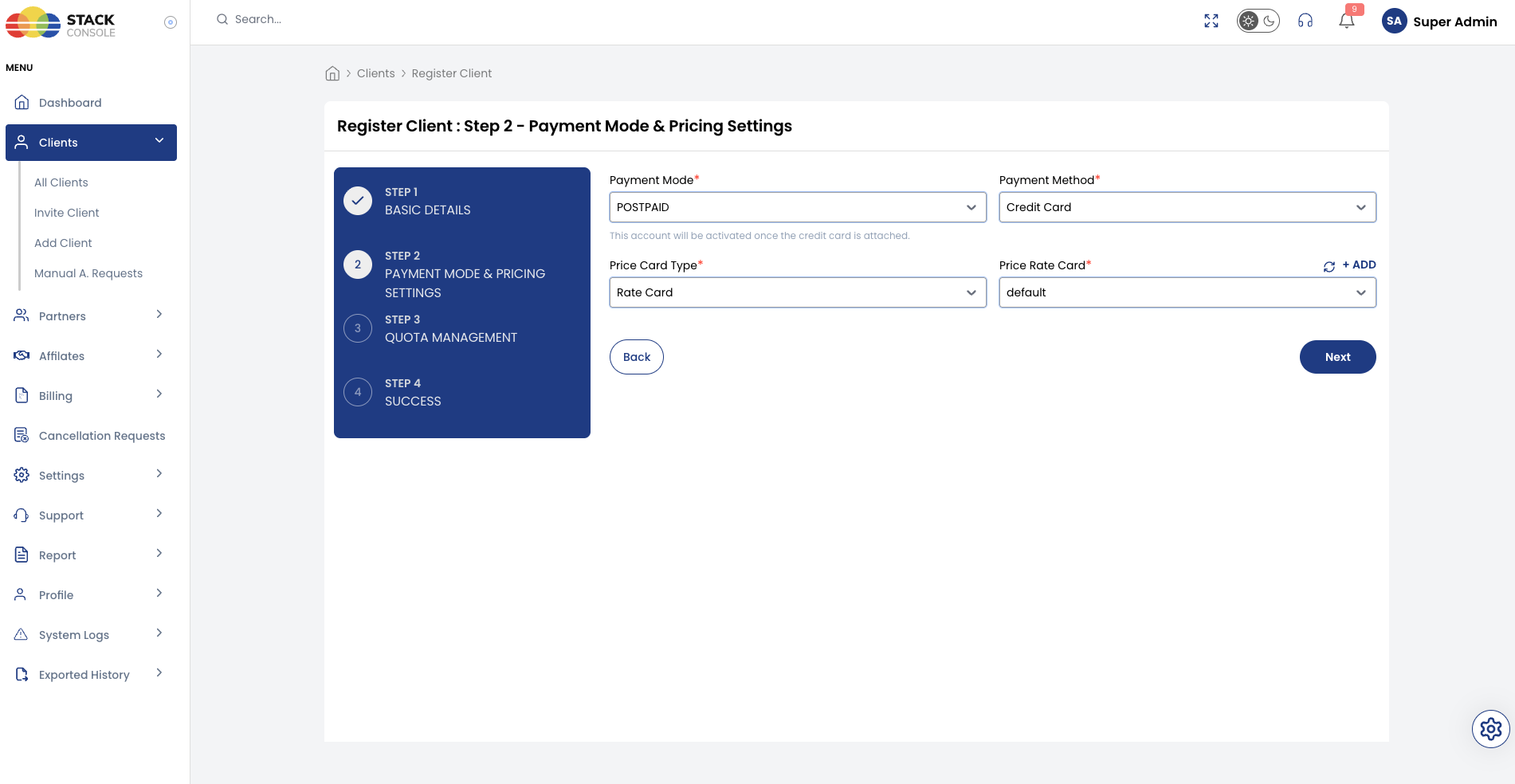
Admin selects POSTPAID when onboarding a customer via Clients → Register Client.
| Step | Action |
|---|---|
| 1 | Basic Details — enter customer information |
| 2 | Payment Mode & Pricing Settings — select POSTPAID, Payment Method (Credit Card), assign Price Rate Card |
| 3 | Quota Management — assign quotas |
| 4 | Success — customer must attach credit card to activate |
See Admin registration flow and Step 2 — Postpaid (admin).
Self-registration
Customers can select POSTPAID on the public signup form when postpaid is enabled for Customer in Payment Mode Settings. Modes marked Recommended show a badge on the form.
| Step | Action |
|---|---|
| 1 | Verify Email Address |
| 2 | Complete Payment — select POSTPAID, add and validate credit card |
Account activates once the customer attaches a saved card (requires gateway with Has Save Card and auto-charge support).
Billing cycles and postpaid
| Billing cycle | Use with postpaid? |
|---|---|
| Hourly | ✅ Recommended — usage consolidated monthly; threshold limits exposure |
| Monthly | ✅ Recommended — one billing period of outstanding exposure |
| Quarterly | ❌ Not recommended |
| Semi-annually | ❌ Not recommended |
| Annually | ❌ Not recommended |
| Bi-annually | ❌ Not recommended |
| Tri-annually | ❌ Not recommended |
Why quarterly and longer cycles do not fit postpaid:
- Revenue risk — you may wait many months or over a year before collecting payment for a committed period
- Fraud risk — a customer can provision long-cycle services, consume resources, and leave before an invoice is settled
Enable only hourly and monthly billing cycles for postpaid customers. Use prepaid or manual for quarterly and longer commitments. See Billing Cycles — payment modes by cycle.
| Rule | Behaviour |
|---|---|
| Service creation | Allowed until threshold is reached |
| Threshold breach | Invoice generated immediately + card auto-charge attempted (resets counter to 0) |
| Monthly renewal | Invoices at month end; auto-charged to saved card |
| Failed charge | Retries daily per invoice_no_of_attempts → then Frozen |
Threshold (spending cap)
Threshold limits outstanding usage exposure before the normal billing period ends. It protects cloud providers from unbilled usage accumulation and fraud.
- Global currency caps — configured separately for Organization Threshold and Personal Threshold (Settings → Billing Setup → Currencies → Configure)
- Client-level override — individual accounts can have custom thresholds (Clients → [Customer] → Billing Setup → Threshold;
0inherits global) - System behaviour on breach (
generate_threshold_invoice):- When
true(default) — CMP immediately generates an out-of-cycle invoice, auto-charges the saved payment method, and resets the threshold counter to0 - When
false— CMP sends alert notifications without generating an invoice, and blocks further service creation until limits are raised or cleared
- When
For full workflow diagrams, hierarchy configuration, screenshots, and comparison tables, see Threshold — spending cap, global currencies, and client overrides.
Service creation
CMP allows customers to create services as long as the defined threshold is not exceeded.
Service renewal
At the end of each month:
- Invoices generated based on actual usage
- Invoices automatically charged to the customer's saved card
Auto-charge failure workflow
Retry attempts
- System retries charging the card once per day
- Number of attempts controlled by global setting
invoice_no_of_attempts
Invoice frozen
If all retry attempts fail:
- Invoice marked Frozen
- Notifications sent to admin and customer
- Email templates:
FrozenInvoiceCustomerNotification,FrozenInvoiceAdminNotification
Handling frozen invoices
| Actor | Action |
|---|---|
| Admin | Verify with client → manually unfreeze invoice → system can process again |
| Customer | Open Invoice Details → attempt manual pay → on success, services continue |
Consolidated invoicing (one account, one invoice)
Postpaid (and manual) deployments can use One Account One Invoice (OAOI) so customers receive one consolidated invoice per month instead of separate invoices per service event.
Full documentation — requirements, unsupported rules (prepaid, DATE_TO_DATE), service contracts, timing, and FAQ:
One Account One Invoice (OAOI)
The DATE_TO_DATE billing rule does not support monthly consolidation. See OAOI — unsupported rules and DATE_TO_DATE.
VM upgrade billing (postpaid)
Hourly services
| Period | Charging |
|---|---|
| Before upgrade | Original hourly rate — immediate invoice |
| After upgrade | New hourly rate to month end — included in month-end invoice |
Monthly and fixed cycles
Same proration logic as prepaid upgrades.
Postpaid upgrade invoicing:
- One invoice at end of billing period (e.g. 1st of next month)
- Multiple line items on that invoice — for example:
- Line 1: 1st–12th old plan = $39.36
- Line 2: 12th–30th upgrade adjustment = $29.52
Early deletion before cycle ends
| Billing cycle | Charge |
|---|---|
| Hourly | Actual usage from creation to deletion only |
| Fixed cycles | Full period charged — no refund. Admin may grant free credits for disputes |
Admin-generated custom invoices
- Manual Payment Mode is an account settlement method where invoices are settled offline (bank wire, UPI, etc.).
- Admin-Generated Custom Invoices are ad-hoc billing documents created directly by an administrator for non-catalogue items (e.g. consulting or custom setup), independent of the account's payment mode.
| Question | Answer |
|---|---|
| Will a custom unpaid invoice auto-charge the customer's credit card immediately? | No. If an admin creates a custom unpaid invoice in a postpaid account, it will not auto-charge the customer’s saved credit card. |
| Who settles custom invoices? | Admin-generated custom invoices are not processed automatically by recurring auto-charge jobs. It is the admin’s responsibility to mark such invoices as paid, or the customer can log in to the portal and pay them manually. |
| What services can custom invoices be generated for? | Custom invoices can be generated for ad-hoc, one-off, or non-catalogue services (such as migration assistance, hardware setup, or custom consulting). Services provided and metered natively by CMP (such as VMs, Load Balancers, Kubernetes, etc.) are billed through normal cycles and cannot be directly linked to custom invoice creation. |
Admin-generated custom invoices are not processed automatically by CMP. Full step-by-step creation guide: Create Custom Invoice.
Disciplinary actions and renewals
| Disciplinary state | Renewal invoices |
|---|---|
| Freeze | System continues creating renewal invoices |
| Suspend | System continues creating renewal invoices |
| Terminated | System does not create renewal invoices |
Full workflow: Disciplinary Actions.
Invoice settings (postpaid)
Postpaid invoice timing is controlled by flags in Admin → Invoices → Invoice Settings.
| Global setting | Purpose |
|---|---|
invoice_no_of_attempts | Days/attempts to retry failed card charges |
delay_due_date_in_days | Delay invoice due date (0 = immediate) |
Postpaid invoice generation modes
CMP supports two postpaid invoice generation approaches. Both are controlled by invoice settings flags — default is false for both.
| Flag | Default | When true | When false (default) |
|---|---|---|---|
POSTPAID_ADVANCE_PRO_RATA_INVOICE | false | A pro-rata payable invoice is generated immediately at service creation | Usage records are maintained during the cycle; charges are converted to a payable invoice on the next renewal. This cycle repeats |
POSTPAID_ADVANCE_INVOICE | false | The renewal payable invoice is generated on the 1st of the month (start of month) | Usage records are maintained during the cycle; charges are converted to a payable invoice on the next renewal. This cycle repeats |
Both flags default to false. If your deployment needs advance postpaid invoicing, decide this during initial system setup and inform StackConsole so the flags can be configured correctly.
Changing this behaviour after go-live is not supported. Mid-stream changes can break billing workflows and cause invoice inconsistencies for existing services.
Default mode (false — standard postpaid)
When both flags are false:
- CMP maintains usage records during the billing cycle
- On the next renewal, accumulated usage is converted to a payable invoice
- Auto-charge runs against the payable invoice
- The cycle repeats for each subsequent period
This is the behaviour most postpaid deployments use out of the box.
Advance mode (flags enabled)
When advance flags are enabled, CMP generates payable invoices immediately on the advance schedule instead of deferring conversion of usage records to payable invoices.
| Invoice type | When generated (advance mode) |
|---|---|
| Pro-rata invoice | Immediately at service creation |
| Renewal invoice | On the 1st of the month (start of month) — not at end of month |
Example — monthly billing cycle, service created 10 Jan 2026:
| Invoice | Generated | Covers period |
|---|---|---|
| Pro-rata | 10 Jan 2026 (immediately at creation) | 10 Jan – 31 Jan 2026 |
| Next renewal | 1 Feb 2026 (start of month) | 1 Feb – 28 Feb 2026 |
Advance postpaid invoicing uses the same timing as Manual advance invoice settings — pro-rata at creation, renewal on the 1st of the month. Only the flag names differ (POSTPAID_ADVANCE_* vs MANUAL_ADVANCE_*).
Only Manual → Postpaid is supported — it happens automatically when the customer saves a card. Prepaid and postpaid accounts cannot be converted to another payment mode. See Changing payment mode.