SSLCommerz
SSLCommerz (SSLCOMMERZ) is a Bangladesh payment gateway aggregator. In CMP it is used for prepaid wallet top-ups and checkout in BDT.
Provider: sslcommerz.com/payment-gateway
| Best for | Bangladesh / BDT prepaid payments |
| Configure in CMP | Settings → Billing Setup → Payment Setting / Payment Provider |
| Currency | BDT (assign under Currencies → Configure) |
| Payment modes | Prepaid only — postpaid is not supported |
SSLCommerz in CMP has hard limits. Do not enable it as a postpaid or auto-charge gateway.
| Capability | Status |
|---|---|
| Prepaid (wallet top-up / registration charge) | Supported |
| Postpaid (saved card / invoice auto-charge) | Not available (NA) |
| Has Autocharge / variable recurring charges | Not supported — leave Has Autocharge = No |
| Manual offline settlement | No SSLCommerz auto-charge (manual stays offline) |
| Currency | Configure and assign for BDT |
If you need postpaid auto-charge, use a gateway that natively supports it (for example Stripe).
Supported payment modes at CMP
| Payment mode | Support |
|---|---|
| Prepaid | Supported |
| Postpaid | NA |
What SSLCommerz is used for in CMP
| Mode | Behaviour |
|---|---|
| Prepaid | Customer pays via SSLCommerz at wallet top-up / checkout; IPN confirms the payment |
| Postpaid | Not supported — do not set SSLCommerz as a postpaid default gateway |
| Manual | Offline payment — no SSLCommerz auto-charge |
See Payment Gateways hub.
CMP currency and amount limits
Assign SSLCommerz to BDT under Settings → Billing Setup → Currencies → Configure → Step 2.
| Setting | Value |
|---|---|
| Currency (gateway setting) | BDT |
| Min Validation Amount | 0.1 |
| Min Transaction Amount | 0.1 |
| Max Transaction Amount | 1000000 |
After credentials and branch assignment, add SSLCommerz on Currencies → Configure → Step 2 for BDT. Otherwise the gateway stays hidden. See currency assignment.
Configure SSLCommerz in CMP
- Obtain sandbox (then live) store credentials from the SSLCommerz merchant panel / live dashboard
- Open Settings → Billing Setup → Payment Setting → add or edit SSLCommerz
- Assign Branches, enter store ID / credentials, and set Is Live as appropriate
- Under Payment Provider, keep Has Autocharge = No
- Assign SSLCommerz to BDT under Currencies → Configure → Step 2
- Configure the IPN / webhook URL in the SSLCommerz panel (required for reliable payment confirmation) — see Webhook (IPN) setup
Edit Payment Gateway Settings
Path: Settings → Billing Setup → Payment Setting → edit SSLCommerz
img/screenshots/cmp-payment-gateway-sslcommerz.png

Payment Provider
Required. Select SSLCommerz.
Branches
Required. Assign to one or more branches. The gateway is visible only for customers under those branches. See branch visibility.
Store / API credentials
Required. Enter the SSLCommerz store ID and authentication credentials from the merchant panel (sandbox vs live). Keep secrets confidential.
Note
Optional. Internal description (for example, SSLCommerz BDT prepaid).
Disable On Registration
Optional. If enabled, this gateway is hidden on the self-registration form. Admins can still use it while onboarding customers from the admin panel.
Is Live
Required when going to production. Use sandbox credentials with Is Live off for testing; switch to live credentials for production.
Payment Gateway Providers
Path: Settings → Billing Setup → Payment Provider
Form title: Edit Payment Gateway Providers
img/screenshots/cmp-payment-provider-sslcommerz.png
Currencies
Required. Include BDT.
Has Autocharge
Required. Set to No. SSLCommerz is prepaid only in CMP; enabling autocharge will not make postpaid work.
Status
Required. Active or Inactive.
Webhook (IPN) setup
SSLCommerz sends an Instant Payment Notification (IPN) to CMP so the wallet/order can be updated even if the customer’s browser does not return to the site after payment.
Steps
- Log in to the SSLCommerz merchant panel:
- Sandbox: https://sandbox.sslcommerz.com/manage
- Live: use your production merchant panel URL from SSLCommerz
- Open My Stores → IPN Setting (IPN Settings)
- Enable Enable HTTP Listener
- Set the webhook URL to your CMP API IPN endpoint:
https://<CMP_API_URL>/api/sslcommerz/ipn
Example (API served under a /backend base path):
https://cmp.example.com/backend/api/sslcommerz/ipn
- Click Save
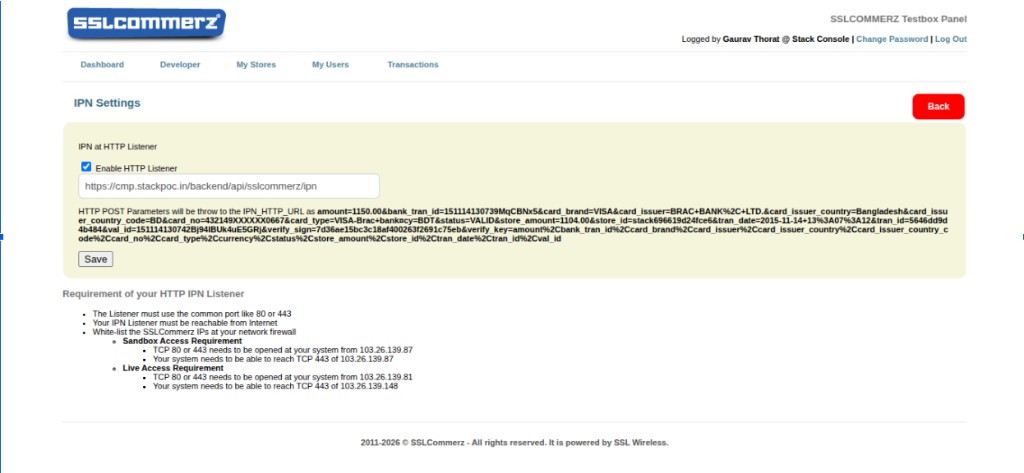
SSLCommerz posts payment parameters to the listener (for example amount, bank_tran_id, card_brand, status=VALID, and related fields). CMP validates and applies the prepaid credit / order update from this callback.
IPN listener requirements
- The listener must be publicly reachable over HTTP/HTTPS on standard ports 80 or 443
- The endpoint must be reachable from the public internet without authentication prompts or blocking redirects
- Whitelist SSLCommerz source IPs on your network firewall (see below)
Sandbox / Dev environment (firewall)
| Direction | Requirement |
|---|---|
| Inbound | Allow TCP 80 or 443 so SSLCommerz can reach the Dev VM / sandbox CMP API (IPN listener) |
| Outbound | Allow TCP 443 from the Dev VM to SSLCommerz sandbox endpoints |
Live (production) environment (firewall)
| Direction | Requirement |
|---|---|
| Inbound | Allow TCP 80 or 443 so SSLCommerz can reach the Prod Backend VM (IPN listener) |
| Outbound | Allow TCP 443 from the Prod Backend VM to SSLCommerz live endpoints |
Use the current SSLCommerz source IP allowlist from the merchant panel / SSLCommerz docs when configuring the firewall — do not hard-code IPs in runbooks; they can change.
Testing credentials (sandbox)
Use these only in the sandbox panel / test checkout — never in production.
| Field | Value |
|---|---|
| Card number | 4111 1111 1111 1111 |
| Expiry | 12/27 |
| CVV | 123 |
| Card holder name | Any name |
| OTP | 111111 or 123456 |
Before go-live checklist
- Sandbox top-up tested with the card credentials above
- IPN enabled; URL points to
https://<CMP_API_URL>/api/sslcommerz/ipn - Firewall allows SSLCommerz ↔ Dev VM (sandbox) and Prod Backend VM (live) on ports 80/443 as required
- Gateway assigned to the correct branch(es)
- Gateway assigned to BDT under Currencies → Configure
- Has Autocharge = No; postpaid default is a different gateway (or unused)
- Live store credentials and Is Live set only after sandbox verification