Invoice number settings
Invoice numbers are generated dynamically from settings defined per subsidiary (branch). Each branch keeps its own independent sequence.
CMP path: Settings → System → Branch → [branch] → Configure → Invoice Number Setting (wizard Step 4)
img/screenshots/cmp-branch-invoice-number.png
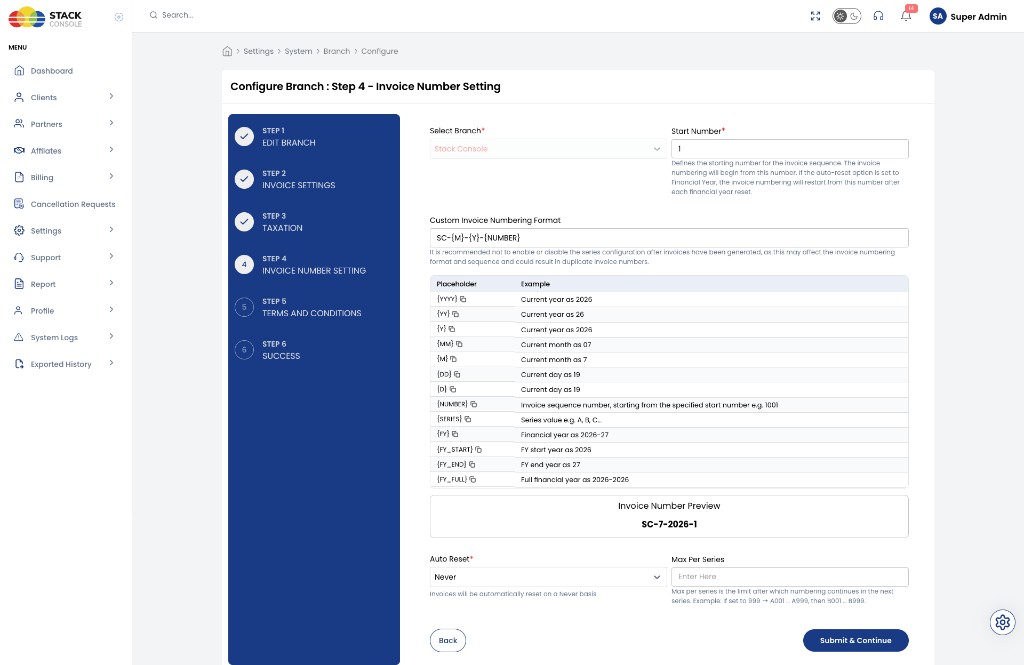
You control:
- Invoice format structure
- Number sequencing and zero padding
- Auto reset rules (including financial year)
- Series management (
A→B→ … →Z→AA→AB→ …)
It is recommended not to enable or disable series configuration after invoices have been generated. Changing format or sequence mid-stream can produce duplicate or inconsistent invoice numbers.
Invoice Number Setting fields
Format
Defines how the invoice number appears. The string can include placeholders that CMP replaces when each invoice is created.
Financial year placeholders ({FY}, {FY_START}, {FY_END}, {FY_FULL}) apply only when Auto Reset is set to Financial Year.
Supported placeholders
| Placeholder | Description |
|---|---|
{NUMBER} | Sequential invoice number (with padding) |
{SERIES} | Alphabetical series |
{YEAR} | Current year (YYYY) |
{MONTH} | Current month |
{DAY} | Current day |
{FY} | Financial year |
{FY_START} | Financial start year |
{FY_END} | Financial end year |
{FY_FULL} | Financial full year |
Additional date tokens
| Token | Output example |
|---|---|
{YYYY} | 2026 |
{YY} | 26 |
{MM} | 02 |
{M} | 2 |
{DD} | 28 |
{D} | 28 |
{FY} | 2025-26 |
{FY_START} | 2025 |
{FY_END} | 2026 |
{FY_FULL} | 2025-2026 |
The form also shows a live Invoice Number Preview for the current format (for example SC-7-2026-1 for SC-{M}-{Y}-{NUMBER}).
Start From
Defines the starting number for the sequence.
| Configuration | First invoice |
|---|---|
1 | 1 |
1000 | 1000 |
If Auto Reset is Financial Year, numbering restarts from this value after each FY reset.
Next Number
Stores the upcoming number that will be assigned to the next invoice. CMP increments it automatically after each generation. Used internally to keep the sequence continuous.
Padding Length
Defines how many digits {NUMBER} uses (leading zeros).
| Padding Length | Number | Output |
|---|---|---|
3 | 1 | 001 |
5 | 25 | 00025 |
Auto Reset options
Controls when the invoice sequence restarts.
Financial Year reset
When Auto Reset is Financial Year, the number resets when the financial year changes.
Other options (for example Never) keep the sequence running without a period reset — select the policy that matches your accounting rules.
Financial Year Start Month
Defines when the financial year begins.
Default: April (month 4).
Example (FY starts in April)
| Date | Financial year |
|---|---|
| March 2026 | 2025-26 |
| April 2026 | 2026-27 |
If Financial Year reset is enabled, the sequence restarts when the FY changes.
Series
Alphabetical prefix that increments when Max Per Series is reached.
Series pattern
A → B → C → … → Z → AA → AB → … → AZ → BA → …
Max Per Series
Maximum invoices allowed in the current series. When the limit is reached:
- Series increments (for example
A→B) - Number resets to Start From
| Max Per Series | Result |
|---|---|
3 | A/001, A/002, A/003 → then B/001 |
If empty or not set, the series does not auto-increment.
Last generated period fields
CMP tracks internally (for reset logic):
- Last Year
- Last Financial Year
These values decide when reset conditions apply.
Select Branch on the form chooses which subsidiary these settings apply to.
Click Submit & Continue to proceed to Terms and Conditions (in-step / branch Step 5).
Sample configurations
Example 1 — Calendar format
| Setting | Value |
|---|---|
| Format | INV/{Y}/{MM}/{NUMBER} |
| Start From | 001 |
| Padding | 3 |
Generated:
INV/2026/03/001
INV/2026/03/002
Next month (sequence continues if Auto Reset is Never):
INV/2026/04/003
Example 2 — Financial year based
| Setting | Value |
|---|---|
| Format | INV/{FY}/{SERIES}/{NUMBER} |
| Financial Year Start | Choose month (for example April) |
| Auto Reset | Financial Year |
{SERIES} is optional.
Generated:
INV/2025-26/A/001
INV/2025-26/A/002
After FY change:
INV/2026-27/A/001
Example 3 — Series limit enabled
| Setting | Value |
|---|---|
| Start From | 001 |
| Max Per Series | 2 |
| Series | A |
Generated:
INV-A-001
INV-A-002
Next:
INV-B-001
Summary
| Capability | Behaviour |
|---|---|
| Sequencing | Invoice numbers are sequential |
| Format | Fully customizable with placeholders |
| Financial year | Supports FY tokens and FY auto-reset |
| Series | Alphabetical rollover with optional max per series |
| Padding | Configurable zero-padding for {NUMBER} |
| Scope | Each subsidiary / branch has independent numbering |