Free Trials
Free trials allow providers to offer selected resources to customers at no cost for a limited period. Customers can explore services and evaluate the platform before moving to paid usage.
In CMP, free trials are currently supported for:
| Service | Free trial |
|---|---|
| Virtual Machines | Supported |
| Volume / Block Storage | Supported |
| Licenses | Supported |
Even when you run free trial campaigns, customer account activation still requires verification:
| Payment mode | Required to activate |
|---|---|
| Postpaid | Customer must add a valid payment method |
| Prepaid | Customer must add funds to their account |
This step is mandatory. Adding a payment method or funds acts as a validation check for genuine users.
Admin settings required for free trial
Configure both global settings and package-level settings.
1. Global settings
These apply platform-wide:
| Setting | Purpose |
|---|---|
enable_service_trial | Must be true. If disabled, no free trials are offered. |
service_trial_delete_days | Days to wait after the trial end date before the service is automatically deleted (for example 7 = delete 7 days after trial ends). |
service_trial_end_reminder | Days before the trial end date when a reminder email is sent (for example 3 = reminder 3 days before trial ends). |
service_trial_delete_reminder | Fallback for the reminder if service_trial_end_reminder is not set (for example 3). |
Path: Admin Global Settings (see also Billing Settings).
2. Package-level settings
Once the service trial module is enabled globally, configure free trial on each package at create or edit.
Path: Settings → Billing Setup → Rate Cards → [Rate Card] → Packages → edit package (for example VM Package).
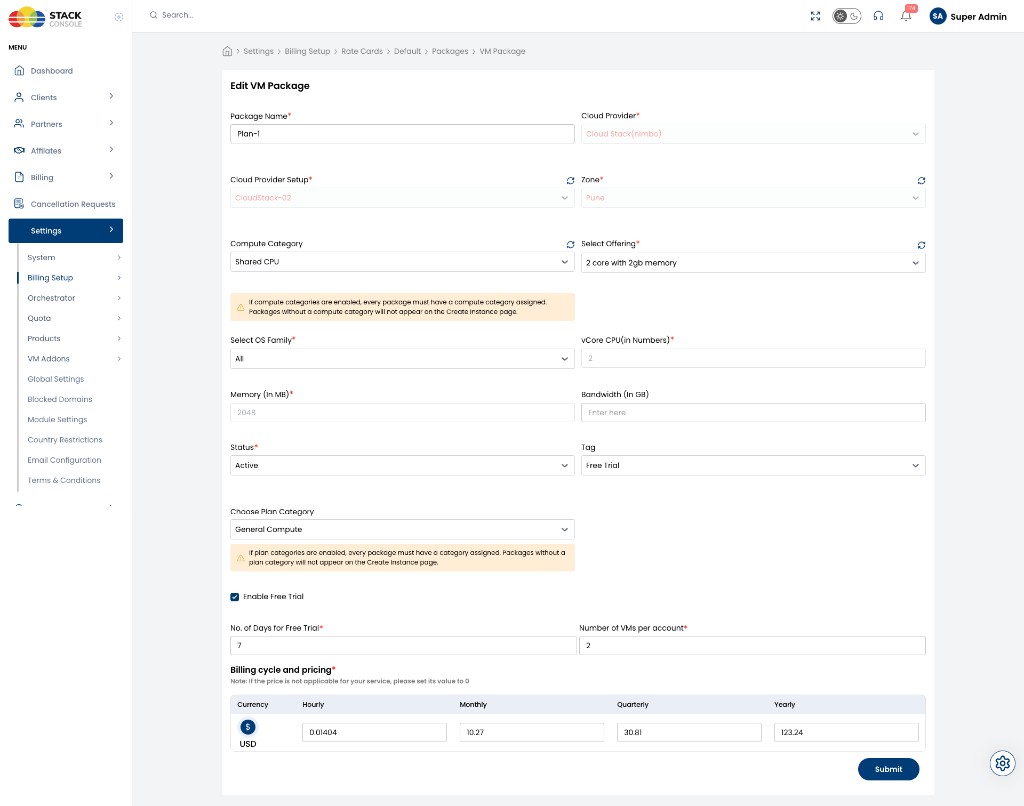
Tag
Optional. Set to Free Trial so the free trial badge is visible to customers on package selection. See How customers know it is a free trial.
Enable Free Trial
Optional. When checked, this package can be provisioned under free trial (subject to global enable_service_trial and the account’s remaining trial limit).
No. of Days for Free Trial
Required when Enable Free Trial is on. Length of the trial in days (for example 7).
Number of VMs per account / trial_service_limit
Required when Enable Free Trial is on. Maximum number of trial services per account for this package (for example 2).
To provide a complete free trial and avoid surprise charges, enable free trial on related packages that form the full solution — for example compute (VM) and storage (volumes / block storage).
IP Address packages do not support free trial. Public IPs are billed from acquisition even if the VM is on trial — see IP Address packages.
If related packages are not configured carefully, customers may assume everything is free, then see unexpected charges and lose trust.
How do customers know this is a free trial service?
On free trial packages, a Free Trial Available badge is shown in the customer portal (for example on Create Instance).
As an admin, apply the Free Trial tag on the package so the badge is visible.
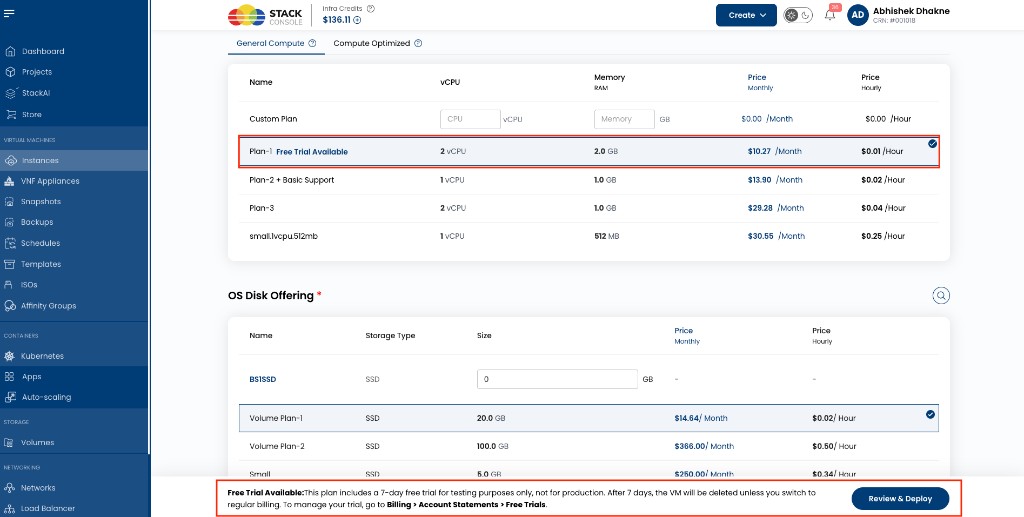
The create flow also shows a footer notice with trial length and where to manage trials (for example Billing → Account Statement → Free Trials).
Where can customers see free trial services and details?
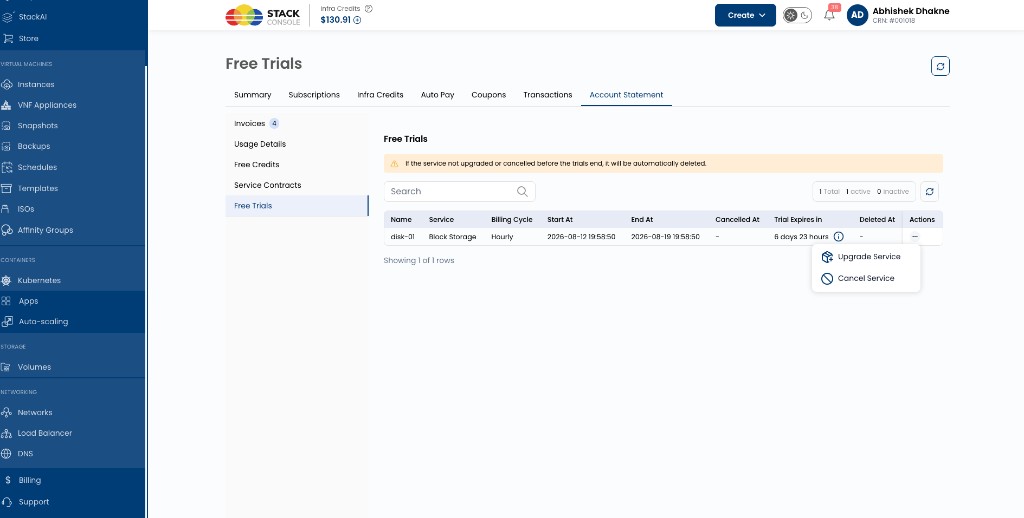
Customer path: Billing → Account Statement → Free Trials
End customers use this page to review active free trial services and manage them.
The list shows trial details such as name, service type, billing cycle, start/end times, and Trial Expires In. A banner warns that if the service is not upgraded or cancelled before the trial ends, it will be automatically deleted.
From the row Actions (…) menu, customers can:
| Action | Effect |
|---|---|
| Upgrade Service | Convert the trial to a paid plan (ends the free trial; billing starts) |
| Cancel Service | End the trial and cancel / remove the service |
See also Account Statement.
What actions can a customer take on free trial services?
Upgrade
Customers can upgrade a free trial service from:
- Billing → Account Statement → Free Trials → Actions → Upgrade Service, or
- For VMs: VM details → Change Plan → select plan → confirm
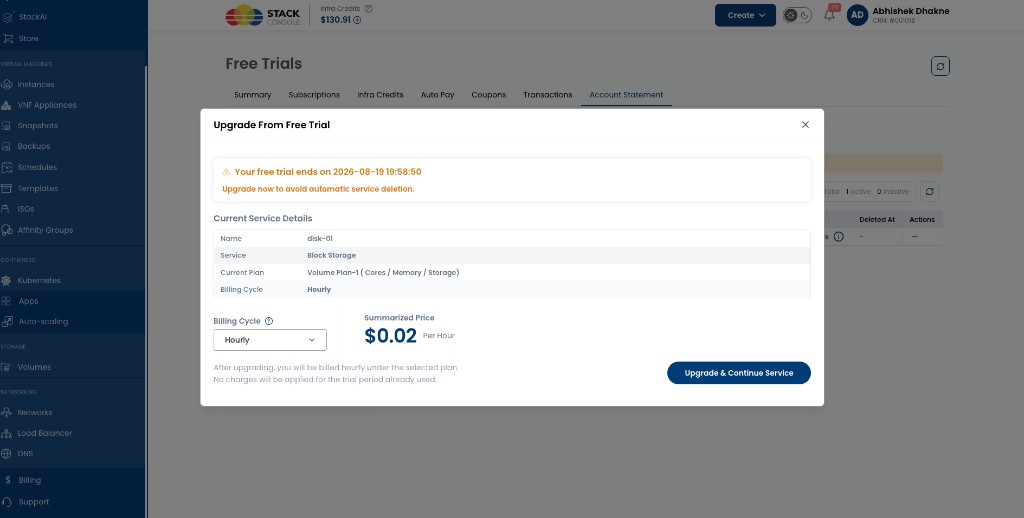
Upgrade From Free Trial opens a modal where the customer can:
- Review current service details (name, service type, current plan, billing cycle)
- Choose a billing cycle for the paid plan (for example Hourly, Monthly)
- See the summarized price for the selected cycle
- Confirm with Upgrade & Continue Service
The modal warns when the trial ends and that upgrading avoids automatic deletion. After upgrade, billing starts under the selected plan; no charges apply for the trial period already used.
When they upgrade a free trial service:
- CMP ends the free trial for that service (trial is cancelled)
- The service continues on the selected plan and billing cycle
- An invoice is created and billing starts from the upgrade time
There is no separate “convert trial to paid” button — Upgrade Service / Change Plan performs that role.
Cancel
Customers can cancel from Free Trials → Actions → Cancel Service, or delete the resource from its service details page.
They should also cancel or delete related services they no longer need (for example attached volumes), especially if those related resources are billed separately (for example public IPs).
What happens when the free trial expires?
When a free trial reaches its end date, CMP does not start billing automatically.
Billing starts only if the customer upgrades / updates the plan (for example Upgrade Service or Change Plan). Until then, the trial service is not converted to paid usage by expiry alone.
What CMP does at / after trial end
CMP only performs these automated checks:
| Check | What happens |
|---|---|
| 1. Notifications | If reminder / notification rules are met, CMP sends the configured emails (for example trial ending soon, or trial ended / service deleted) |
| 2. Deletion | If deletion rules are met (service_trial_delete_days after trial end), CMP automatically deletes the service |
There are no other automatic actions on trial end — in particular, CMP does not start charging or generate paid usage for that trial service solely because the trial expired.
Settings that control notifications and deletion
| Setting | Role |
|---|---|
service_trial_end_reminder | Days before the trial end date when a reminder email is sent (for example 3) |
service_trial_delete_reminder | Fallback for the reminder if service_trial_end_reminder is not set |
service_trial_delete_days | Days to wait after the trial end date before automatic deletion (for example 7) |
Example
| Item | Value |
|---|---|
| Free trial duration | 7 days |
service_trial_delete_days | 3 |
Outcome: trial ends on day 7 → service can keep running until the deletion window → if the customer does not upgrade or cancel, CMP deletes the service on day 10. No billing is started by expiry itself.
Reminder before trial ends
A reminder email is sent X days before trial expiry when that setting applies.
X comes from:
service_trial_end_reminder, orservice_trial_delete_reminder(fallback if the above is not set)
The email notifies users that the trial is ending and that they can upgrade to a paid plan or cancel before automatic deletion.
Automatic deletion
A scheduled job checks for expired trials past the grace period (service_trial_delete_days).
If the customer has not upgraded or cancelled:
- The service is automatically deleted (for example the VM is destroyed)
- A notification email can confirm deletion when configured
To keep the service and start paying for it, the customer must Upgrade Service (or Change Plan) before automatic deletion. Expiry alone does not turn the trial into a paid subscription.
How many free trial services can be created?
Limits are per package and per account.
- Each package has
trial_service_limit(shown as Number of VMs per account on VM packages when free trial is enabled) - Trials available =
trial_service_limit− (number of service trials already created for that account and package) - A new service gets a free trial only if trials available ≥ 1 for that package
- When the limit is used up, new services on that package are paid from creation
Example: trial_service_limit = 2 → at most 2 free trial VMs on that plan. A third VM on the same plan is billed from creation.
Invoices after trial
Free trial expiry by itself does not create paid invoices for that service.
- After upgrade — invoicing / billing starts from the upgrade time under the selected plan and cycle
- If the customer never upgrades — the service is removed when automatic deletion runs (subject to
service_trial_delete_days); there is no paid conversion from expiry alone
Limitations
| Limitation | Detail |
|---|---|
| Not customer-specific | Free trials cannot be limited to selected customers only. Use a free-credit coupon for targeted offers. |
| Related services | Configure free trial carefully across related packages (VM + storage). IP packages do not support free trial. |
| No backups on free trial VMs | Backups cannot be taken on free trial VMs. |
| Default card / activation | Account must still complete prepaid top-up or postpaid card attachment before use. |
Examples
Example 1: First free trial VM
- Admin sets
enable_service_trial=true - Admin creates a VM plan with Enable Free Trial, 7 days,
trial_service_limit=2 - Customer creates a VM on that plan (0 trials used so far → trials available = 2)
- VM gets a 7-day free trial — no billing for those 7 days
- After day 7, the trial is expired — CMP does not start billing
- If
service_trial_delete_days=7, and the customer does not upgrade or cancel, the VM is deleted 7 days after trial end (day 14 from creation), with a deletion notification when configured - If the customer upgrades before deletion, billing starts from the upgrade time only
Example 2: Second trial VM, same plan
Same plan (trial_service_limit = 2). Customer already has one free trial VM.
- Second VM on the same plan → trials available = 1 → also gets the 7-day free trial
- Third VM on the same plan → trials available = 0 → no free trial; billed from creation
Example 3: Reminder and deletion
| Setting | Value |
|---|---|
service_trial_end_reminder | 3 |
service_trial_delete_days | 7 |
| Trial end date | 15 March |
- 12 March — reminder email (trial ends 15 March)
- 15 March — trial ends; no automatic billing
- 22 March — if still not upgraded or cancelled, VM is automatically deleted; deletion email sent when configured
- To keep the service as paid, the customer must Upgrade Service before 22 March
Example 4: Upgrading the free trial service
- Service is still within its free trial (or after expiry but before deletion)
- Customer opens Free Trials → Actions → Upgrade Service
- In Upgrade From Free Trial, they choose a billing cycle, review the summarized price, and select Upgrade & Continue Service
- Free trial ends; billing starts from that moment under the selected cycle — no charge for the trial period already used